AgentKit by OpenAI Review
What is AgentKit and How to use it
Hi there!
In our previous post, OpenAI made life easier for AI creators — today, it is developers’ turn. At their Dev Day, the company presented AgentKit, a visual development framework that lets anyone build and customize AI agents without delving into code stuff. It promises to save you weeks of work, turning agent creation into a one-night project.
While some call it the new wave of automation, others are in two minds about it. As for us, we will just lift the hood and see what’s really inside.
Ready?
More on OpenAI
What is inside?
OpenAI clearly heard an SOS from the dev community that worked around the clock gluing code together, debugging orchestration bugs, and juggling dozens of incompatible SDKs and custom pipelines like maniacs — and decided to deliver a cure-all.
The brain of AgentKit is made of four components:
- Agent Builder — a visual canvas for designing, connecting, and creating multi-agent workflows (let’s call it the cortex);
- Connector Registry — a helper for connecting external data, APIs, databases, and external systems and tools like Google Drive, Dropbox, or Teams across OpenAI products (think of it as the sensory system);
- ChatKit — a toolkit for embedding customizable chat-based agent experiences right into your product (a voice of your project);
- Evals for Agents — a testing system that finally acknowledges that agents need quality control (literally an immune system);
P.S. Frankly speaking, I want to stress that the evaluation feature is not new and has already been on OpenAI’s platform for almost a year. They just moved it around and gave it a fresh coat of paint.
- Guardrails — a protector of the Agent in real-world use. It detects and mitigates jailbreak attempts and filters out unsafe behaviors during execution;
- Reinforcement Fine-Tuning (RFT) — a trainer that pushes the system to advance. RFT moves from static prompting toward experience-based learning by evaluation metrics and feedback loops.
The system works hand in hand with the open-source Agents SDK (Python/JS), the engine that manages agents, tools, and results under the hood, while the new platform adds a visual builder, chat UIs, evaluation tools, and connector management.
In short, AgentKit gives developers a solid framework for building AI agents that actually get things done. But is it really that healing? Let’s find out.
How AgentKit works
Christina Huang from OpenAI compared the tool to Canva, but I would say it resembles Figma more. On a visual canvas, developers can drag, drop, connect logic blocks, set conditions, run quick tests, and instantly see the results.
This brings a significant change within the OpenAI family, for the first time, the entire lifecycle of an agent — from concept to deployment — takes place in a single environment. Developers are able to run trial sessions and instantly visualize where your agent struggles.
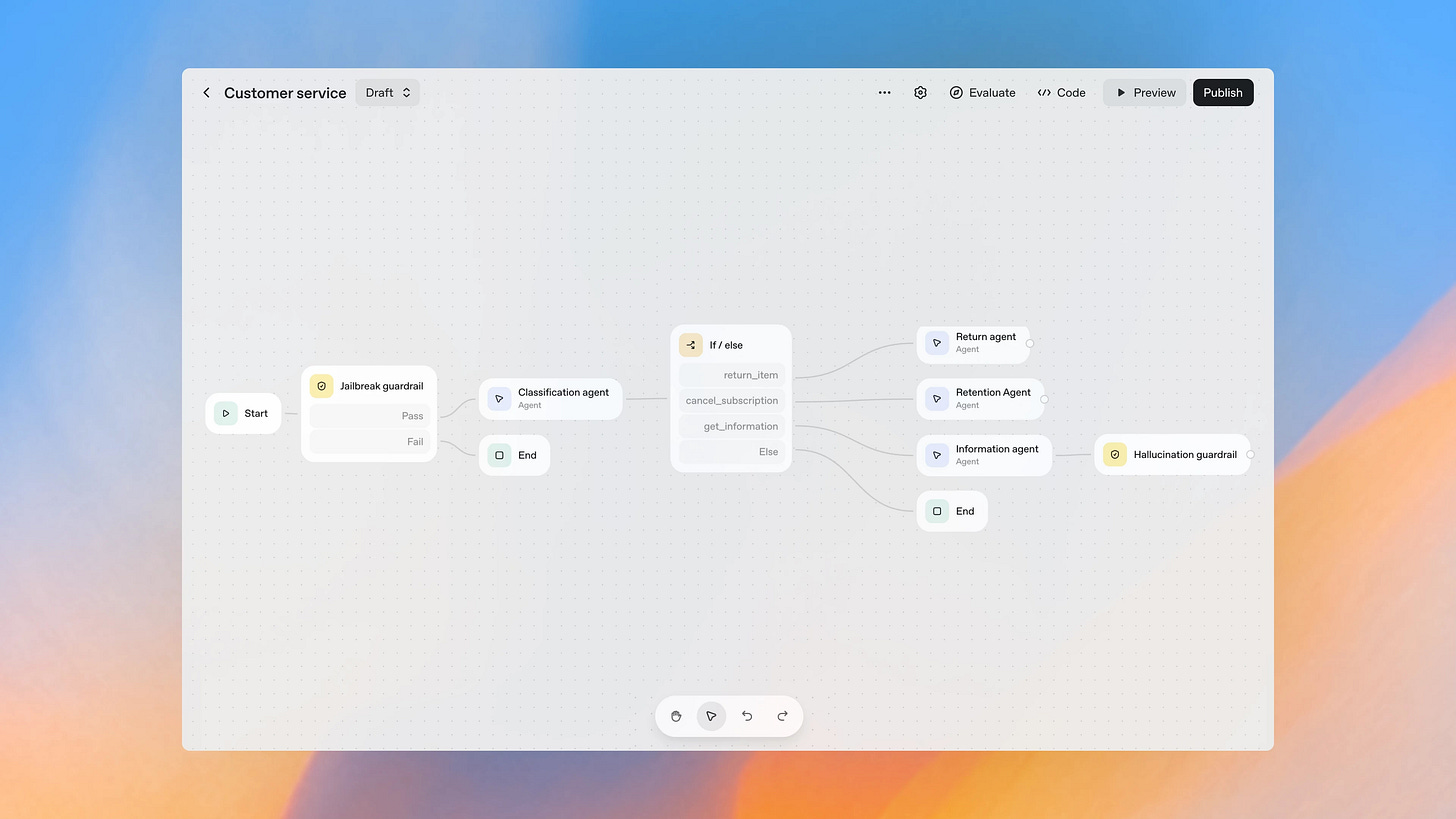
To summarize the above, building an agent now follows a clear flow:
- Visual design and logic mapping
- Connector integration
- Fine-tuning and testing
UI embedding and deployment
Creators' AI is a reader-supported publication. To receive new posts and support my work, consider becoming a free or paid subscriber.
The problems that it solves
AgentKit now manages chaos like a wizard. It customizes connectors, hand-built pipelines, and manual front-end development into one cohesive environment.
So, all of these:
- Fragmented workflows and multiple toolchains;
- Orchestration bugs, cascading failures when one tool breaks;
- Version mismatches and drift between agents or pipelines;
- Security and governance gaps across connectors and APIs;
- Tedious front-end work for embedding agents.
It introduces consistency and visibility, at least making it much easier to control the process.
# Zero days without comparison
You tell me: “But we already have OpenAI’s Agents SDK, AutoGen, and even n8n with Zapier!” And you’d be absolutely right.
Take a look at the table.
!function(){"use strict";window.addEventListener("message",(function(e){if(void 0!==e.data["datawrapper-height"]){var t=document.querySelectorAll("iframe");for(var a in e.data["datawrapper-height"])for(var r=0;r<t.length;r++){if(t[r].contentWindow===e.source)t[r].style.height=e.data["datawrapper-height"][a]+"px"}}}))}();
It is a mistake to define any single tool as the “best.” Instead, I always recommend starting with a question: Which tool best addresses the specific problem you’re trying to solve?
Every tool falls somewhere on the same spectrum. SDKs tend to offer flexibility but often come with added complexity with code, while automation platforms are typically simpler to use but may offer less depth. The right choice depends entirely on your unique needs and the challenge at hand.
Pricing
Currently, AgentKit is included in the standard pricing of the OpenAI API. So, no additional fee. However, internal tools come at a cost. For example, the file search tool costs $2.50 per 1,000 requests, + the cost of file storage.
Sharing is caring! Refer someone who started a learning Journey in AI!
# Here are some details…
No direct orders
Despite all these advantages, OpenAI has clearly focused on developer tooling rather than user-facing workflows. And here comes the irony: the company that literally builds one of the world’s best language models just released a platform where we can’t talk to it in “natural language”.
Simply speaking, there is no true no-code editor where you could simply say, “Build me an agent that processes website submissions and sends weekly summaries to Google Sheets.” Instead, you have no choice but manually connect boxes, tweak connectors, and test conditions.
Current limitations of the visual builder
At the moment, the Agent Builder can only create chat-based agents, since the only supported trigger type is chat. This means that automatic triggers such as webhooks, schedules, or API events are not yet supported. Also, you cannot yet launch an agent automatically based on an external event or a workflow condition inside the Builder itself.
Ecosystem lock-in
In addition, the platform only supports OpenAI models. This is not good news as it locks you. It is impossible to plug in Anthropic, Mistral, or other LLMs for comparison or hybrid use. It is like being forced to take only one bus line when you actually need to go in a different direction — you’re stuck with whatever route they offer.
# How to access + Сases
- Upgrade to the OpenAI platform
- Register or log in to your account.
- At the first login, create an organization and a project, and generate an API key (optional).
- Top up your API account (for example, buy credits for $5, $10, or $20) — you can actually open the AgentKit interface and draft a workflow without paying anything, but you must activate a billing account to run or test it.
There is also an API Organization Verification section. This supposes that the organization must be verified in order to unlock “additional models and features” in the API.
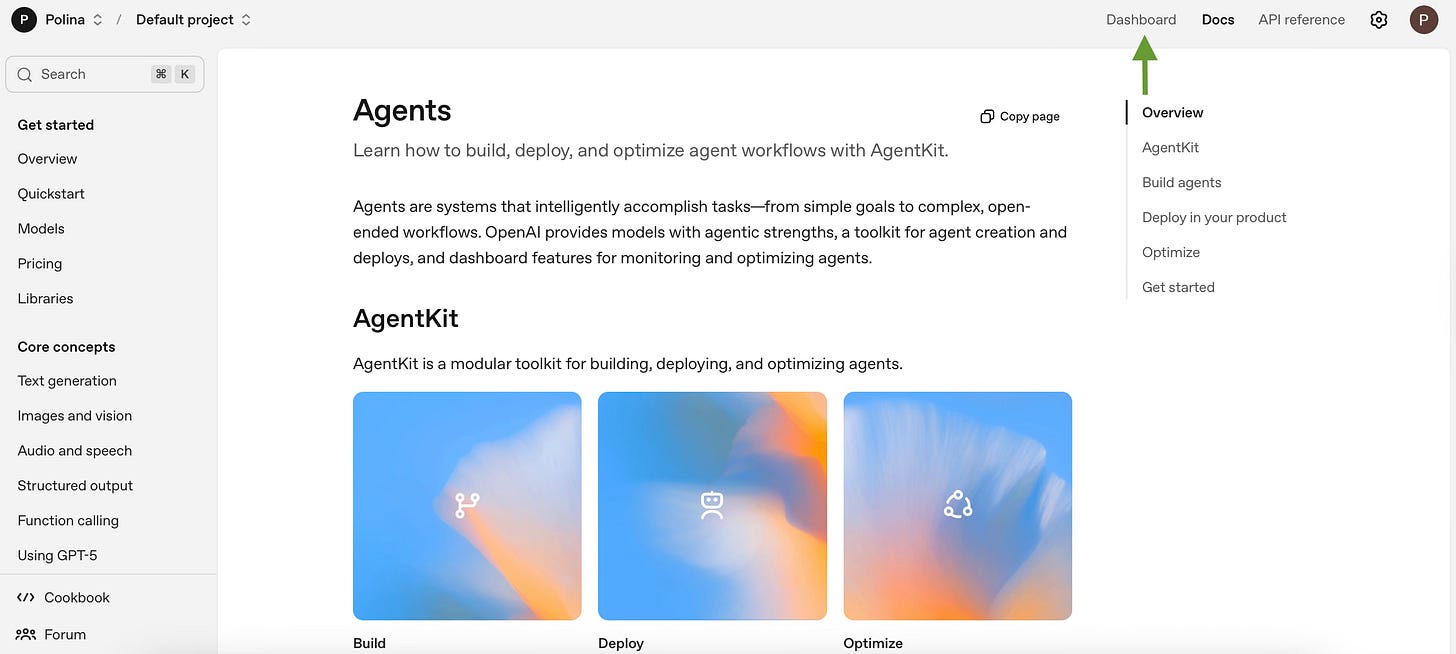
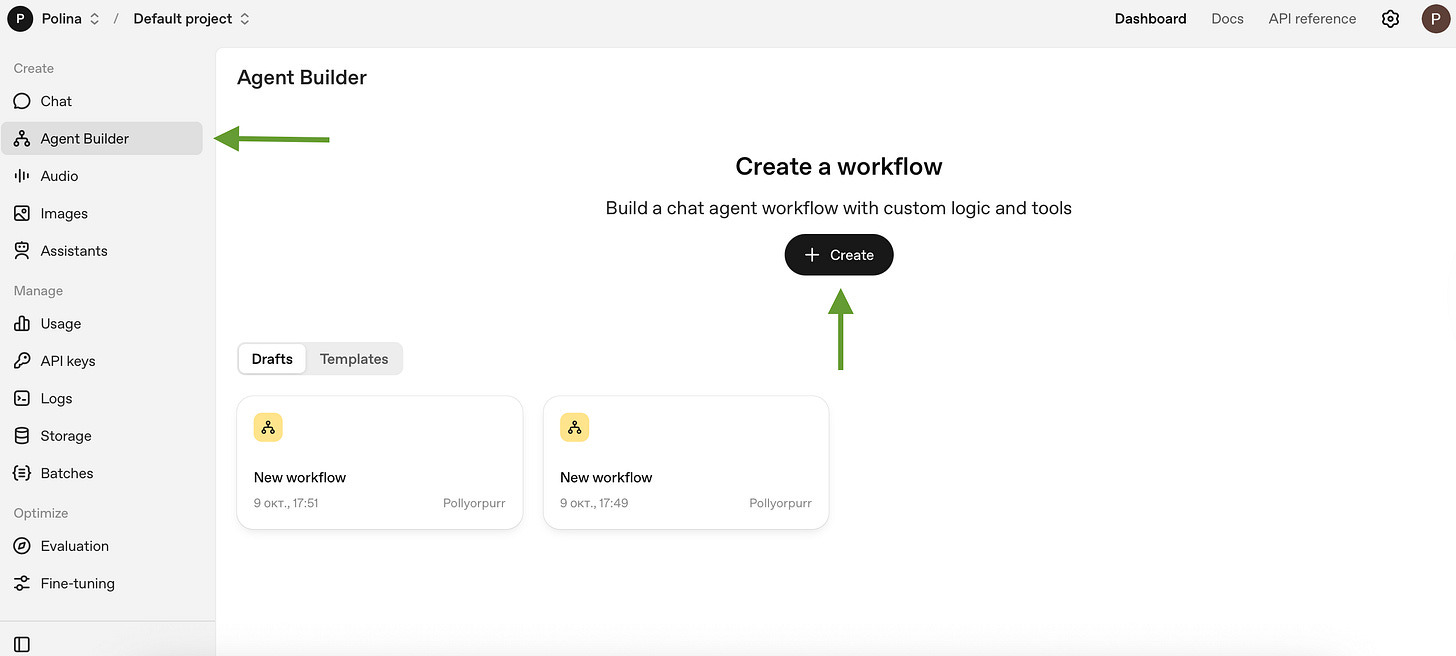
- In the “Dashboard”, select “Agent Builder” in the left navigation
- Click “Create” to make a new workflow (or select a template).
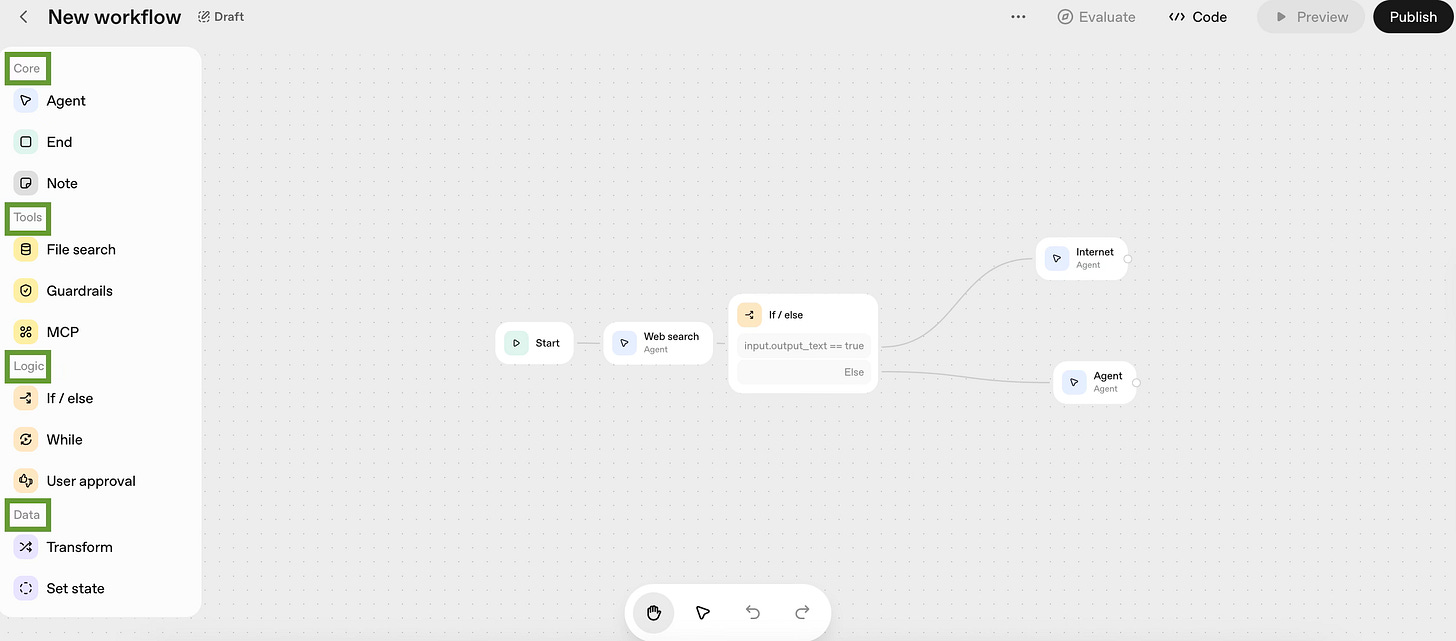
- And finally, to work with Agent, we will need node types:
Core Nodes: Start, Agent, Note
Start - prompt or event input to kick off the entire execution chain;
Agent - here you specify the model, define its instructions, and decide which tools it’s allowed to use (reasoning and action);
Note - don’t affect how your workflow runs — just exist.
Tool Nodes: File Search, Guardrails, MCP (Model Context Protocol)
File Search - here you connect file repositories or vector databases so the agent can pull information or ground its responses in real documents;
Guardrails - it monitors inputs and outputs to check if they is safe;
MCP (Model Context Protocol) - it organises interactions with APIs, external servers, or business tools, but strictly controls all permissions and data flow.
Logic Nodes: If/Else, While, User Approval
If / Else - It routes logic based on conditions;
While - it enables loops for iterative tasks;
User Approval - just pauses everything and waits for human confirmation before continuing.
Data Nodes: Transform, Set State
Transform reshapes data before passing it to another step, while Set State stores values or intermediate results that can be reused later.
Some ideas on how you can use the AgentKit:
- Customer support automation (triage, self-serve, and safe escalation)
What it solves: Repetitive tier-1 requests like “Where is that or this?” or “How do I reset my password?” overwhelm support inboxes. The thing is that agents can handle these instantly, freeing humans for nuanced cases that require negotiation (thanks, machine).
AgentKit: Agent Builder defines triage logic and escalation paths; ChatKit embeds the support chat UI; Connector Registry provides secure access to CRM and order systems; Guardrails manage authentication, redaction, and escalation policies.
Evidence: OpenAI’s 2025 Dev Day featured Klarna’s deployment — an AgentKit-based workflow now resolving over half of incoming requests automatically. The model uses Evals to grade handoff quality and detect failures before they reach customers.
- Competitive and market research automation
What it solves: Manually tracking competitors, pricing, and new product launches is time-consuming. So we put all the grunt work on the agent that can collect, filter, and summarize updates overnight, so teams start each morning with a ready brief.
AgentKit: Agents SDK connects to headless browsers via the Connector Registry; the workflow runs scheduled browsing, structured extraction, and synthesis; Evals datasets verify factual accuracy before reports are shared.
Evidence:
According to OpenAI’s Agent Platform Overview (2025) and live partner demos, several consulting and VC teams already integrate Browserbase with AgentKit to produce structured competitor summaries.
- Internal knowledge assistant (enterprise RAG with governance)
What it solves: We are again saving time. Large organizations lose it searching for answers across wikis and emails. A governed internal agent can surface trusted information instantly with full citation.
AgentKit: Connector Registry manages secure links to internal data sources (Confluence, SharePoint, Notion); Guardrails enforce permission scopes; Evals datasets measure retrieval precision and recall.
Evidence: OpenAI’s enterprise documentation highlights AgentKit’s role in transforming internal chatbots into auditable, policy-compliant knowledge systems. Early adopters report up to 40 % fewer redundant queries in team channels.
- Compliance and policy automation
What it solves: Fact checking is everything nowadays. Before publishing public-facing materials, companies must ensure content aligns with legal and tone guidelines. AgentKit automates first-pass checks to save reviewers time.
AgentKit: Guardrails enforce redaction and phrasing rules; Evals datasets benchmark compliance quality; Connector Registry links to policy documentation or training data.
Evidence: A demo highlighted in OpenAI’s New Tools for Building Agents (2025) shows a marketing agent automatically flagging non-compliant phrasing, reducing review time by 70 %.
- Step-by-step build: a “Homework Helper” agent
What it solves:Educational platforms can create personalized AI tutors that explain concepts simply, test understanding, and maintain academic integrity.
AgentKit:Agent Builder for logic orchestration; File Search for knowledge retrieval; ChatKit for interactive UI; Guardrails for plagiarism detection and data masking; Evals for measuring answer quality.
Example flow:
- Explain a homework concept in plain language, end with two practice questions.
- Add an Agent node “Tutor”; set instructions and model.
- Attach File Search with course notes or textbook excerpts; enable citations.
- Add a “Reveal Answers” button via ChatKit.
- Add If/Else routes — “solve” → Worked-Example sub-agent; “define” → Tutor.
- Turn on plagiarism and data-masking filters.
- Test with “Explain the chain rule to a ninth grader”; adjust tone.
- Deploy the versioned agent and mount ChatKit in a “Homework Helper” page.
- Measure it: run an eval set, track latency, accuracy, and cost.
Result:Yes! We created an adaptive tutoring agent built entirely within OpenAI’s ecosystem — from file search to UI — in under an hour.
# Conclusion
So, AgentKit is not a breakthrough in agent mechanics. It is a major step in democratizing access. Now building and working with agent flows is possible not just for AI or IT engineers, but for product managers, analysts, and operations teams.
This is also about consolidation. OpenAI took half-working pieces from the past two years (Assistants API, Evals, SDK) and assembled them into a unified visual platform with transparent trace logs and versioning (even if they failed individually).
It is clear this is just the beginning, and the platform will continue to evolve. In the long run, Agent Builder may become a serious competitor to tools like n8n or Zapier, especially if OpenAI expands its automation layer.
However, at this stage, the platform still feels limited — there are no webhooks, automatic triggers, or background workflows. In other words, no agents based on external events or schedules directly within the Builder. Most likely, they will soon add natural language workflow generation, but for now, we’re working with what’s available.
We’d love to hear your thoughts — do you see AgentKit as the next big step in AI development, or just a passing trend?
This article was first published in the Creators AI newsletter. View the original edition.