Autoresearch: The Loop That Improves Your Work While You Sleep
How Karpathy's Experiment Escaped the Lab and Became a Business Tool
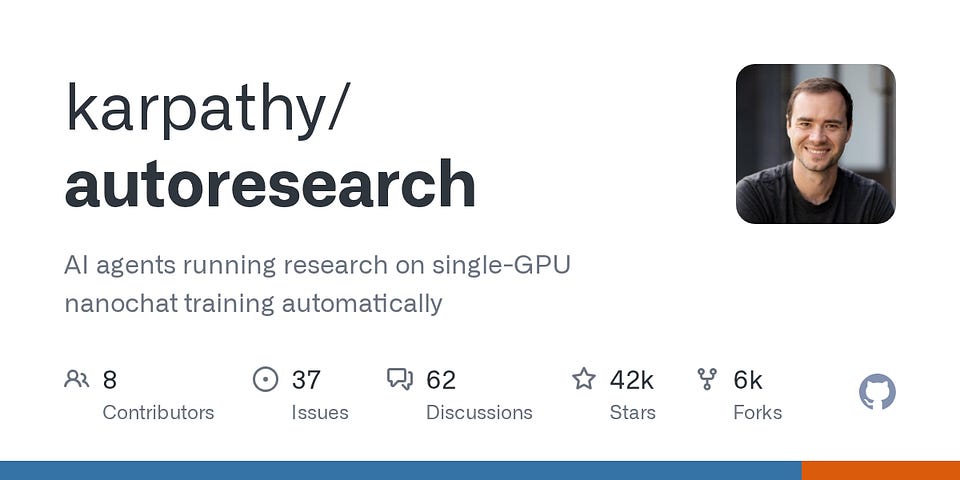
When Andrej Karpathy — one of the original architects of modern AI — published this idea in a 630-line open-source script, it got 8.6 million views in two days and hit 26,000 GitHub stars in under a week. Today the repo sits at over 42,000 stars and 5,500 forks, with the community already shipping ports for Windows, Apple Silicon, and non-ML business workflows. The reaction wasn't hype about a new model. It was recognition of a new method.
Karpathy left an agent running on his codebase for two days.
700 experiments. No human in the loop. Every bad idea rolled back automatically. Every winner kept.
The result: an 11% performance gain on a benchmark that thousands of ML engineers compete on.
That’s Autoresearch. And the reason it matters isn’t the ML benchmark. It’s the underlying logic — a loop that can be pointed at almost any measurable problem. Cold email reply rates. Page render speed. Landing page conversions. Retrieval accuracy. Anything with a scoreboard.
Let’s break it down.
Keep your mailbox updated with practical knowledge & key news from the AI industry!
The Story Behind the Loop
Karpathy built a system called nanochat — a minimal character-level language model — and gave an agent one job: make it train faster. Not by rewriting everything. By doing one thing at a time.
The agent could touch one file. It could run one experiment. It read one metric. And it had a simple rule: if the number got better, keep the change. If not, revert it. Start again.

After two days and roughly 700 experiments, about 20 changes survived. The benchmark moved from 2.02 hours to 1.80 hours — roughly 13 minutes faster per full training run.
That doesn’t sound dramatic. But think about what actually happened.
No human reviewed 700 experiment results. No one debated which change to try next. No one rolled anything back manually. The loop did all of it — and stacked 20 real improvements cleanly, without one cancelling out another.
That’s the compounding part. And it’s what makes this different from just asking an AI to “help improve” something.
How Autoresearch Actually Works
It’s easier to understand as a loop than as a codebase.

Here’s how the loop works in plain language, step by step:
1. You write the goal in plain English. You create a simple text document and write your instructions: what you want the AI to improve, what it’s allowed to touch, and what “better” looks like. That’s the only thing you write. The AI does everything else.
2. The AI makes one small change. It opens the one file it’s allowed to edit and tries something — maybe it adjusts how fast the model learns, maybe it changes how information is grouped and processed. One small change. Nothing else.
3. It runs a 5-minute test. Every single experiment runs for exactly 5 minutes — no exceptions. The fixed time is what makes experiments fair. Every change gets the same amount of time to prove itself, whether it’s a tiny tweak or a bigger structural change.
4. It checks one number. At the end of the 5 minutes, the system produces a single score. Lower is better. The AI asks one question: is this score lower than before the change?
5. Keep or undo — automatically. If the score improved, the change is saved and becomes the new starting point. If the score got worse or stayed the same, the change is completely undone — as if it never happened. No human needs to review anything. It happens automatically.
6. Repeat, immediately. The AI doesn’t pause or wait for approval. It goes straight back to step 2 and tries something new, building on whatever worked and ignoring whatever didn’t. This happens around 8 to 12 times every hour.
7. You check the results in the morning. Every improvement that survived is recorded. Every failed attempt was automatically cleaned up. You wake up to a clear history of what was tried, what worked, and by how much — often 60 to 100 completed experiments from a single overnight run.
The core idea is simple: try something → measure it → keep it or undo it → repeat. What makes it powerful is that a machine can run this loop dozens of times while you sleep, without getting tired, distracted, or tempted to keep a bad idea just because it took effort to come up with.
The interesting thing is that this loop works in the same way across wildly different domains. Which is exactly what the next three cases show.
Now lets check some cases
Case 1: Andrej Karpathy + nanochat — Where the Pattern Came From
The original implementation is still the clearest.
Result: 700 experiments over two days. 20 surviving changes. “Time to GPT-2” benchmark went from 2.02 hours → 1.80 hours. An 11% improvement on a leaderboard thousands of engineers compete on.
How it worked: Think of the agent as a junior researcher with a key to one locked room. It could edit the mutable training layer, run the same 5-minute experiment each time, and read the same frozen metric. Because every run used the same budget, the winning changes stacked cleanly instead of creating noise.
What it means for you: If you have any process that takes 1–2 hours per full run and repeats regularly — training pipelines, content workflows, benchmark suites — an 11% improvement compounds fast. Across 50 runs per month, that’s roughly 11 hours back. And you didn’t have to review a single experiment.
The real takeaway isn’t the benchmark. It’s this: once you have a clean loop with a frozen metric, the system starts doing research on your behalf.
This connects directly to something we covered in depth in our post on context engineering — the main control surface in agent workflows often sits in how you structure the instructions and context itself. Autoresearch is the same idea applied to iteration.
Case 2: Tobi Lütke + Shopify Liquid — When Autoresearch Escaped the Lab
This one got the attention of the broader tech world — because Liquid isn’t a toy.
Shopify’s Liquid templating engine powers millions of storefronts. It’s mature, heavily used, and extensively optimized by experienced engineers. There’s not a lot of obvious low-hanging fruit.
Lütke ran /autoresearch on the Liquid codebase anyway.
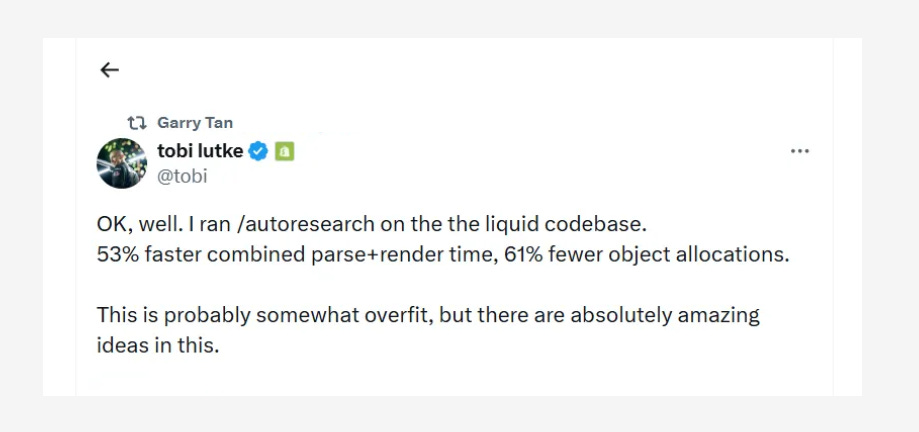
Result: 53% reduction in combined parse + render time. 61% fewer object allocations.
How it worked: The loop received a narrow job: find performance wins in a benchmarked hot path. Every candidate change had to beat the same benchmark. Faster versions stayed. Slower ones were discarded.
What it means for you: If your system has a stable benchmark — a parser, a template renderer, an ETL step, a ranking function, a query planner — you can run this pattern today. On a service currently rendering at 120ms, a comparable improvement brings it to about 56ms. On a batch that allocates 10 million objects, you’re down to 3.9 million.
Those aren’t small wins. And on mature codebases, they’re the kind that usually require weeks of careful engineering work.
Creators’ AI could be a valuable gift for your friend, colleague, or family member. Gifting books is bright, but giving an AI newsletter is a superb move 😎
Case 3: Nick Saraev + LeftClick — Autoresearch as a Revenue Engine
The most directly translatable case for creators and founders.
1SecondCopy is a content marketing agency. LeftClick wired an Autoresearch-style loop into their outbound system: lead targeting, enrichment, automated cold email, AI-generated personalization. And one KPI at the center of everything — positive reply rate.
The loop tested one variable at a time. Subject line first. Then the opener. Then the CTA. Each variant went to a controlled slice of the list. The winner stayed. The loser got reverted. Next variable.
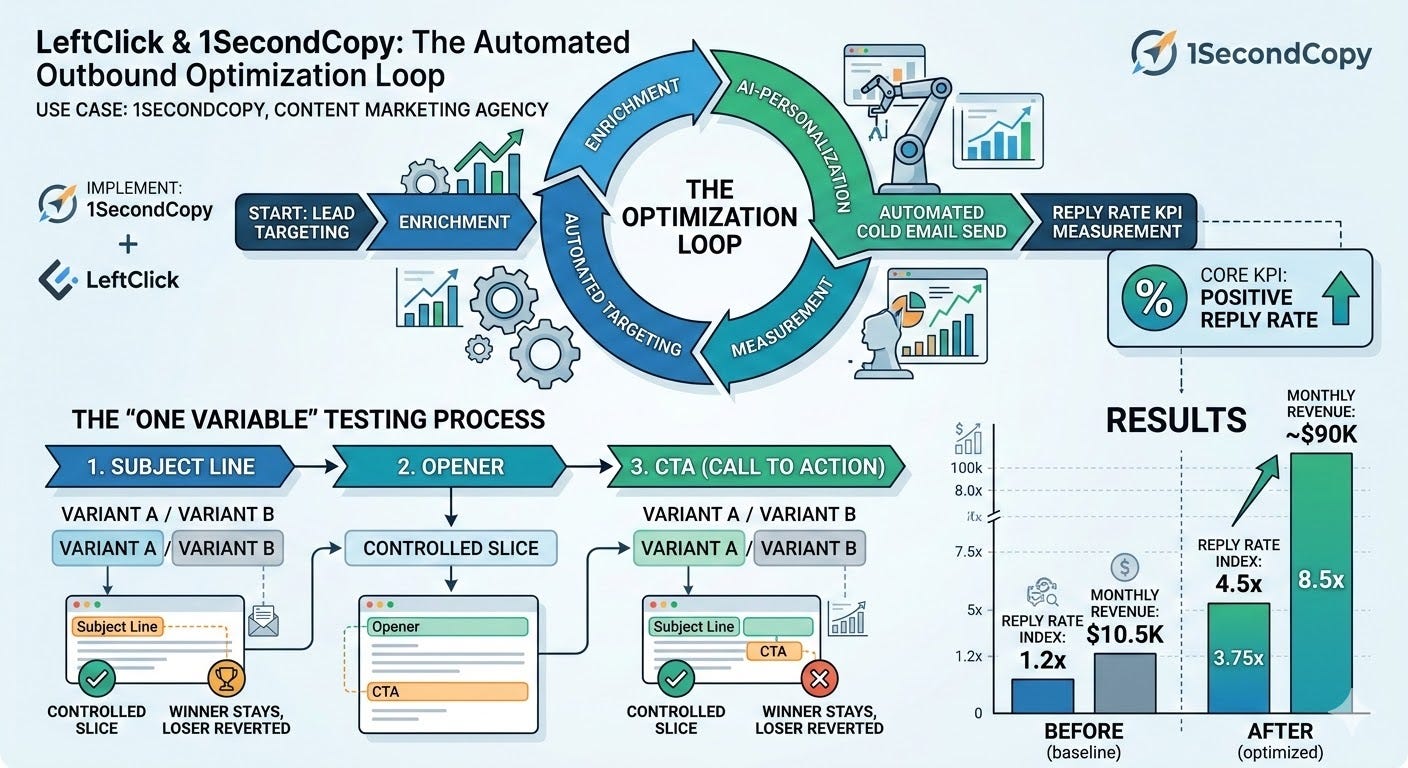
Result: Reply rate index moved from roughly 1.2x to 4.5x. Monthly revenue grew from $10.5K to approximately $90K.
The revenue number belongs to the full outbound system, not one isolated experiment. But the mechanism behind the growth was exactly the Autoresearch pattern: a single measurable metric, one mutable variable per round, automatic keep-or-revert.
What it means for you: The math is simple. At 10,000 delivered emails per month, moving from 1.0% to 4.5% positive reply rate adds 350 extra replies. If 20% convert to qualified conversations, that’s 70 extra opportunities. The loop creates that value when it’s wired into a real distribution system with a clean KPI.
No one needed to manually review what worked. The system learned it.
We covered a live version of this kind of outbound stack in our post on how solopreneurs are using full AI agents — lead sourcing, enrichment, personalized outreach, and execution wired into one agentic loop. Same underlying logic.
The Real Limitations (The Ones That Actually Matter)
1. A bad metric teaches the system the wrong lesson.
Optimize cold email for raw reply rate and you’ll get replies from people who will never buy. Optimize a landing page for clicks and you might hurt qualified conversion. The loop is only as intelligent as the metric you give it.
Before you build the loop, ask: does this number actually represent business value? Or does it just feel measurable?
2. Noisy environments can fake progress.
Engineering benchmarks are clean. Growth systems are messy. Deliverability shifts. Traffic quality changes. Seasonality distorts the scoreboard. In a noisy environment, the loop can start “learning” from random fluctuations — and confidently make things worse.
The fix: set a minimum sample size before any result counts. 30 benchmark runs for code. 500+ sessions per variant for landing pages. 1,000+ delivered emails per variant for cold email. Comparability is what keeps the loop honest.
3. Token burn is a real constraint.
A long-running coding agent can consume a surprising amount of tokens for a relatively small number of surviving changes. If the expected upside per experiment is low, the economics break.
Set a cost ceiling before the first run. 20 iterations for a pilot. One night of GPU time. A fixed token budget. Autoresearch is powerful because it searches a lot. That’s also exactly how it gets expensive.
Practical Playbook: How to Set Up Autoresearch in One Hour
No ML background required. You need a GPU, a terminal, and an AI coding agent. That’s it.
What you need before you start
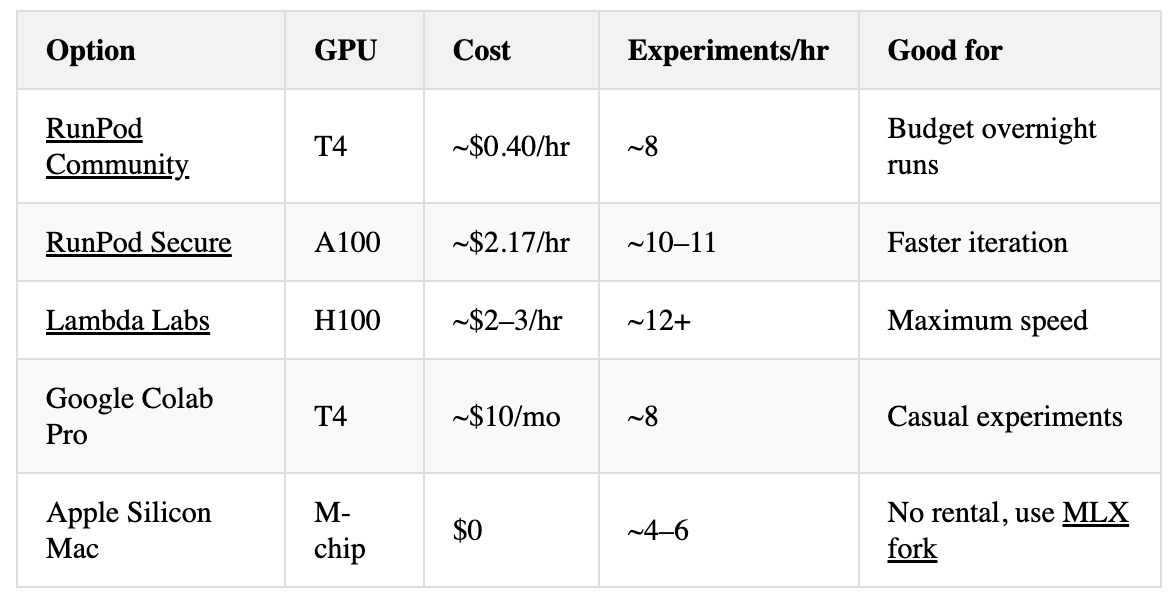
A GPU. Autoresearch requires an NVIDIA GPU to run the official repo. You don’t need an H100 — a T4 on RunPod costs ~$0.40/hr and runs ~8 experiments/hour. For an overnight run (8 hours), that’s under $4. H100 runs ~12+ experiments/hour but costs ~$2–3/hr. On a Mac with Apple Silicon? Use the community fork autoresearch-mlx — no GPU rental needed, no PyTorch, runs natively via MLX.
An AI coding agent. Claude Code is what Karpathy used. GPT-4 also works. You’ll use it to run the loop — not to write code yourself.
Python 3.10+ and git. Standard installs. If you’re renting a GPU VM, these are usually pre-installed.
Step 1 — Install uv (the package manager)
curl -LsSf https://astral.sh/uv/install.sh | shuv is a fast Python package manager. Takes about 10 seconds.
Step 2 — Clone the repo
git clone https://github.com/karpathy/autoresearch
cd autoresearch
Step 3 — Install dependencies
uv syncThis installs everything autoresearch needs. ~1 minute.
Step 4 — Prepare the data (one-time, ~2 minutes)
uv run prepare.pyThis downloads the training dataset and trains the tokenizer. You only run this once. It saves everything to ~/.cache/autoresearch/.
Step 5 — Test a single training run (~5 minutes)
uv run train.pyThis runs one 5-minute experiment. If it completes without errors and prints a val_bpb score, you’re ready. That score is your baseline — the number the loop will try to beat.
Step 6 — Write your program.md
This is the only file you write. It’s plain English instructions telling the agent what to focus on, what it’s allowed to change, and what success looks like. The default file is already in the repo — you can run with it as-is, or customize it.
A minimal program.md looks like this:
## Goal
Minimize val_bpb on the nanochat benchmark.

## What you can change
Only train.py. Do not touch prepare.py or any evaluation code.

## Rules
- One change per experiment
- Each run is exactly 5 minutes
- Keep the change if val_bpb improves. Revert if it doesn't.
- Log each experiment: what changed, score before, score after.

## Where to look for wins
Try: optimizer settings, learning rate schedule, batch size, architecture tweaks.
Avoid: changes that take longer than 5 minutes to show results.
The tighter and more specific your instructions, the better the agent searches.
Step 7 — Start the loop
Open Claude Code (or your agent of choice) in the repo directory and say:
Have a look at program.md and let’s kick off a new experiment.The agent reads program.md, edits train.py, runs uv run train.py, checks val_bpb, and either keeps the change with a git commit or resets to the previous version with git reset. Then it starts the next experiment.
Leave it running overnight. At ~8–12 experiments/hour, you’ll wake up to 60–100 completed runs.
Step 8 — Read the results
git log --onelineEvery kept improvement is a git commit. Every failed experiment was automatically reverted. Open analysis.ipynb (included in the repo) to see the full experiment history, what changed each time, and how the score evolved.
GPU rental cheat sheet
Three Starter Templates
A. Performance Loop for Code
- Target: Median latency on one hot path
- Guardrail: Tests, type checks, and correctness benchmark must pass
- Start size: 20–30 iterations, 30 benchmark runs each
- Good first surfaces: Parser, template renderer, ETL step, ranking function
B. Outbound Loop for Cold Email
- Target: Positive reply rate
- Guardrail: Bounce rate under 3%, complaint rate inside platform limits
- Start size: 1,000 delivered emails per variant
- Good first surfaces: Subject line, opener, CTA, offer frame, send time
C. Retrieval / Document Loop
- Target: Benchmark accuracy on real tasks
- Guardrail: Latency cap and zero broken outputs
- Start size: 100 benchmark tasks across the file types you actually serve
- Good first surfaces: Chunking policy, retrieval query, reranker, context filter, extractor prompt
If you want to go deeper on running agent-powered research workflows, our ChatGPT Agent tutorial shows how to turn one-off research into a recurring, scheduled system with ongoing output.
The Bigger Question This Unlocks
Everyone has been asking: what can AI generate for me?
Autoresearch pushes that question one level up: what can AI improve for me continuously?
The generation question is about output. The improvement question is about systems. And systems compound in ways that single outputs never do.
Karpathy’s benchmark got 11% better because a loop ran 700 experiments overnight. Shopify’s rendering got 53% faster because a loop searched through a mature codebase no human wanted to optimize by hand. A content agency went from $10.5K to $90K per month because a loop kept finding better ways to start a conversation.
The humans in each case did something more valuable than running the experiments. They defined the metric. They set the scope. They decided what “better” meant.
That’s the new job. Not managing outputs. Programming the loop.
Found it valuable? Share with friends!
This article was first published in the Creators AI newsletter. View the original edition.