Claude Cowork: Complete Guide & Practical Use Cases
Best Claude Interface for non developers
Hello folks!
In our articles, we shared dozens of practical tips (Read.md files and artifacts, remember?) on how to use Claude Code directly in the terminal to handle routine tasks without writing code.
Since Claude Code was quite technical, startups saw an opportunity and were trying to wrap it in a friendly UI for regular users.
But after collecting feedback, ideas, and complaints, Anthropic finally did it themselves.
They launched Cowork. And it can become your right hand.
Right now, Cowork is available to Claude Max (starting at $100/month) and Pro ($20/month) users on macOS. Within days, it went from Max-exclusive to far more accessible (and who knows where it’s going).
So let’s break down:
- What Cowork actually is
- How it works under the hood
- What makes it different from regular Claude
- Who it’s useful for and how creators use it (from simple to specific cases)
Jump in!
Keep your mailbox updated with practical knowledge & key news from the AI industry!
A quick example: Lenny Rachitsky’s Podcast Analysis
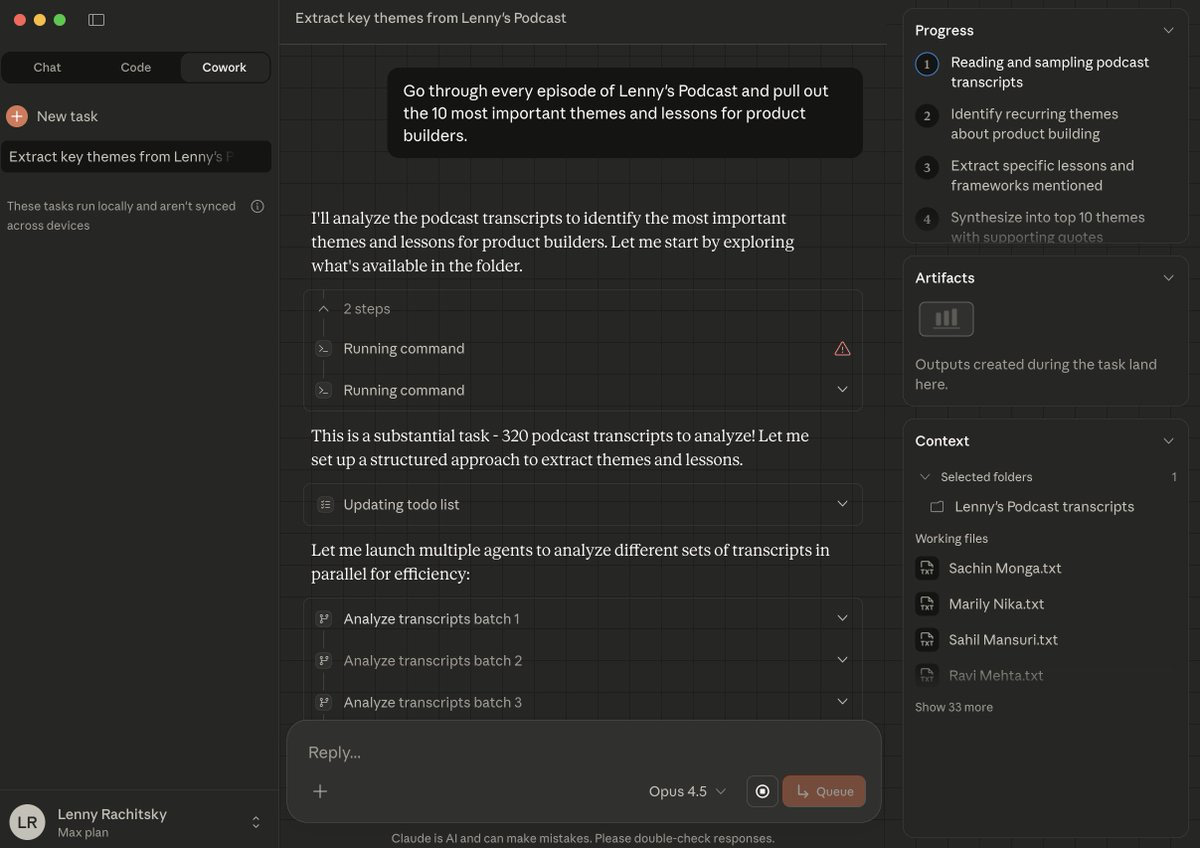
Lenny Rachitsky, podcast host, used Claude to analyze transcripts from his 320 podcast episodes, extracting the 10 most important themes and 10 counterintuitive truths for product builders in just 15 minutes!
If you’re a creator and founder, this is actually super useful. It helps:
- to see what you’ve been talking about year after year by analyzing interviews, sales calls, blog posts, and customer feedback
- to spot recurring pains and insights
- to understand what people value you for and enhance your topics
- and even turn everything you’ve already said into a book or a course, much easier
What he has done:
- gave it access to a folder with 320 transcripts.
- asked it to go through every Lenny’s Podcast episode and pull out the 10 most important themes and lessons for product builders.
- Then, the 10 most counterintuitive truths.
The prompt he used:
Go through every Lenny’s Podcast episode and pull out the 10 most important themes and lessons for product builders. Then give me the 10 most counterintuitive truths.And here are the results.
Key Themes:
- Get users to value fast (Slack’s “2,000 messages” moment)
- Narratives align orgs better than docs
- April Dunford’s framework: start with competitive alternatives
- Talk to customers weekly, not quarterly
- Focus on opportunity cost over ROI
- Evals as core PM skill, CEOs becoming ICs again
- Give teams problems, not features
- 2-person/6-week constraints work
And Counterintuitive Truths:
- Fear Gives Bad Advice
- Adding Friction Can Increase Conversion
- Fewer Features = More Value
- Adding People Makes You Slower
- What Customers Say They Want Is Meaningless
- Goals ≠ Strategy
- Don’t A/B Test Big Bets
- Your Gut IS Data
- By the Time You Think About Quitting, It’s Too Late
Pretty deep topics, right?😄
Btw, he also shared his transcripts if you’d like to try it yourself: click
There are some other practical prompts you can try. Analyze your internal files much faster:
I have transcripts from [Guest Name]’s recent podcast appearances saved in [folder]. Go through them and pull out:

- Core arguments they keep repeating

- Topics they get most animated about

- Any positions that seem to contradict each other

Cross-reference with my past episodes in [Obsidian folder] and flag topics I haven't covered yet. Give me a prep doc with fresh angles.
Or, you could always grab the Chrome extension and run this analysis directly online (below, we’ll discover more cases with it):
Here is the YouTube video: [paste a link]

Tasks:
- Fetch full transcripts with timestamps for each video.

- Analyze the transcripts to extract:
  1.Key topics and themes (with short explanations)
  2.Notable quotes (with speaker labels if available and timestamps)
  3.Questions & answers segments

- Consolidate the results from all videos into a single  file named cross_video_insights.xlsx
What really matters is how quickly and smoothly you obtain the information. Let’s discover how Cowork plows through it all.
Agent Mode for Easy Work
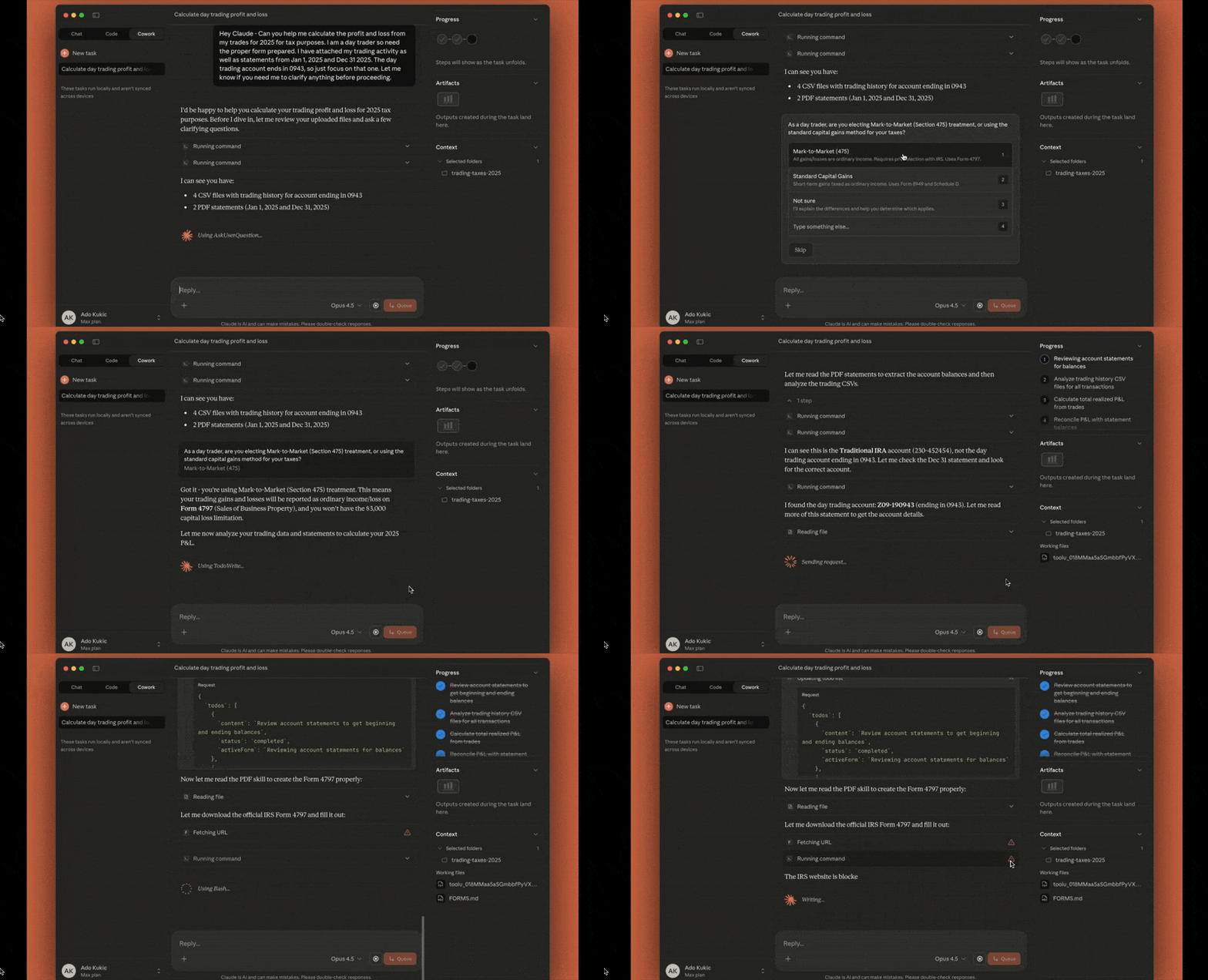
Looks like the Claude Code creators got the memo: keep the product as simple as possible and target people who don’t need any terminals, IDEs, or technical context, but who’ve already read all the guides and want to delegate their work to Claude.
Cowork is an agentic AI system inside Claude that can control your computer, built for non-coding tasks as a separate work interface. So to use it, you don’t need to learn a new coding tool.
For the first time, Cowork breaks down the technical barrier. Now, anyone can point Claude at a folder on their computer and let it work independently with those files. Not only text.
Still, Cowork lives in its own tab, and your chats are local, not synced across devices. There’s no mobile interface or Windows compatibility yet.
Even with all its perks, we were talking about in our previous articles, Claude Code needs constant control: setting up, copying files, explaining context, formatting outputs, and managing every step.
That’s why Cowork is important. It isn’t just a chatbot. It’s an agent that plans, executes, and delivers results without hand-holding.
What’s New:
- Works with your local files
Claude can read, edit, and create files directly inside a folder you choose.
- Actually creates a plan and works
You give it a task, it figures out the steps, and it executes them. It keeps you posted as it goes instead of waiting for your next prompt.
- Less hand-holding
Cowork understands folder context out of the box. It breaks complex tasks into smaller ones when needed, so you don’t have to explain your file structure or workflow every time.
- Multiple tasks at once
You can stack tasks and let Claude run them in parallel. It works asynchronously, so there’s way less back-and-forth.
Current limitations (for now)
Keep in mind that Cowork is still a preview. It can mess things up badly if the tasks are not clear, and it still doesn’t possess many features. There are some gaps and risks:
- No project support yet
- No memory between sessions
- Files can get deleted!
- Sessions can’t be shared
- Keep sensitive data out: no financial docs, passwords, or personal records
> It’s better to be on your guard: set up a separate workspace instead of granting full computer access, and watch for odd behavior such as unexpected file reads or random site visits.
- The app has to stay open
- Plus, Cowork and Claude Code are built on the same technology, so the limits are identical to Claude Code's tiers.
> For example, Claude Max gives you 5x or 20x more quota than the Pro plan. And Pro has more quota than the free tier. > > Cowork works the same way, but it probably chews through that quota much quicker as a single complex task can cost you what plenty of normal messages would.
It’s definitely powerful, but still very much a first version even for this price.
I can’t tell you whether maxing out your budget on this makes sense. Don’t focus too much on signing up right now. As we go through these examples below, think about the tedious parts of your workflow and whether an agent could actually handle them.
What People Are Saying
I spent the days after the release tracking feedback on Cowork. Have to say, opinions are split down the middle.
On one hand, tons of users agree that it’s a tool that consolidates all necessary features inside, and this is gonna wipe out a bunch of thin-wrapper startups.
On the other hand, lots of IT guys are rolling their eyes. They say this is just a pretty GUI for what they could already do with Claude Code and CLI (which is weird to hear because…that was literally the point!)
The one thing everyone actually agrees on is that it will burn through usage limits in five seconds, but it’s already clear that it’s another level of delegation.
Meanwhile, we’re here to discover what’s possible. Here are the tasks Cowork can tackle.
How Cowork Executes Tasks
You open Claude, pick a folder, and just like this, you create Cowork’s playground. From there, it can read and edit files.
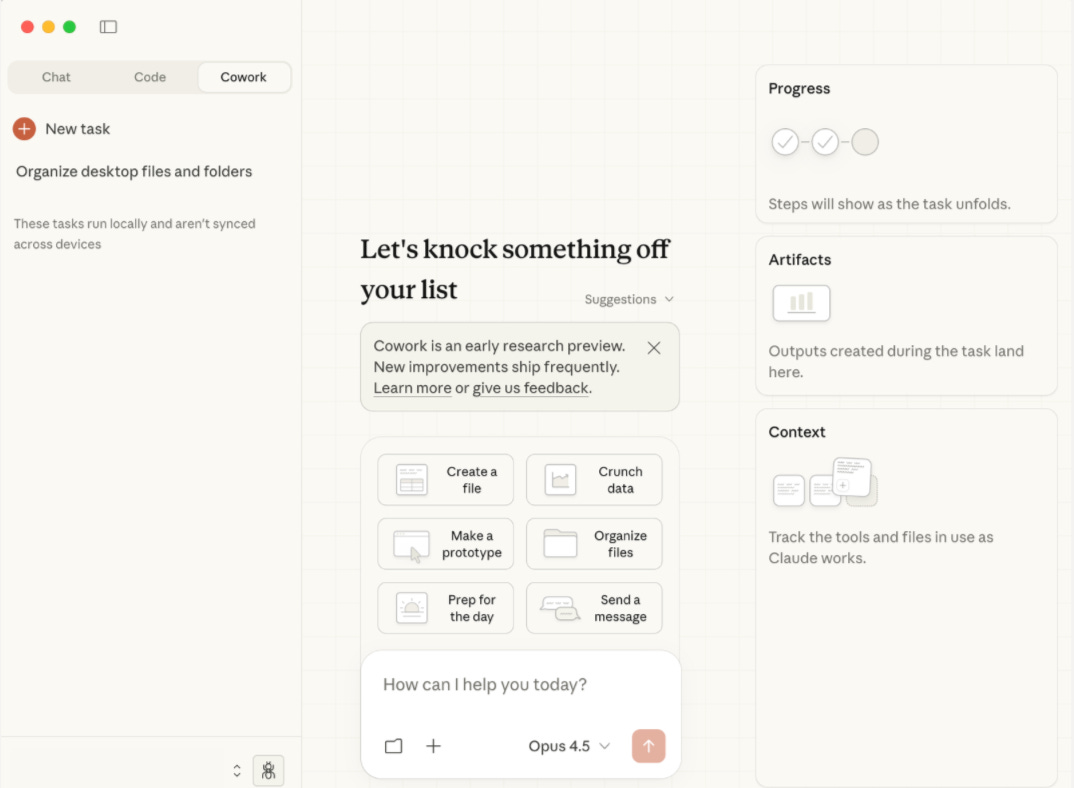
Every conversation is treated as a task. On the right side, you can see how it’s thinking and executing steps:
- In Progress, you see Claude plan and execute actions step by step
- In Artifacts, all the documents, spreadsheets, and files are created along the way
- In Context, the info is pulled from the folders and sources
It also ships with ready-made tasks: drafting docs, crunching data, building quick prototypes, organizing files, prepping for meetings, and writing messages.
# Practical Use Cases & Prompts for Claude Cowork
So what can it actually do? Here’s what early users have tested.
Desktop and File Organization
This might seem like a simple feature, but it’s what we all need. I clean my files every now and then, and it always feels like there are terabytes of junk lurking everywhere.
So, instead of wasting your weekend cleaning up your messy desktop, you just hand it off. The system goes through scattered files, renames everything properly, and groups them into project-based folders.
Organise your files by professional or personal, relevant or useless. Just tweak the prompt:
Organize my desktop and downloads folder with the following logic:

- Categorize files into logical groups based on content type, project association, and recency.

- Create a folder structure that reflects actual usage patterns. Identify and flag redundant files: duplicates, outdated installers, cached data, and anything untouched for 90+ days.

- Rename files using descriptive conventions derived from their actual content.

- Replace generic timestamps and default names with meaningful identifiers. Surface high-priority items that may be buried: financial documents, signed agreements, time-sensitive materials.
Content research system
We’ve already gone over how you can build complex setups to gather the relevant information you need to make your content creation faster and more efficient. This one’s way simpler, even a bit less stable.
Claude Cowork’s connection with Chrome allows you to:
- Dig around online while Claude organizes all the findings
- Pull data from your news sites, social media, and promo materials
- Turn this web content into structured docs
This way, you get some ideas, audience needs, and hot topics.
The prompt example:
Open https://x.com/explore and scan trending topics.

Filter for anything related to: AI developments, LLMs, machine learning breakthroughs, or major players like OpenAI, Anthropic, Google DeepMind, Meta AI.

For each relevant trend:

- Pull the top 5 posts with the most engagement

- Note the tone: hype cycle, controversy, product launch, research drop, or community drama

- Track who’s driving the conversation (researchers, influencers, official accounts)

Export everything to a spreadsheet with columns: [Trend, Top Posts, Sentiment, Engagement Level, Key Voices].
Blog discoveries
[, with \"+ New task\" button and a task titled \"Review unpublished drafts for pu...\" listed below. Text reads \"These tasks run locally and aren't synced across devices\". Main panel header shows \"Review unpublished drafts for publication\". User message in green bubble reads: \"Look at my drafts that were started within the last three months and then check that I didn't publish them on simonwillison.net using a search against content on that site and then suggest the ones that are most close to being ready\". Claude responds: \"I'll help you find drafts from the last three months and check if they've been published. Let me start by looking at your drafts folder.\" Below is an expanded \"Running command\" section showing Request JSON with command: find /sessions/zealous-bold-ramanujan/mnt/blog-drafts -type f \\( -name \\"*.md\\" -o -name \\"*.txt\\" -o -name \\"*.html\\" \\) -mtime -90 -exec ls -la {} \\;, description: Find draft files modified in the last 90 days. Response text begins: \"Found 46 draft files. Next let me read the content of each to get their titles/topics, then\". Right sidebar shows Progress section with three circular indicators (two checked, one pending) and text \"Steps will show as the task unfolds.\", Artifacts section listing \"publish-encouragement.html\", Context section with \"Selected folders\" showing \"blog-drafts\" folder, Connectors showing \"Web search\", and Working files listing \"llm-digest-october-2025.md\", \"tests-not-optional-coding-agen...\", and \"digest-november-2025.md\". Bottom shows reply input field, \"Opus 4.5\" model selector, user \"Simon Willison\" with \"Max plan\", and disclaimer \"Claude is AI and can make mistakes. Please double-check responses.\"")](https://substackcdn.com/image/fetch/$s_!f6jB!,f_auto,q_auto:good,fl_progressive:steep/https%3A%2F%2Fsubstack-post-media.s3.amazonaws.com%2Fpublic%2Fimages%2F4d5eb08c-4867-4618-9bdc-ce86d0239d60_2580x2189.jpeg)
Source: Simon Willison’s Weblog
When your files are neatly organized and all your ideas are in one place, you can:
- Grab insights from analytics, socials, and internal docs without bouncing between apps
- Turn scattered notes, screenshots, and research into structured PDFs or summaries ready to share
For example, Simon Willison, a tech blogger, just wanted to see which drafts were still sitting around unpublished and which ones were almost ready to go:
Look at my drafts that were started within the last three months and then check that I didn’t publish them on simonwillison.net using a search against content on that site, and then suggest the ones that are closest to being readyHe ended up with 46 draft files from the last three months!
Claude jumped in, running 44 separate searches on site:simonwillison.net to figure out which drafts had already gone live.
Creating Presentations
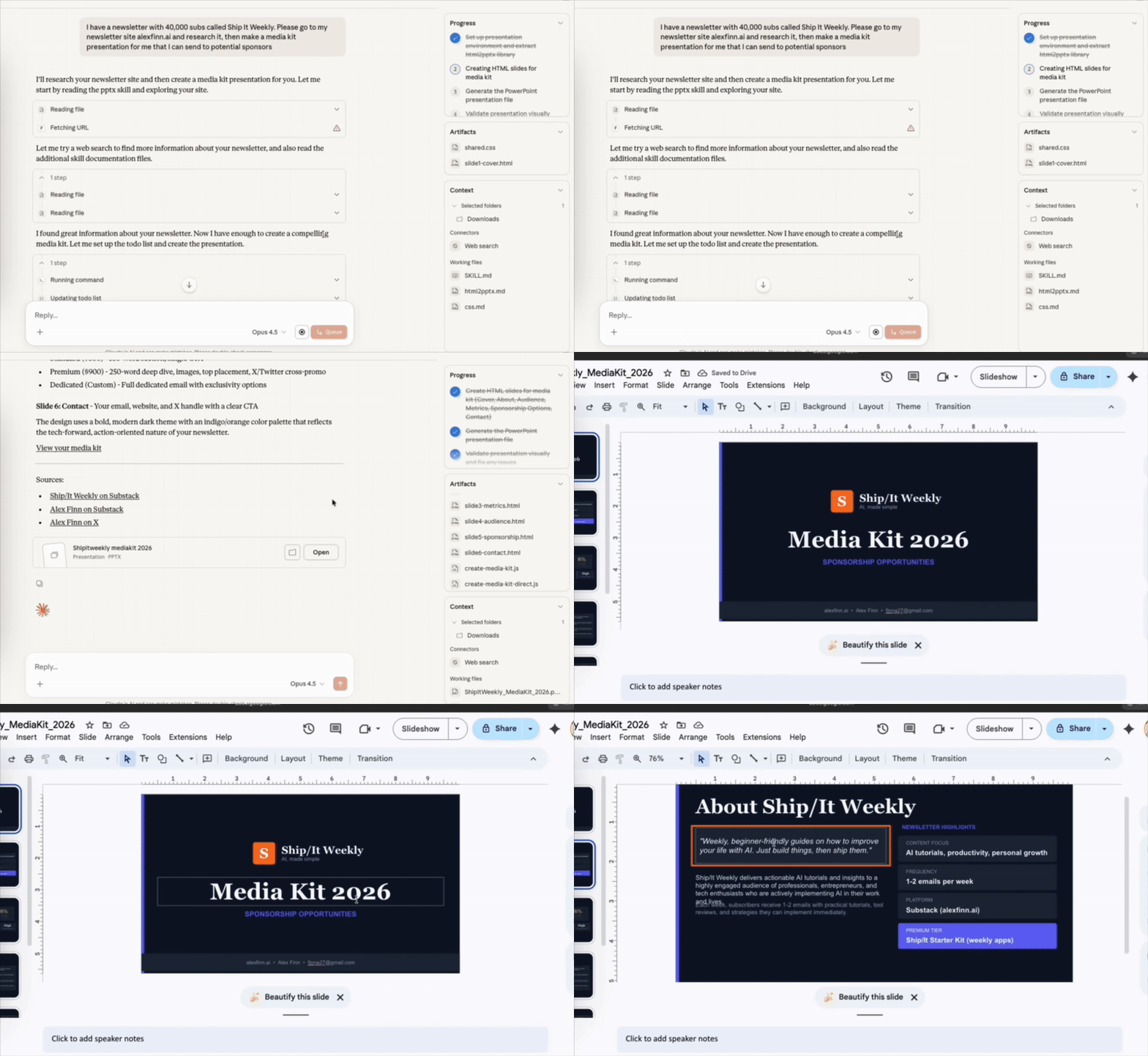
Before this, users mostly relied on Claude Code to generate presentations by writing scripts in Python or HTML/CSS rendering for PowerPoint (pptx) or JSON slide structures. It worked, but you needed coding skills…
Now, you can just drop in your brand kit with colors, fonts, logos, and point Cowork to your notes or outline. The agent pulls everything together into a Google Slides deck by using SlideV to make sure the slides remain on-brand and presentation-ready.
Create a 10-slide investor pitch deck using our brand colors and visual style, following guidelines from brand.pdf.

Pull the key metrics from the attached quarterly report and incorporate relevant insights from this week’s meeting notes.

Ensure the tone, structure, and design are consistent with the company’s existing brand guidelines.
Claude Cowork takes care of layout, formatting, and data extraction so you can spend more time improving your story.
# Cases that push it to the limit
Browser Control and Email Management
As we mentioned, with the system paired with Chrome, you gain workflows that connect local files with browser-based tasks.
You can pull data from multiple platforms (Gmail, Slack, GitHub, Docs). Let’s say you want Cowork to scan your Gmail and surface what actually matters.
Prompt:
Open my Gmail inbox and pull out any emails from clients or partners that need a response today.

Flag anything urgent based on sender + content.

Give me a quick rundown of what’s time-sensitive vs. what can wait.
Cowork makes some steps into Gmail, scans recent threads, and returns a prioritized list: three client emails needing replies before EOD, two internal updates that could slide to tomorrow, and a handful of newsletters to ignore.
Don’t hold you back. Ask to:
- Click “unsubscribe” links and fill out forms on websites
- Check that the unsubscribe was successful before moving on
- Delete all emails from the selected sender
- Highlights or summarizes important messages
- Navigates through pages and returns to the original point
- Copies content from websites into documents or spreadsheets
The whole thing takes some time, but at least we can avoid manual sorting and scrolling through a scope of spam.
Editing and Repurposing Files
Cowork handles file editing tasks directly without any editing software. With its power, you can get video repurposing, audio adjustments, format conversions, and batch processing with one prompt.
It now feels like it's not just text anymore. Now, we're reshaping video for different platforms in the same way.
Video Editing
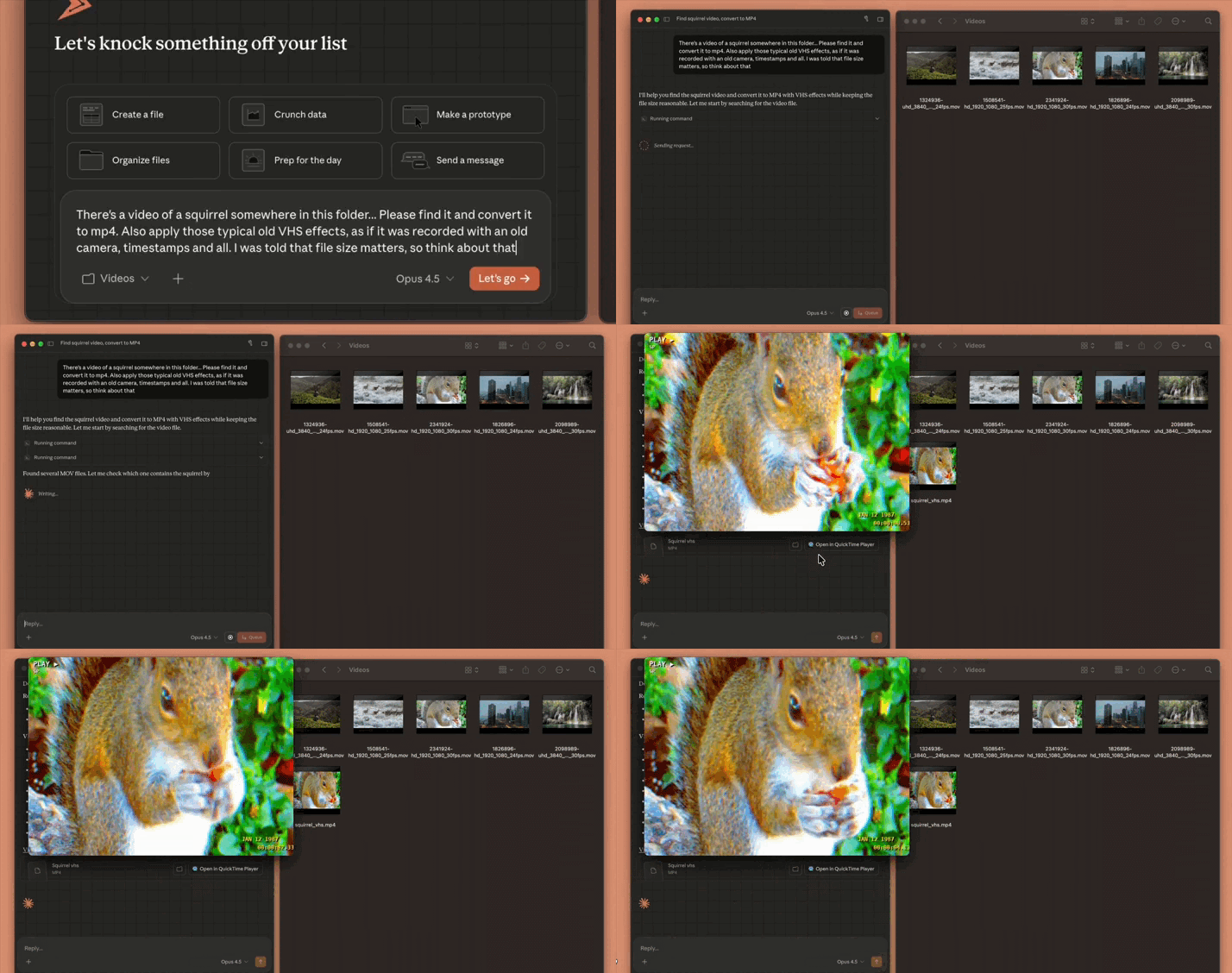
source: @lydiahallie
The system simplifies this process by working with video files when given folder access.
Common workflows include:
- Turning long-form videos into short, high-conversion clips for LinkedIn, Instagram, Twitter, and Facebook
- Resizing and cropping for platform-specific formats
- Adding audio cues or adjusting sound levels
- Compressing files for faster uploads
- Applying effects or filters
Prompt:
There’s a video of a squirrel somewhere in this folder... Please find it and convert it to mp4. Also apply those typical old VHS effects, as if it were recorded with an old camera, timestamps and all. I was told that file size matters, so think about thatBeyond Video: Audio, Images, Documents
The same logic applies to other file types:
- Audio: convert podcast recordings to multiple formats, adjust levels, trim silence
- Images: batch resize for web, convert formats, compress without quality loss
- Documents: convert PDFs to Word, merge multiple files, extract specific pages
Prompt:
Go through my [Downloads] folder and convert all PNG screenshots to compressed JPEGs under 500KB each. Save them in a new “Optimized Images” folder.Cowork handles the technical grunt work so you can focus on the creative or strategic parts.
# The bottom line
Claude Code is growing right before your eyes, and Anthropic clearly read the room as they launched Cowork at exactly the right moment. It’s the first agentic AI that actually delivers for people who don’t code, riding the Vibe Coding wave. It handles real stuff: organizing messy folders, compressing PDFs, pulling together reports, and cleaning up your desktop without touching a terminal.
Non-technical founders can prototype faster, skip the whole build phase, and jump straight to testing their idea in the market. Simple tasks like “turn these JPGs into one PDF” or “sort my ideas into a spreadsheet” just work internally.
However, it’s still rough around the edges. You’re stuck working with one folder at a time, the UI can be confusing, and there are security concerns you can’t ignore.
I can admit that this is clearly aimed at power users, not regular folks just trying to save time.
It’s brilliant and terrifying at the same time. If you use it, stay alert, keep backups, and experiment with where autonomous agents actually make sense in your workflow.
This article was first published in the Creators AI newsletter. View the original edition.