Creators Making $32k/mo on Newsletter with AI
Real case + tutorial with prompts and completely free AI tools!
👋 Hey, I’m Stepan and welcome to a ✨ subscriber-only edition ✨ of Creators’ AI. By subscribing, you directly support Creators' AI's mission to deliver top AI insights & practical knowledge without ads or clutter. Your subscription allows us to grow our dedicated team and curate the most important AI Tools, Stories, and Tutorials in one place. - Stepan
Intro
Newsletters. Newsletters are everywhere. (Right now, you're reading one, by the way.) It's understandable that newsletters are a powerful and convenient tool for connecting with your audience, building brand awareness, and increasing engagement. But beyond that, they're a great way to make money.
Some creators are making up to $32K (and a lot more) using AI tools to automate almost all of their work. At the same time, their newsletters remain exciting and attention-grabbing. But how hard is it to create your newsletters using AI?
I'd say it's pretty easy and also fast. Today, we're going to make sure of that. But first, we'll discuss the case study of a creator who successfully created his AI newsletter. Then, I'll show you how to create your own newsletter from scratch, and we'll look at monetization options for your AI-powered content and bonus AI platforms.
Have a seat, it's going to be interesting :)
In this edition:
- Case study of creator who are making money with AI newsletter
- Tutorial on creating an AI-generated newsletter + useful prompts and tools
- Overview of revenue streams for your future newsletter
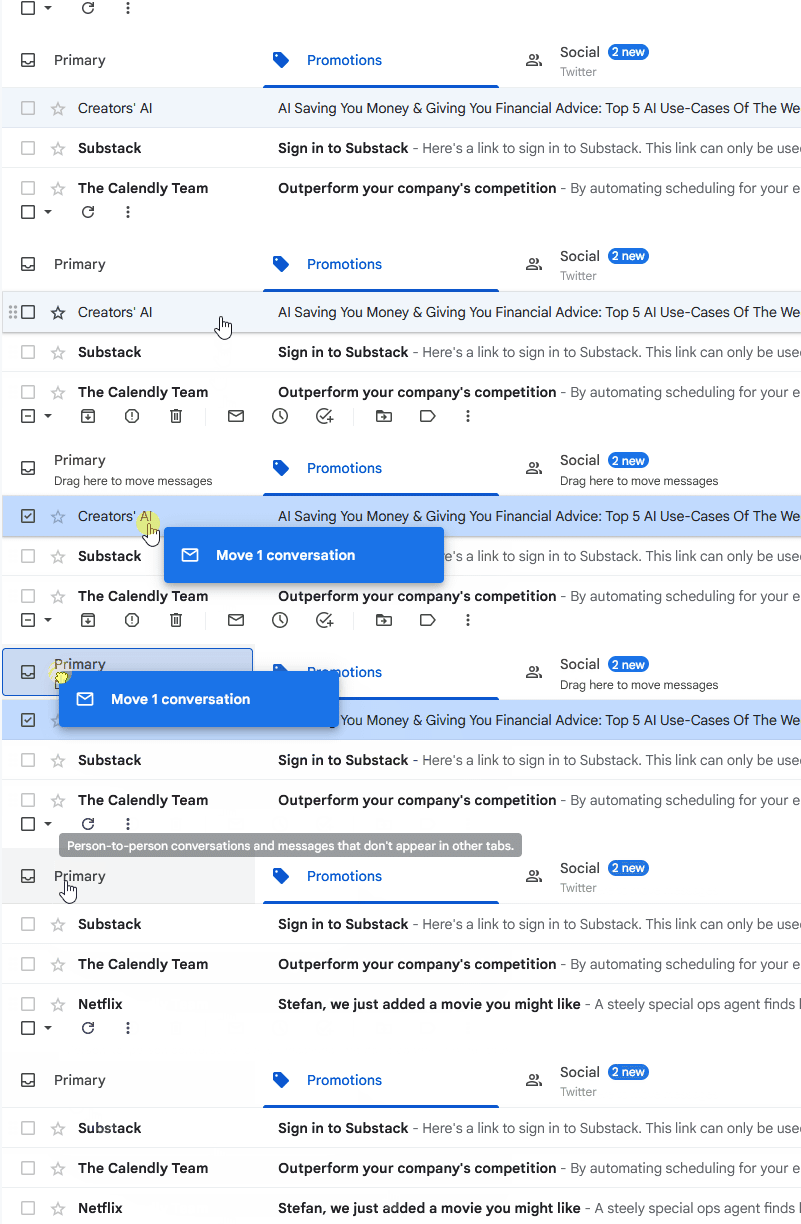
🔗 Are you already subscribed and want to ensure you don’t miss our newsletters? Move our newsletter from “Promotions” to “Primary” in your inbox! (video instructions below)

From 0 to $32,000 per Month in Less Than a Year
Our case study is Eric from Exploding Ideas. He is an enthusiast and creator who helps entrepreneurs build startups and create new projects. In particular, Eric often sets up experiments to develop new revenue streams, inclYuding newsletters.
Let's break down what he's done.

Last year, Eric launched his newsletter called Exlopding Ideas. It's a project for entrepreneurs that tells subscribers about interesting ideas for startups. The content is quite simple: the emails come once a week and contain one trending idea you can capitalize on, as well as 3 additional concepts you can use to create an online business.
In less than a year, newsletter has gained over 10,000 loyal readers and Eric's monthly income has grown to $32,000! At the same time, as the author himself says, it takes him about five minutes a day to write a newsletter with ChatGPT.

Judging by Eric's Twitter, where he regularly shares his achievements, the Exlopding Ideas newsletter is actively growing. Every month, it gets up to 1,000 new subscribers. This is a perfect indicator, considering that Eric focuses on entrepreneurs.
Keep your mailbox updated with practical knowledge & key news from the AI industry!
Why Eric's case study is important for us:
- Timeless and factual content: We all know that ChatGPT and other AIs often get confused by complex context. At the same time, they are great at generating ideas and short posts. That's exactly how Exlopding Ideas works.
- Brilliant choice of niche: Eric creates content for entrepreneurs who are willing to pay for content. This is a good approach to monetizing a newsletter;
- Regularity and consistency: The creator relies on updating the newsletter regularly and meeting readers' expectations. Eric's AI newsletter is pretty good with that, too.
On Eric's YouTube channel, you'll also find the story of his journey and useful information. For example, how he attracts subscribers and monetizes his newsletter:
We've seen a creator create engaging content with AI and monetize it. Now, let's see what it takes to replicate his success!
How to Create Your First Newsletter with AI Tools
While preparing this newsletter, I was very tempted to use recursion. I thought about asking ChatGPT and other AI Tools to create a newsletter on "A guide on how to use AI Tools to create newsletters" and then writing the newsletter you're reading.
But let's get a little more serious. We want to benefit our readers, not drive you crazy (although if such an experiment sounds interesting to you, let us know in the comments!). So, for a basic AI-powered newsletter, we'll need ChatGPT or Gemini, Rytr, and Hubspot.
Above I've listed free basic tools that have many alternatives. As we go through the tutorial, I'll suggest additional platforms that you can use to go deeper into the topic and customize your content.
Identifying Newsletter Topics
Let's start by choosing a topic. Launch ChatGPT or Gemini and type in the prompt you see below, filling in the blanks. I will use "the restaurant industry" as an example.
Prompt: Based on this [insert industry], generate a list of 10 potential topics for a monthly newsletter.
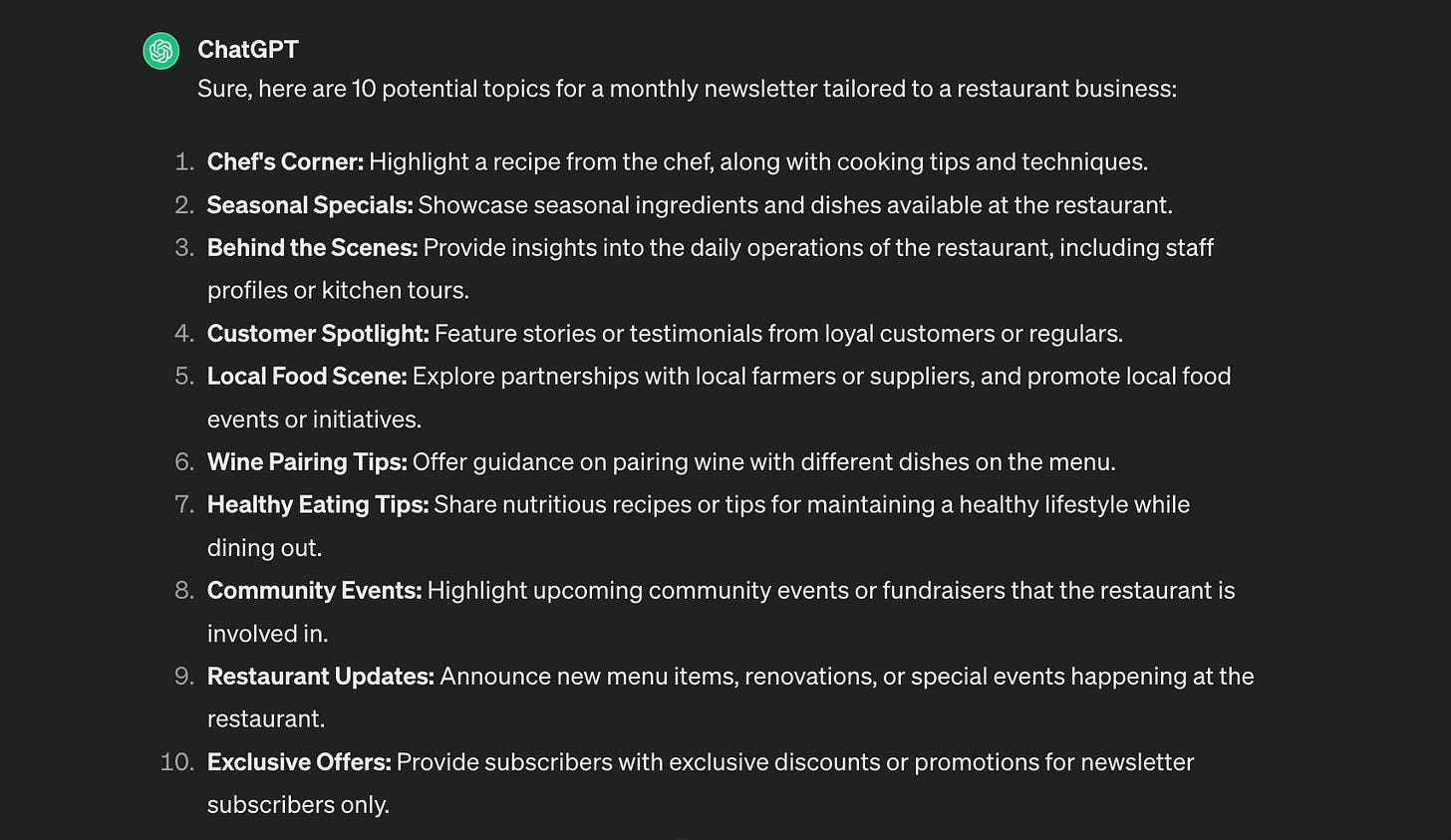
That's what we got:
If you don't have a pre-selected niche, you can also ask ChatGPT about it. I recommend checking not only the demand but also the supply. If you choose the Finance or Tech, you will not only have a lot of potential readers, but also hundreds of serious competitors.
Great, now we have topic options for our newsletter. If you don't like any of them, you can generate a few dozen more until you find one that really suits you.
Let's choose the right one, save it, and move on. I'll select number 7. Developing a friendly restaurant brand that shares helpful information with customers sounds like a good idea.
What else might be useful:
OpenAI and Google chatbots are great tools to create newsletters. But not everyone knows how to use them. If you plan to do this a lot, you'll find these prompts useful:
- "What are some relevant topics for a newsletter aimed at [your target audience]?"
- "Create a concise summary of this article/blog post [provide a link]."
- "Develop an outline for a newsletter section about [topic]."
- "Suggest a humorous subject line for my newsletter on [topic]."
- "Craft a compelling call to action for my newsletter encouraging readers to [desired action: share, subscribe, visit the website, etc.]"
- "Rewrite this paragraph in a friendly and conversational tone suitable for a newsletter."
- "Help me brainstorm a personal anecdote related to [industry theme] that would resonate with my readers."
Share this with your friends, especially those interested in AI Tools!
Expanding on the topic
Now, we can expand on the topic. You can continue your work in ChatGPT, but I suggest going to Rytr. It's a free platform focused on text-based content creation. And Rytr also has a feature that allows you to write newsletters specifically.
Simply copy the selected theme from ChatGPT and paste it into Rytr. Select the tone of voice and also the use case. In our case, it is a newsletter. When you've done that, click "Ryte for me" and wait a few seconds.
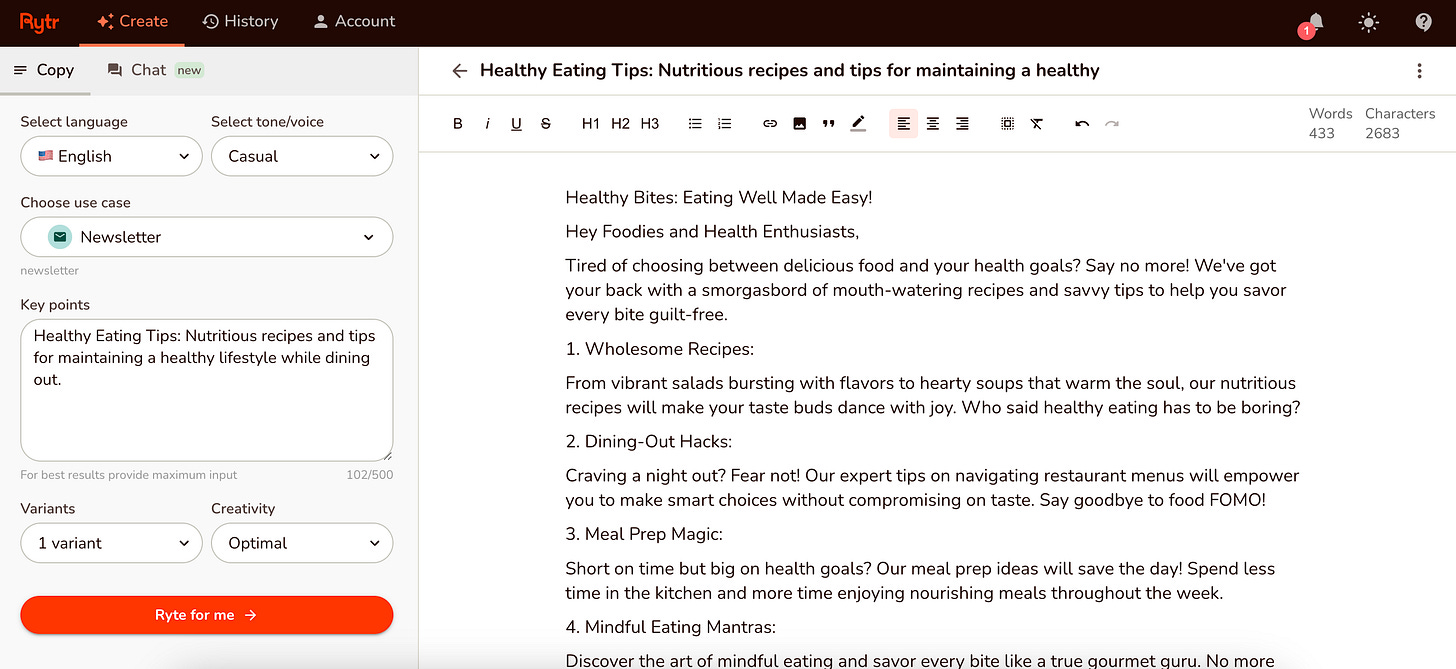
Good job! Most of the work is behind you. At this point, you can edit your post or ask the AI to generate other options. If you want to refine your query and heavily rework the result, return to ChatGPT, ask it to generate additional keywords for better SEO optimization, and refine your query for Rytr.
What else might be useful:
Rytr is not the only good tool for writing newsletters. Jasper.ai, Copy.ai, and Writesonic offer similar features and even deeper customization.
Keep in mind, however, that these services are subscription-based.
Designing Newsletters that Pop
This stage scares many people, but... Come on, we live in an era of great tools. So, let's utilize them. One of the best solutions for quick newsletter design would be HubSpot's Drag and Drop Email Builder. It's a free tool that allows you to quickly assemble a suitable look and feel (we'll discuss how you can diversify it below).
In your HubSpot account, go to Marketing > Email. Click the "Create email" button and select "Regular" for a standard, one-time email. You'll be presented with a choice of email editors. HubSpot has a library of pre-designed templates to make your life easier. Browse through and choose one that fits the style of your email.
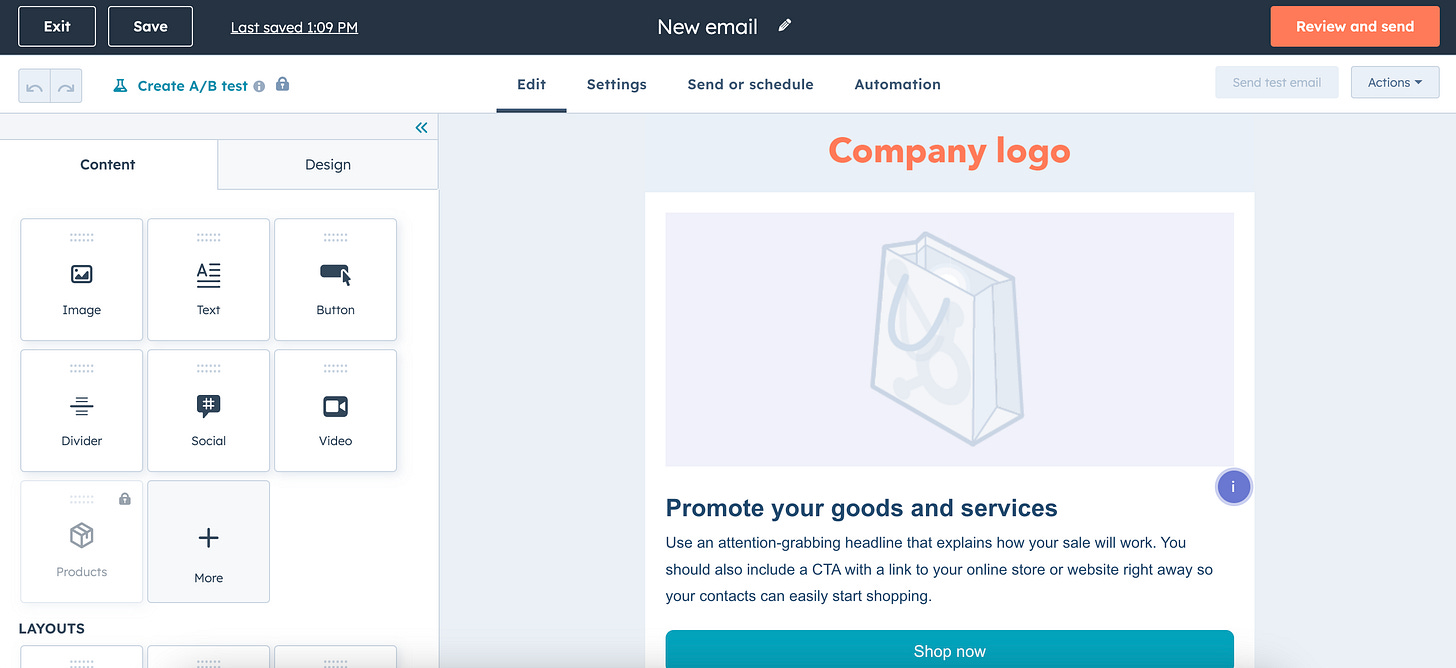
Layout and Modules. Your chosen template's basic structure is already in place. The drag-and-drop editor lets you customize sections, columns, and rows as needed. The modules are the core elements you'll add to your email. Drag and drop modules from the left-hand panel onto your email layout. Common modules include text, images, buttons, videos, dividers, and social links.
When you're done selecting the right modules, simply copy your text from Rytr and paste it to HubSpot. And that's it; your first newsletter is ready!
What else might be useful:
If you want to create large newsletters, you'll need images to dilute the text and make the posts more engaging. This is where DALL-E and Midjourney come in handy. If you want to know more about them, follow this post:
Sharing is caring! Refer someone who started a learning Journey in AI!
Revenue Streams (+ Bonus Tools)
We can't ignore the key revenue streams if we're talking about newsletters making good money. So here's a breakdown:
Core Revenue Streams
- Newsletter Ads and Sponsorships: This is the most common path to newsletter monetization. You partner with brands to feature their products or services in your newsletter. This could involve text ads, image ads, or dedicated sponsored content sections.
Ensure the sponsorships are relevant to your audience to avoid losing their trust.
- Affiliate Marketing: Promote products or services from other companies and earn a commission on sales through your unique referral links.
Only recommend products you believe in and align with your audience's interests.
- Paid Subscriptions: Offer a premium newsletter version with exclusive content, early access, or other benefits to paying subscribers. This model works best with highly engaged and valuable content.
Structure tiers of subscriptions with varied benefits to cater to different audience segments.
- Memberships and Paid Communities: Build a community around your newsletter where members get exclusive content, access to discussions, networking opportunities, and other value-added features beyond the newsletter itself.
Focus on providing a strong sense of community, interaction, and unique benefits.
Bonus Tools
In addition, we've got you covered with useful AI platforms that will speed up the creation of cool newsletters:
- Visme - An excellent option when you want to level up the visual appeal of your emails. It uses AI to suggest layouts, images, and designs that perfectly match your content.
- Piktochart AI - Similar to Visme, this tool helps you create stunning newsletter designs quickly. It's great for those with little design experience who want a polished final product.
- Junia AI - A comprehensive AI-powered tool that helps with everything from topic generation and content writing to email personalization and analytics.
- Rasa.io - Offers powerful AI features for creating, sending, and analyzing highly effective newsletters. It excels in content curation and optimization.
- ClickUp AI - While ClickUp is a broader productivity tool, its AI includes a newsletter generator, offering content suggestions and catchy subject lines.
Conclusion
As we said at the beginning, the rise of AI-generated newsletters opens up exciting collaboration and community-building possibilities. But while AI can significantly streamline the newsletter creation process, it's important to remember that the human touch remains essential.
Right now, until AI is ready to replace us fully, I recommend you use generated content as a starting point, but always infuse your unique voice, insights, and personality into the final product. The key to producing newsletters that resonate with your audience is to strike a balance between AI assistance and human creativity!
What do you think about AI-generated newsletters? Tell us in the comments!
This article was first published in the Creators AI newsletter. View the original edition.