Gemini: The Complete Guide to Google's AI
Deep Research, Ecosystem Features, Canvas, and More!
Google was outright bad on the AI side in 2024. Its model lost out to ChatGPT and others in almost everything, and AI Overview was so crude that the company shut down its access. But now it's starting to get better (and pretty quickly).
There are so many updates that it's hard to figure out all the features on your own. To make it easier, we've gathered all the main tools and use cases in this post.
Below, you'll find everything you need to know about Google's Gemini:
- Key Features of Google’s AI
- Advanced Tools for Creators, Entrepreneurs & Coders
- Pricing, Availability & Bunch of Pro Tips
Near the end, we'll show you how to try Image Editor with minimal censorship and the latest Gemini 2.5 Pro for free.
Keep your mailbox updated with practical knowledge & key news from the AI industry!
Basics | Dropping ChatGPT?

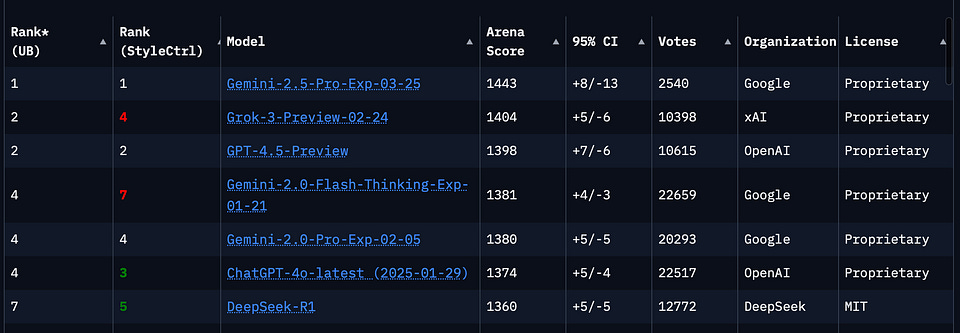
Right now, the new Gemini model holds the top spot in the LMArena benchmark. It's beating everyone.
Unlike other AI companies (like OpenAI, Anthropic, or Perplexity), Google is always about the ecosystem. Due to its service background, Gemini comes closest to achieving actual personal assistant status with seamless integration.
Here are a few valuable features I use. They will be helpful in work, study, and everyday life, even if you don't want to dive deep into prompt engineering.
- Schedule Management: Gemini can handle your calendar and schedule things for you. If you use Google Calendar, you can give the AI access, and instead of searching for the correct date and entering things to do, just ask the chatbot.
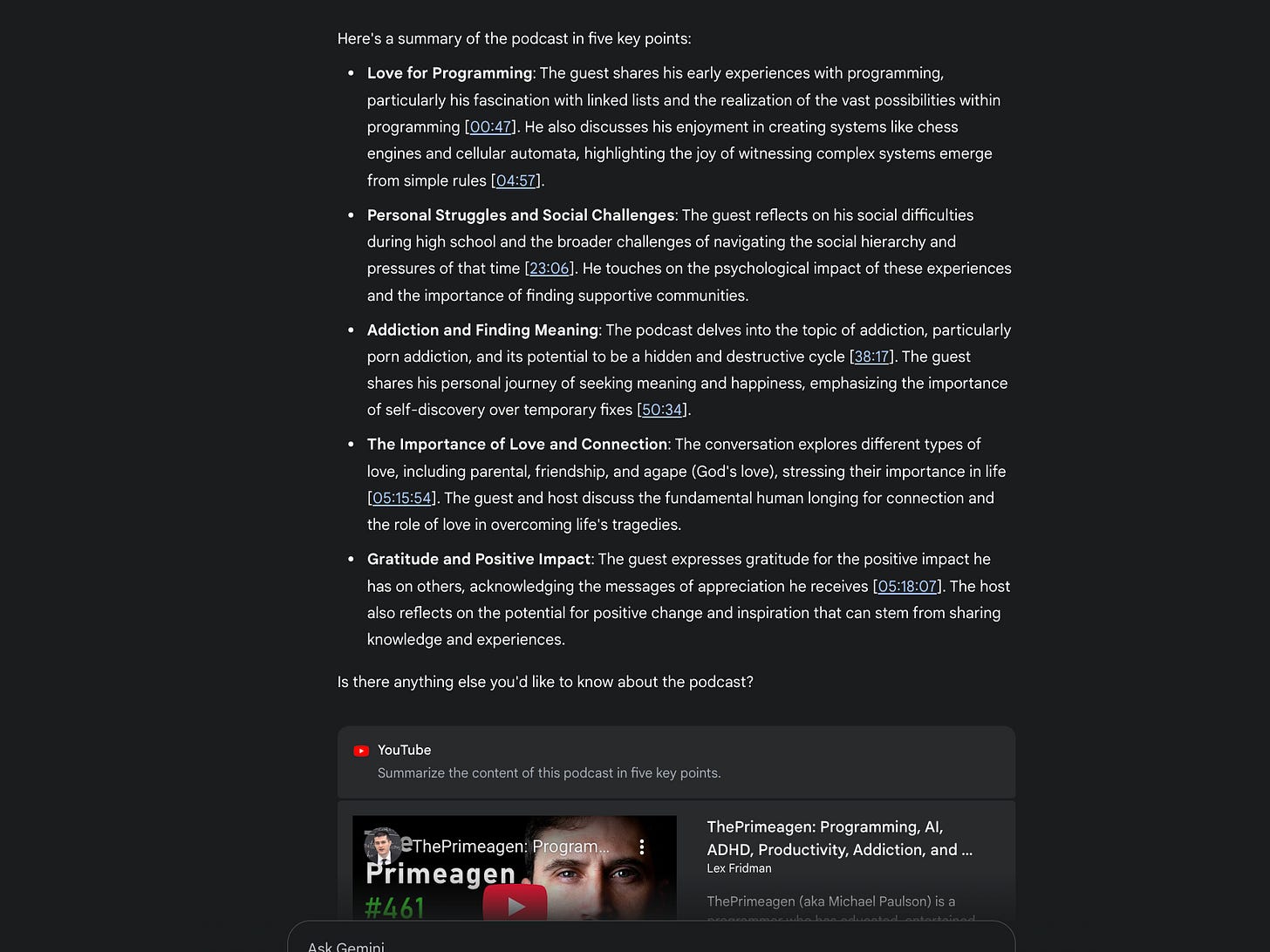
- Summarizing Content: I've tried many tools for summarizing YouTube videos, but as it turns out, Gemini handles it best. In addition to producing pretty accurate squeezes, the processing speed is faster than others.
- Quick Access to Your Data: You can give Gemini access to your Drive, Sheets, and Docs, and then use it to search for relevant documents by title, keywords, and content description. Very handy.
- Travel and Trip Planning: If you're going on vacation or just need to visit several places in one day, you can simply have Gemini consult Maps and create a detailed itinerary from several points.
Pro Tip: Gemini now supports more than 10 Google services, and if we take the time to look at each one, we'll be here for a long time, so catch the light. After typing “@,” you can see and call up any Google services available in Gemini.
But these are just the basics.
Gemini Canvas | For Creators & Coders
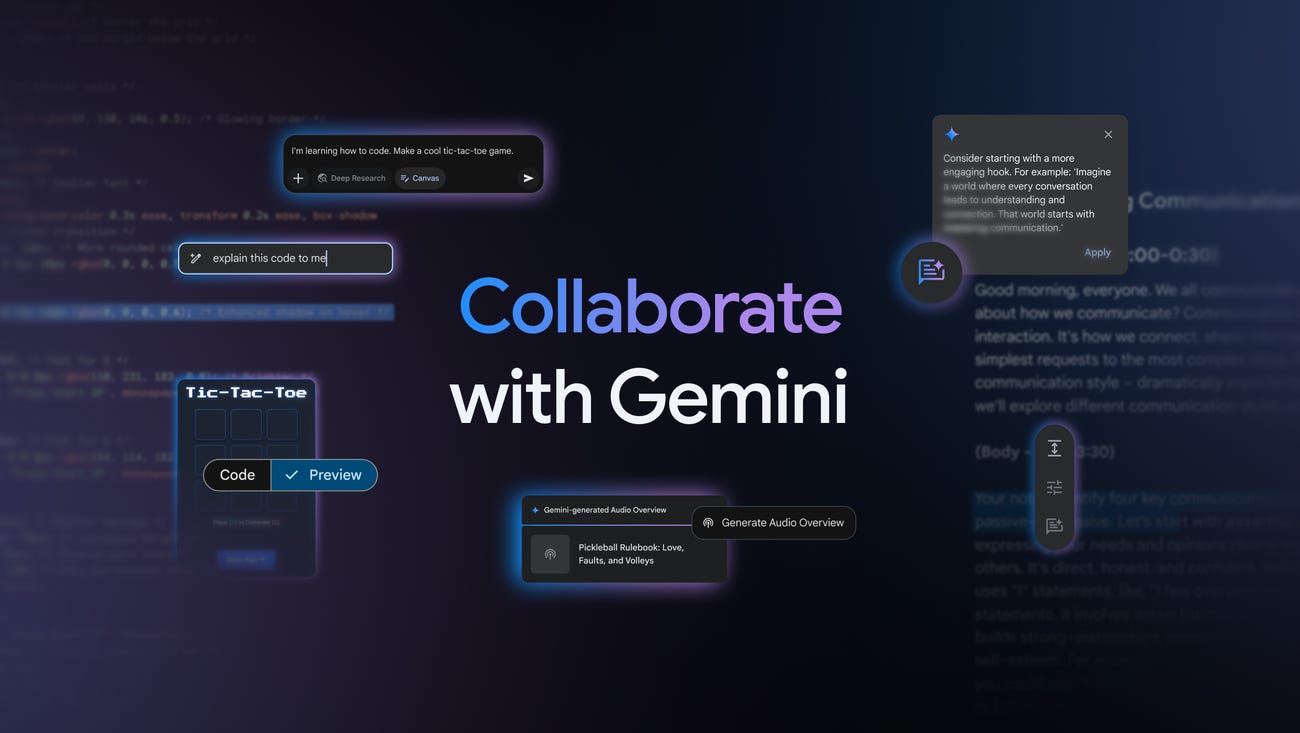
Another feature that ChatGPT and Claude's users are familiar with is Canvas.
It turns the Gemini interface into a text editor or collaboration space. This feature lets you manipulate text blocks, add images, and structure information in ways traditional document formats don't allow.
Recent updates have made Canvas useful for content planning and brainstorming.
Creators and writers can adjust their content's tone, length, or formatting using quick editing tools. For example, you can highlight a paragraph and ask Gemini to make it more concise, professional, or informal.
Those who want to master vibe coding have even more. For them, Gemini with Canvas can generate and preview HTML/React code for web app prototypes, create functional websites, and visualize designs in real-time.
And it looks pretty impressive. Here are a few notable examples.
Creating a website from documents in 30 seconds:
Or oven built the Stripe dashboard in less than 60 seconds:
By the way, this feature combines perfectly with the following tool.
Share this post with friends, especially those interested in AI Insights!
Deep Research | For Entrepreneurs & Analysts
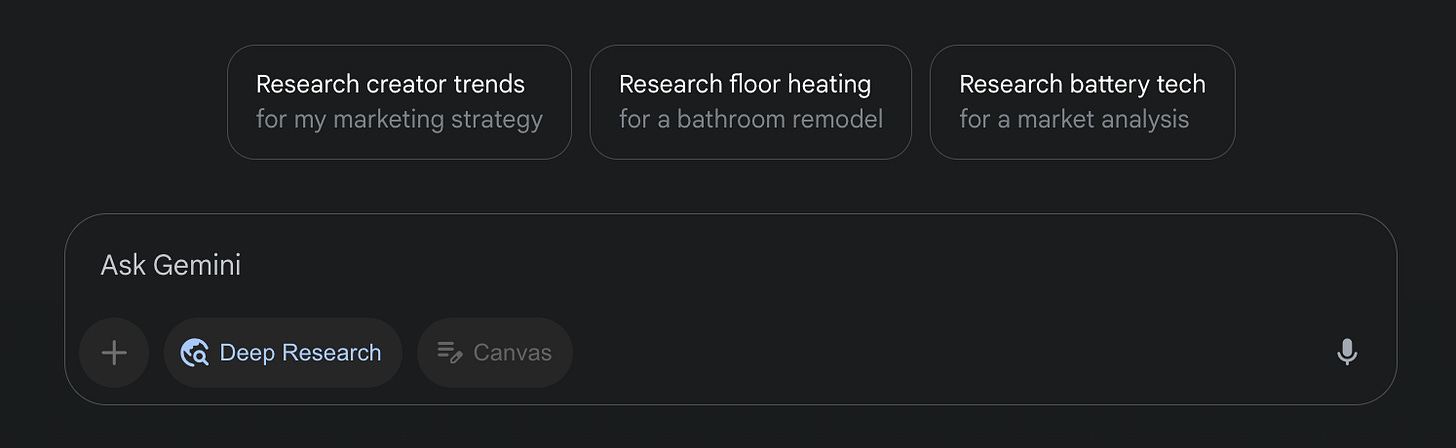
Deep Research is one of the major trends in chatbots, set by OpenAI last year. This feature turns AI into your digital analyst and researcher. In this mode, the model generates complete reports with quotes.
Of course, Google has not been left behind and released Gemini’s Deep Research. But while this feature was previously only available as part of the paid Gemini Advanced subscription, now anyone can create multiple reports.
All you have to do is:
- Go to gemini.google.com
- Select the appropriate model
- Explain the task in natural language
- Make some edits to a plan (optional but cool!)
- Wait for the finished report
There are a whole bunch of use cases for Deep Research.
Entrepreneurs and marketers can test hypotheses, write reports, and monitor competitors and market changes. Whenever I need a quick dive into a topic, I habitually start researching it with a query through Deep Research.
I've done several reports on different topics over the last week. I can say that Gemini is on the same level as Deep Research from OpenAI but inferior to Perplexity.
But even here, Gemini has an advantage. Here's our Pro Tip:
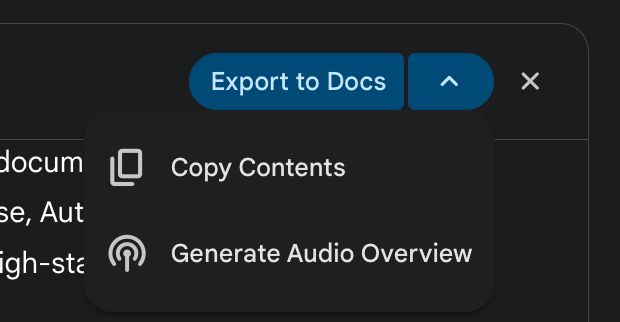
Instead of reading a lengthy report, you can generate a podcast with two hosts. The feature is called Audio Overview (earlier, it used to work only in NotebookLM)
If you want to know more about Deep Researches from different developers and how they work, check out this post:
Creators’ AI could be a valuable gift for your friend, colleague, or family member. Gifting books is bright, but giving an AI newsletter is a superb move 😎
Image Editor | For Creating & Editing
Image Editor is probably the main discovery of Gemini this year. What's funny is that Google didn't emphasize the new model much.
This tool generates images from text prompts and edits them if needed. In some scenarios, the basic version has enough functionality to replace Photoshop and Figma.
Image Editor can add or change elements, keep styles consistent, and include text while tracking context across edits.
Judge for yourself, here's what you can do:
- Combining different objects
- Remove and replace any background
- Erase watermarks
- Arbitrary manipulate objects
And much more.
This feature suits designers, bloggers, and users who need tailored images without much manual work. It’s also useful for hobbyists trying creative ideas and developers integrating image editing into apps.
We recently dedicated a post to image editing. Gemini became a key tool in our list.
Additional Tips & Tricks
Some of Gemini's features go beyond specific scenarios. Here are the ones that struck me as the most important. Try them out as you have time:
- Personalized Search: With the latest update, you can enable a personalized search model that considers what you've searched for on your Google account (not just with Gemini).
It is a way to tell the chatbot about you without telling it about you. And you’ll tell more than you can imagine.
- Ask to Remember: A simple but helpful thing with a telling name. You can ask Gemini to remember your conversation. The model will then refer to this data, and you won't have to provide the same context every time.
- Gemini Gems: This feature lets you create custom assistants for specific tasks using instructions and optional files. Think of it as a way to split one bot into multiple. For example: for work, study, and leisure.
Pricing & Availability
It's also worth saying a word about pricing and availability.
I do it at the end for a reason. The fact is that previously, the free version of the chatbot was severely limited. But now you can try all the features shown in our post for free. To get more, you have to subscribe to Gemini Advanced.
Below is a brief comparison so it's clear what you’ll get.
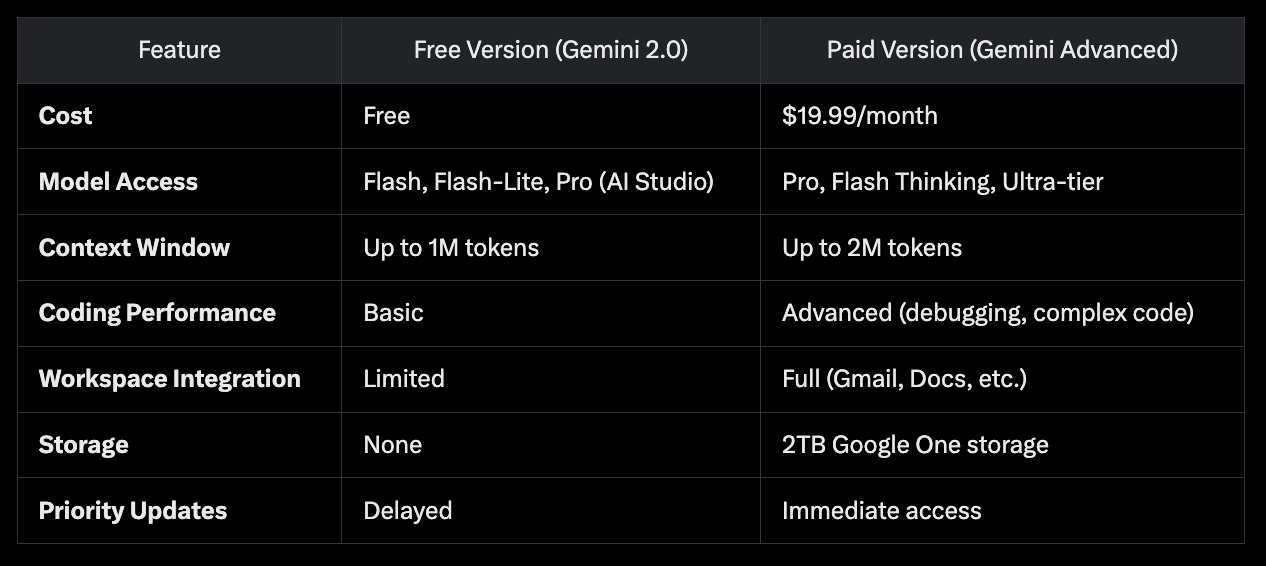
Basic Gemini
- Pricing: Free for everyone
- Models: Includes access to Gemini 2.0 Flash & Experimental
- Context window: Up to 1M tokens for Flash models, sufficient for casual tasks (e.g., summarizing documents up to ~1,500 pages).
Gemini Advanced
- Pricing: $19.99/month
- Context window: Up to 2M tokens with Gemini 2.5 Pro, ideal for processing datasets or complex projects.
- Additional Features: 2TB of Google Cloud storage, expanded access to Deep Research, AI in Workspace, priority access to updates, and higher usage limits for tools like NotebookLM Plus.
But that doesn't mean you can't get more without a subscription.
Gemini Pro & Minimal Censorship for Free
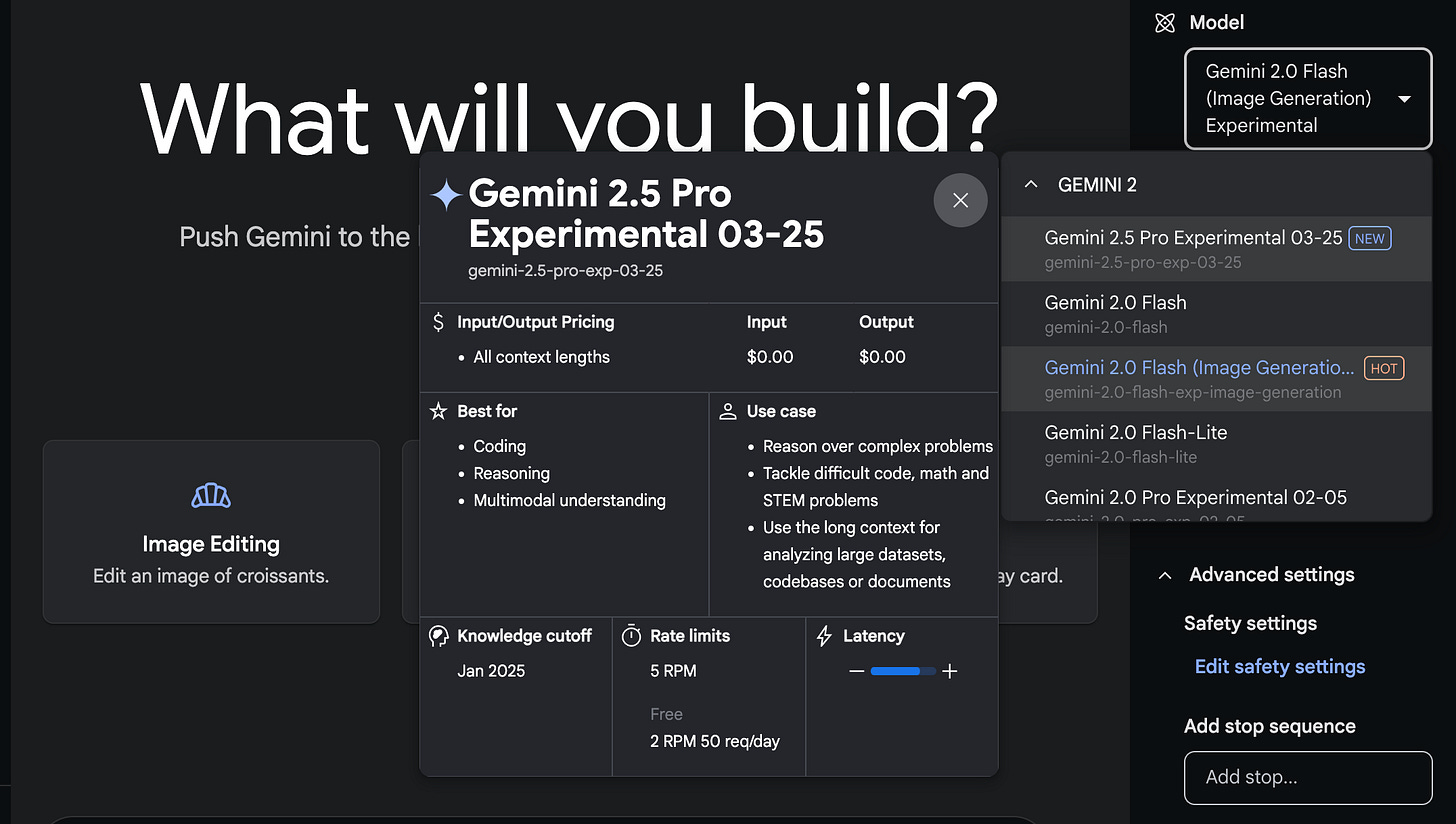
The standard version of Gemini 2.0 has a few limitations (like handling images with people). It can be accessed at gemini.google.com, which Google uses as its primary resource for connecting users with AI. But you can get more for free.
To bypass censorship and restrictions, head to Google's AI Studio, log in, and then follow the same steps as you would on Gemini’s platform.
As you can see from the image above, you can even try Gemini 2.5 Pro Experimental there. This is the company's newest (and the best at the moment) model and is distributed as part of the Advanced subscription.
According to the LMArena benchmark, it now outperforms every model on the market, including GPT, Grok, and DeepSeek.
Gemini API (AI for Developers)
Available through ai.google.dev, this API connects to Gemini models like 2.0 Flash and 2.5 Pro. It’s meant for prototyping and basic app development.
- Access: This tool requires an API key from Google AI Studio. The free tier offers 60 req/min (data logged, no privacy), and paid tiers increase limits.
- SDKs: Python, JavaScript, Node.js, Go, Swift, Kotlin for Android.
- Use Case: Works for prototyping; Vertex AI is suggested for production due to security and scale limits.
- Pricing: Free tier available; paid is $0.000125 input/$0.000375 output per 1,000 characters.
Google also provides Vertex AI. It’s a ML platform that allows you to train and deploy models and apps, as well as customize LLMs for use in AI-based applications. You can learn about it more here.
Google AI Workspace for Business
In January, Google integrated AI features into its Workspace Business and Enterprise plans. These tools promise to boost productivity across business applications:
- Gmail: The "Help me write" feature assists in drafting and refining emails, while email summarization provides concise overviews of lengthy threads.
- Docs: AI capabilities include generating document summaries, creating cover images, and offering writing assistance through the "Help me create" function.
- Meet: Features like automatic note-taking and adaptive audio enhance meeting experiences with real-time translated captions supporting over 65 languages.
- Sheets: Enhanced smart fill detects patterns and suggests contextual completions for quick data entry.
- Slides: The "Help me create an image" feature enables users to generate custom images for presentations, complemented by background removal tools.
Additionally, Google has integrated Gemini into Workspace platforms. These features are included in the Workspace subscription, with a price increase of approximately $2 per user per month.
The Biggest Issue
Unfortunately, nothing is perfect.
Gemini also has one serious flaw: the models. While Google has managed to build an ecosystem around its AI and clothe it with all sorts of functionality, in many cases, 2.0 Flash & 2.0 Flash Thinking lose out to the competition.
If you look at benchmarks, you'll see that Gemini is on the same level (or even higher!) as OpenAI, Anthropic, and many others. However, in real-world usage scenarios, you can almost always find a chatbot that does a better job.
For research: Perplexity's Deep Research with the setting set to “Social.”
For writing code: Claude 3.7. If you want to try vibe coding, take the Anthropic model. It consistently produces better code.
For web search: Grok, ChatGPT, or Perplexity. My experience has shown that these models track trends better and offer more relevant content (surprisingly, it's Google!).
For complex tasks: OpenAI's o3-mini. The reasoning model does better than others at logic, analytics, and financial planning.
As an alternative to o3-mini, I also suggest trying DeepSeek.
Perhaps the only aspect in which Google's AI excels is Image Editor.
And the choice is yours to make.
If you ask me, I suggest giving Gemini a slight chance. Amid the news that the company will “kill” Google Assistant this year (plus the hype surrounding the AI), I believe that Gemini will continue to improve and become the most popular AI.
Am I wrong? Tell us in the comments!
Share this edition with your friends!
This article was first published in the Creators AI newsletter. View the original edition.