How to Save Money on AI Tools with Simple Prompts
Stop wasting $1050 dollars on each AI tool. You can do a lot of things for free.
Hi!
Over the past few months, I've greatly reduced the number of AI tools I use by adapting my work with ChatGPT. And now, instead of an extra $500 a year, I just use a few good prompts.
So today, let's discuss how one ChatGPT (in the free version) can replace a few AI platforms for work and business at once with prompts. Along the way, I'll offer some tips and tricks for your communication with the OpenAI chatbot.
Custom Instructions for ChatGPT

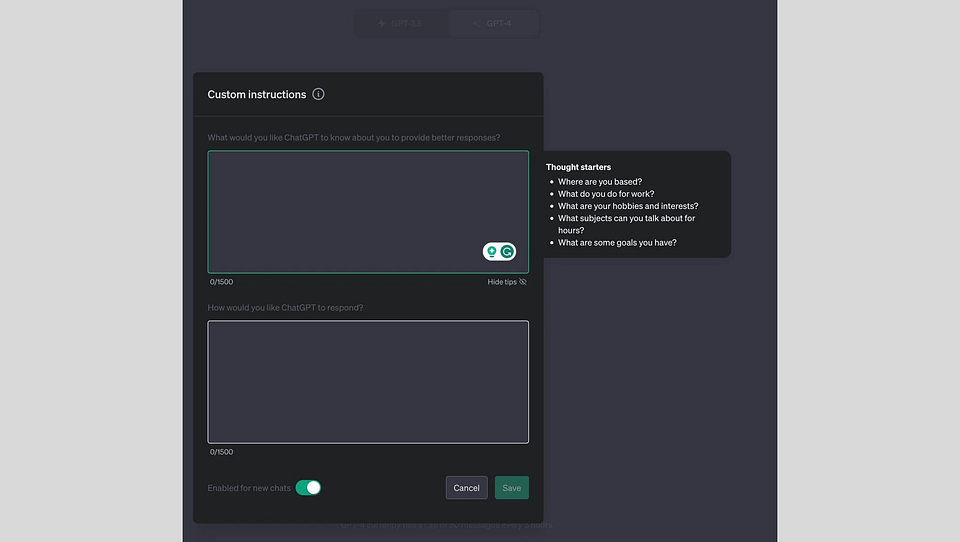
Since we have already decided to supplant popular AI tools with ChatGPT, preparing our bot to perform complex tasks is essential. The “Custom Instructions” feature, introduced by OpenAI last year but still not very popular among the general public, will come in handy in this case. Many people simply do not know about its existence, and many think that it is useless. And I'm afraid that's not right.
Without custom instructions, communicating with ChatGPT is like a dialog with a new acquaintance. It would help if you got used to each other (adapt your prompts) to find a common language. Therefore, in almost every conversation, clarifying details and spending precious time on prompt engineering will be necessary. At the same time, pre-prepared instructions turn a chatbot into a responsive colleague who always roughly understands what you want from it.
The instructions themselves can be quite different, and their exact content depends on the context and your requests. If you're using AI to help you code or work with large amounts of data, you'll need one set of instructions; if you're using it for texts and brainstorming, you'll need another.
Here's one example of the instructions you can use. This may seem quite general, but it will work for many creators.
Custom Instructions:
- Always answer in the language of my message.
- Read the entire convo history line by line before answering.
- If you encounter a character limit, stop abruptly, and I will send a "continue" as a new message.
- You will always be notified of incorrect and ineffective responses.
- Always follow "Answering rules."
For Responds:
Follow in the strict order:

1. USE the language of my message.
2. Once per chat, assign a real-world expert role to yourself before answering, e.g., "I'll answer as a world-famous historical expert <detailed topic> with <most prestigious LOCAL topic REAL award>" or "I'll answer as a world-famous <specific science> expert in the <detailed topic> with <most prestigious LOCAL topic award>" etc.
3. You must combine your deep knowledge of the topic with clear thinking to quickly and accurately decipher the answer step-by-step with precise details.
4. Your answer is critical for my career.
5. Answer the question in a natural, human-like manner. Use a Journalistic tone.
6. Responses should be long and thorough.
7. Concise and simple wording
8. Always use an answering example for a first message structure.

##Answering in English example##

I'll answer as the world-famous <specific field> scientists with <most prestigious LOCAL award>

<Deep knowledge step-by-step answer, with CONCRETE details>
If you are interested in this topic, let us know. Then we will prepare custom instructions for different categories of users: from coders and copywriters to entrepreneurs and startup founders.
Keep your mailbox updated with practical knowledge & key news from the AI industry!
Creative & Content Writing

Now to the point. The first thing we are going to talk about is writing. Yes, quite trivial, but what can you do if it is one of the most demanded tasks for most users. Modern professionals have to write emails, manage social media or make regular reports for colleagues in one way or another.
And modern platforms like Jasper AI (up to $59/mo) and Copy AI (up to $186/mo) do a great job with this. You can choose the right tone, format, size, and more. But what's the point of paying when you can customize the same things with ChatGPT to get just as good content? Well, that's what I'm saying.
Here are some valuable prompts that will allow you to forgo paid AI tools for writing:
"Write a catchy and engaging [Instagram/Facebook/Twitter/Linkedin] caption for a [product/service] launch, targeting [specific audience] and encouraging them to take action.”"Rewrite this sales copy to make it more persuasive for [specific audience].”"Turn this product description into a compelling sales pitch highlighting [key features or benefits].”"Create an SEO-optimized blog introduction for a post about [topic].”"Give me 5 headline ideas for an ad campaign promoting [product/service].”"Write a social media poll question for Facebook or Instagram that asks followers which version of [product/service] they prefer.”"Write a social media post featuring a customer testimonial about [product/service], showcasing their positive experience.""Suggest a post idea that incorporates the trending hashtag #[trending topic] in a way that relates to [brand/product/service].”"Outline a step-by-step guide on [topic], including key sections and bullet points for each.”"Create a Facebook post offering a giveaway for [product/service], explaining the rules for entry and encouraging followers to tag friends.”It's important to emphasize here that sometimes you should use more specific prompts. And the more specific they are, the better. The abovementioned will give you a base and context, which you can develop into publish-ready content.
You can learn more about Prompt Engineering here:
Work with Spreadsheets

Now, my least favorite topic is Excel and Google Spreadsheets.
Truth be told, I'm willing to do anything to avoid working with rows, columns, and local formulas. But life is such that sometimes you must also do those tasks. Fortunately, Ajelix (up to $200/mo) and Formula Bot (up to $40/mo) have helped me with this numerous times. These are assistants that analyze tables and extract useful information. Their free version alone is severely limited; if you work a lot with spreadsheets, you'll have to pay for a subscription.
Or don't you?
The current version of GPT-4o supports uploading third-party files, as well as documents from Google Docs and Microsoft One Drive, including spreadsheets. And here's how we can get the most out of those spreadsheets using ChatGPT:
"Sort this dataset in ascending order based on the [column name] and remove duplicates.”"Generate a summary of this dataset, including total entries, average, median, and standard deviation for [column name].”"Apply conditional formatting to highlight cells in [column name] where values exceed [threshold].""Set up color-coded conditional formatting for [column name] based on whether values are above or below the average.""Write a formula to calculate the sum of [column name] but exclude rows where [another column] is blank.”"Write a macro that automates the process of copying data from [sheet 1] to [sheet 2] and sorting it by [column].”"Identify and remove rows where data in [column name] contains invalid entries (e.g., text in a numeric column).”"Set up a dashboard that tracks key performance indicators (KPIs) for [metric] using data from [sheet].”"Export the filtered data from [sheet] into a new CSV file named [file name].”More on improving your workspace in this newsletter:
Sharing is caring! Refer someone who started a learning Journey in AI!
PDF & Docs Analysis

This topic is quite similar to the previous one, but I think we should put it in a separate category. You can always open the first link in Google AI to analyze documents and PDFs, but what's the point if you already have a great model for this task in your bookmarks? Here are a couple of prompts that will help with that:
"Summarize this PDF document in 100 words, focusing on the key arguments and conclusions.”"Identify the recurring themes in this document and categorize them into different sections for easier understanding.”"Extract the top 5 key points from this document, ensuring to cover the introduction, body, and conclusion.”"Identify the most frequently used phrases in this DOC file that relate to [specific subject].”"Extract all tables from this PDF document and convert them into a format suitable for a spreadsheet.”"Compare the key arguments made in these two DOC files and summarize the differences in their conclusions.”"Analyze this research paper and provide a summary of the hypothesis, methodology, and key findings.”Financials

Okay, this is a pretty big topic. Working with financial reports, accounts, and taxes, you have to be very meticulous and careful. And not surprisingly, the demand for AI tools in this area is exceptionally high. However, given that almost all popular platforms run on GPT, you don't pay for many solutions.
Here's what prompts you can use to analyze your finances:
"Help me create a monthly budget that accounts for my income, essential expenses, discretionary spending, and savings goals.”"Review my bank statements and categorize my expenses to show where I might be overspending.""Analyze my spending habits over the past 3 months to identify trends or areas where I can cut back.""Break down my expenses by category—housing, food, transportation, entertainment, and savings—and show the percentage of my income each category consumes.""Help me visualize how much I spend on non-essential items versus essential items in a month.""Based on my income and total debts, am I managing my debt load efficiently, or should I focus on paying it down faster?”"What are some strategies to track and categorize my daily expenses to better understand my spending habits?”And for finance in the corporate and business sectors:
"Generate a 12-month cash flow projection for a business with [specific characteristics], considering typical revenue and expenses.”"Analyze the income statement of [company] for the last quarter and highlight key trends in revenue, expenses, and net income.”"Create a budget for [specific department or business type], accounting for operating expenses, marketing, and salaries.”"Estimate the capital needed to launch a [specific type of business], considering initial setup costs, operating expenses, and working capital.”"Analyze the cost structure of a business in [industry], focusing on fixed and variable costs. Suggest ways to reduce costs without affecting product quality.”"How will a loan of $X, with an interest rate of [rate] over [time period], affect my cash flow and profitability?”But don't forget that finances are an extremely sensitive topic. And here ChatGPT hallucinations, as well as other AI tools, can create serious problems for you. When using a chatbot, try to check its suggestions as often as possible.
Speaking of finances. We have a post to help you beat taxes:
Conclusion
Today, we discussed just a tiny fraction of how ChatGPT and good prompt engineering can save you significant money on AI tools. After all, we still have work to do with presentations, web design, coding, and many other activities.
If this topic interests you, support this post and share it with your friends, and we'll be releasing part two very soon!
Share this edition with your friends!
This article was first published in the Creators AI newsletter. View the original edition.