How Wisprflow turned my iPhone into a content machine 🤖
AI Voice Notes Use Case Whisprflow
Hey everyone. Today’s edition is about a real use case of a fellow Creator who can teach us some tips on using AI Voice Notes & sync with our knowledge systems!
At a Glance
In this piece, you will learn how to:
- Create Social Media Posts using Voice Notes
- Sync Voice Notes with Personal Knowledge Base (Obsidian & Claude Code)
- Create Newsletter Posts using Voice Notes
This post is prepared with Guest Author - Wyndo . Creator of The AI Maker
If you also want to write for Creators AI - send us email here
I talk to myself in public constantly now. People probably think I’m insane.
I’m not. I’m just running a content machine from my iPhone while walking around.
It started a few months ago. I was walking to meet a friend when a newsletter idea hit me—not just a topic, but the entire structure. The hook, the examples, the framework that would make it useful.
My laptop was at home.
I pulled out my phone and typed a quick note: “AI thinking partner vs search engine - newsletter idea.”
By the time I got home three hours later, I stared at that note with zero memory of what made it exciting. The energy was gone. The connections my brain had made while walking had disappeared.
This kept happening. My best ideas came while away from my desk—walking, in conversations, cooking dinner. But every capture method failed:
- Typing into Notes? Lost all the context and energy, left me with cryptic bullets
- Voice memos? Piled up unlistened, too much friction to review later
- Trying to remember? The ideas evaporated before I got to my laptop
That’s when I realized: I wasn’t losing ideas because I forgot to capture them. I was losing them because typing fragments or leaving raw voice memos doesn’t actually preserve what makes an idea valuable.
This and many other practical posts w/ AI use cases are available exclusively to our subscribers
The setup that changed everything
I needed to capture ideas in their full form—with all the context, energy, and connections—the moment they appeared.
I built two systems using Wisprflow—an AI transcription tool that turns messy voice memos into clean text. Same capture method, totally different purposes:
- Speed system: For ideas that need immediate publishing (social posts)
- Depth system: For thoughts that need time to develop (newsletter content)
Let me show you both.
System 1: Voice → Social Posts (Under 3 Minutes)
The problem I kept running into:
I’d have a sharp insight while walking—something I knew would resonate on social media. But by the time I got home and opened my laptop, one of two things happened:
Either the idea lost its edge (what felt punchy 20 minutes ago now felt obvious), or I’d spend 30+ minutes trying to turn one thought into multiple posts. Writing, rewriting, formatting for different platforms, second-guessing the tone.
The friction between having the idea and publishing it killed the momentum. Social media rewards immediacy—you need to catch ideas when they have energy, not after you’ve overthought them.
I needed a system that could go from thought to published post in minutes, not hours. Without my laptop. Without losing my voice in the process.
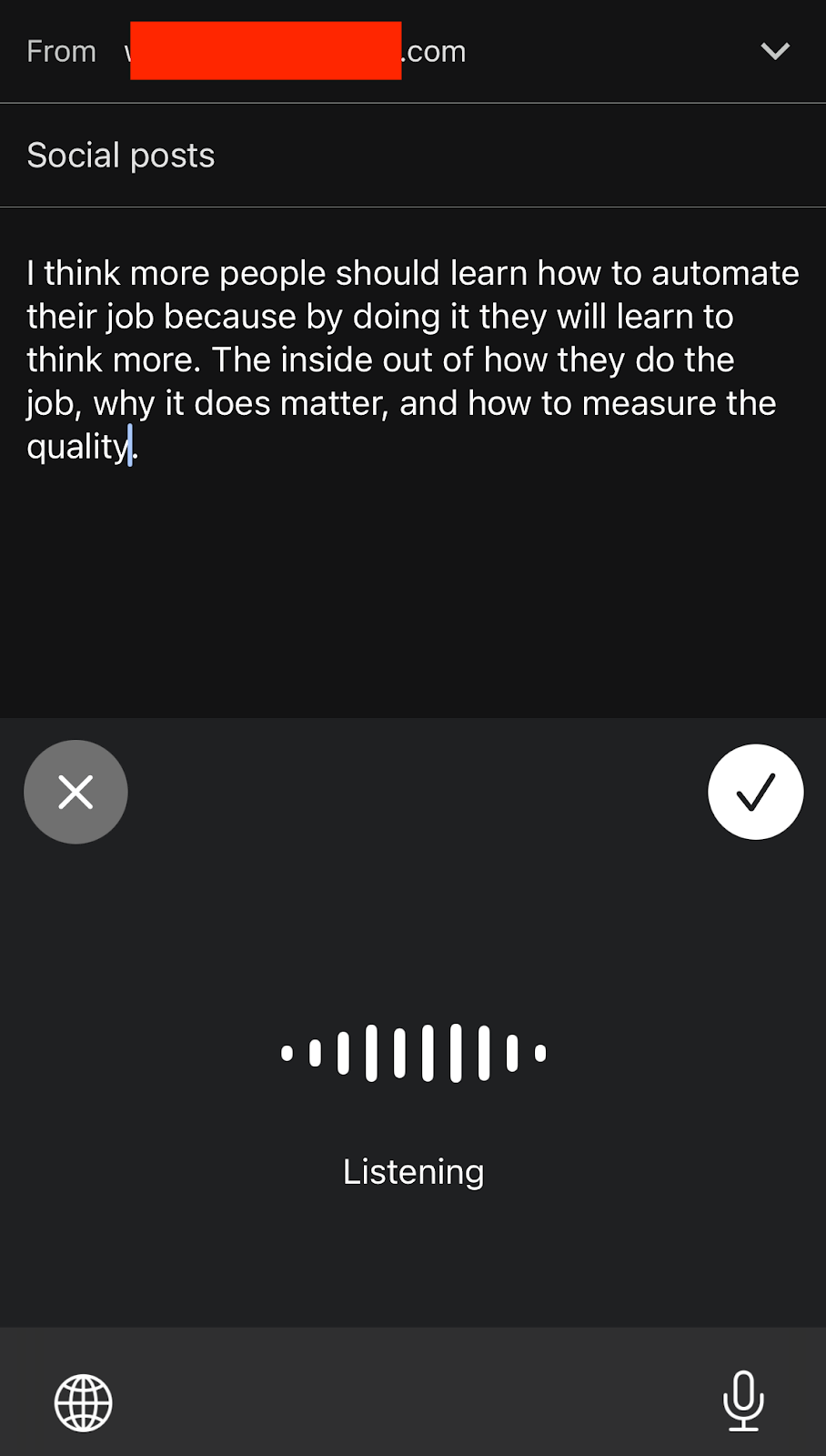
The workflow:
- Open Gmail and speak into Wisprflow through the keyboards
- Transcription pasted into the draft
- Send to my Make.com automation through mailhook integration
- AI processes it and sends back 10 polished Substack Notes
- Total time: Under 3 minutes
What actually happens behind the scenes:
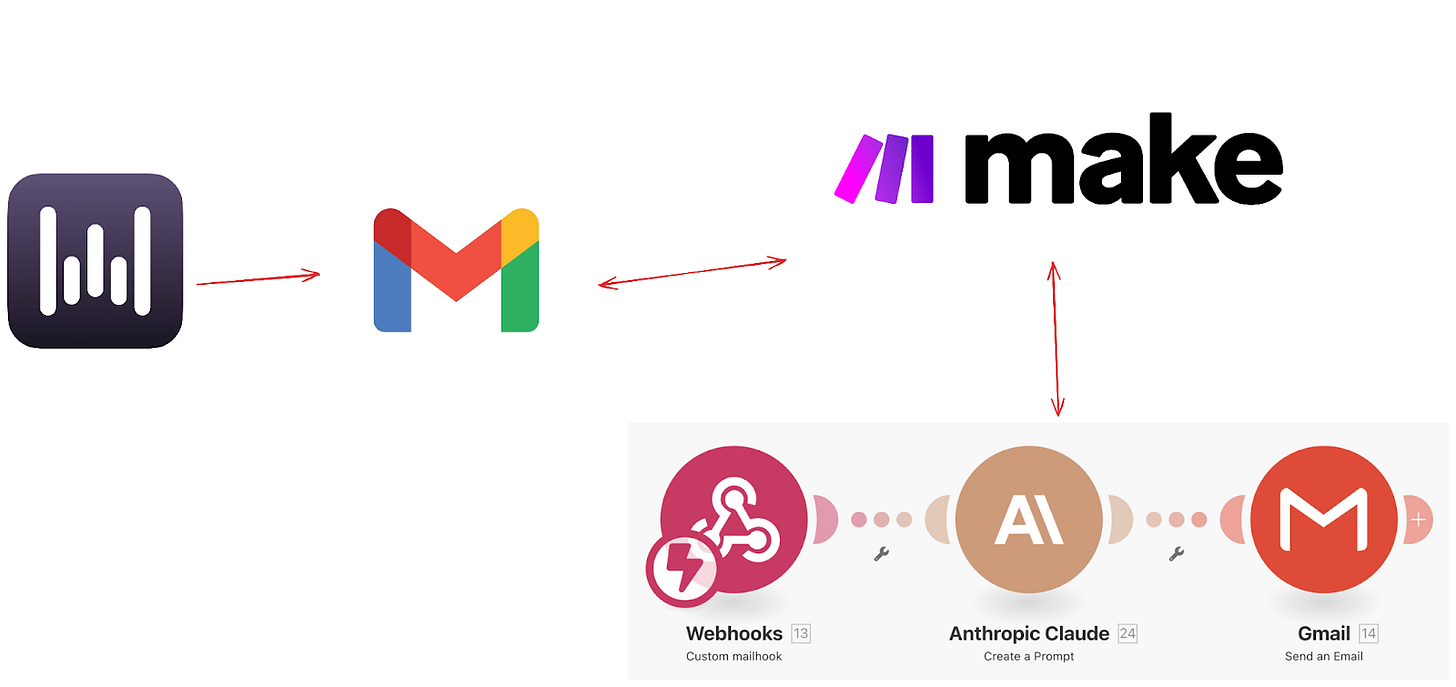
I use Make.com to connect Wisprflow → Gmail → Claude → back to Gmail. When the email hits my automation, it triggers Claude to:
- Read my voice memo transcription
- Analyze my writing style from past successful posts
- Turn one rambling thought into 10 different angles
- Format them specifically for Substack Notes
Real example:
I was walking and thought:
“I think more and more people should learn how to automate their job using AI because they will learn that automating their job is much harder than actually doing the job. You need to understand the thought behind it, the things that you care the most, the quality that you really want. It’s much harder to discern this type of thinking rather than just doing the thing compared to doing the thing. Does it make sense?”
Spoke it into my phone. Three minutes later, I had posts like this:
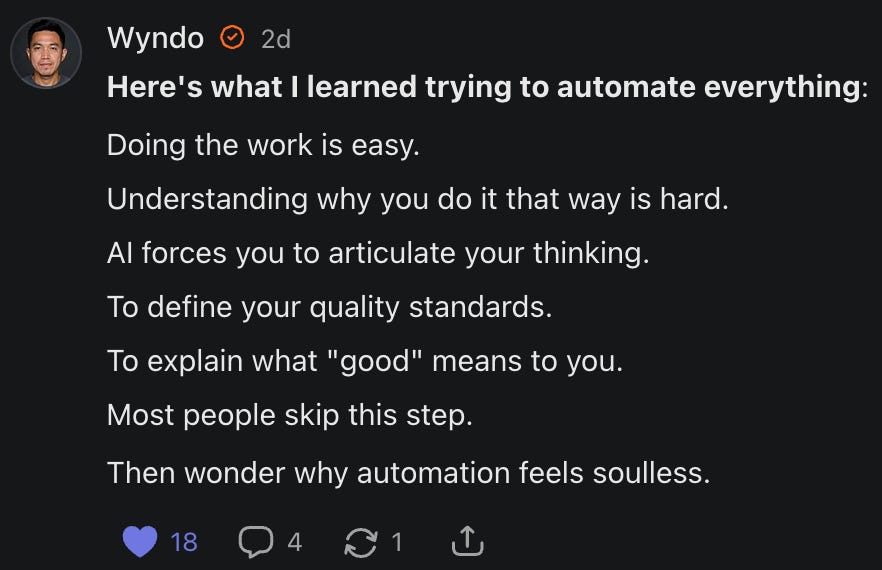
All in my voice. All ready to publish from my phone.
Why this matters: If you want to grow an audience online, you have to keep posting and sharing your thoughts. But some thoughts need a quick refinement before you hit publish—so they land with clearer structure and a takeaway people can use. This workflow does that automatically, with no manual intervention. It gets you 80–90% of the way there before you jump in to edit.
System 2: Voice → Newsletter Development (Obsidian + Claude Code)
Not every idea needs immediate publishing. Some thoughts need time to connect with other ideas.
For context, I’ve been using Claude Code for two months to run my entire newsletter project. The reason is simple: Claude Code has better context management than any other tool I’ve tried. It has access to all my project files—past newsletters, frameworks, audience insights, and successful social posts.
But here’s the catch: Claude Code only runs on my computer. And ideas don’t wait for me to be at my desk.
I’d capture voice memos on my phone, but then they’d sit disconnected from my newsletter project. When I finally sat down to write, I’d have fragmented thoughts in my Notes app and my complete project context in Claude Code—with no way to connect them.
I needed a bridge between mobile idea capture and desktop context development. A way to feed my raw iPhone thoughts into the same system where my newsletter actually lives.
That’s where Obsidian solved everything. It syncs files between my phone and computer seamlessly, which means voice memos captured on my iPhone become instantly available in my Claude Code environment.
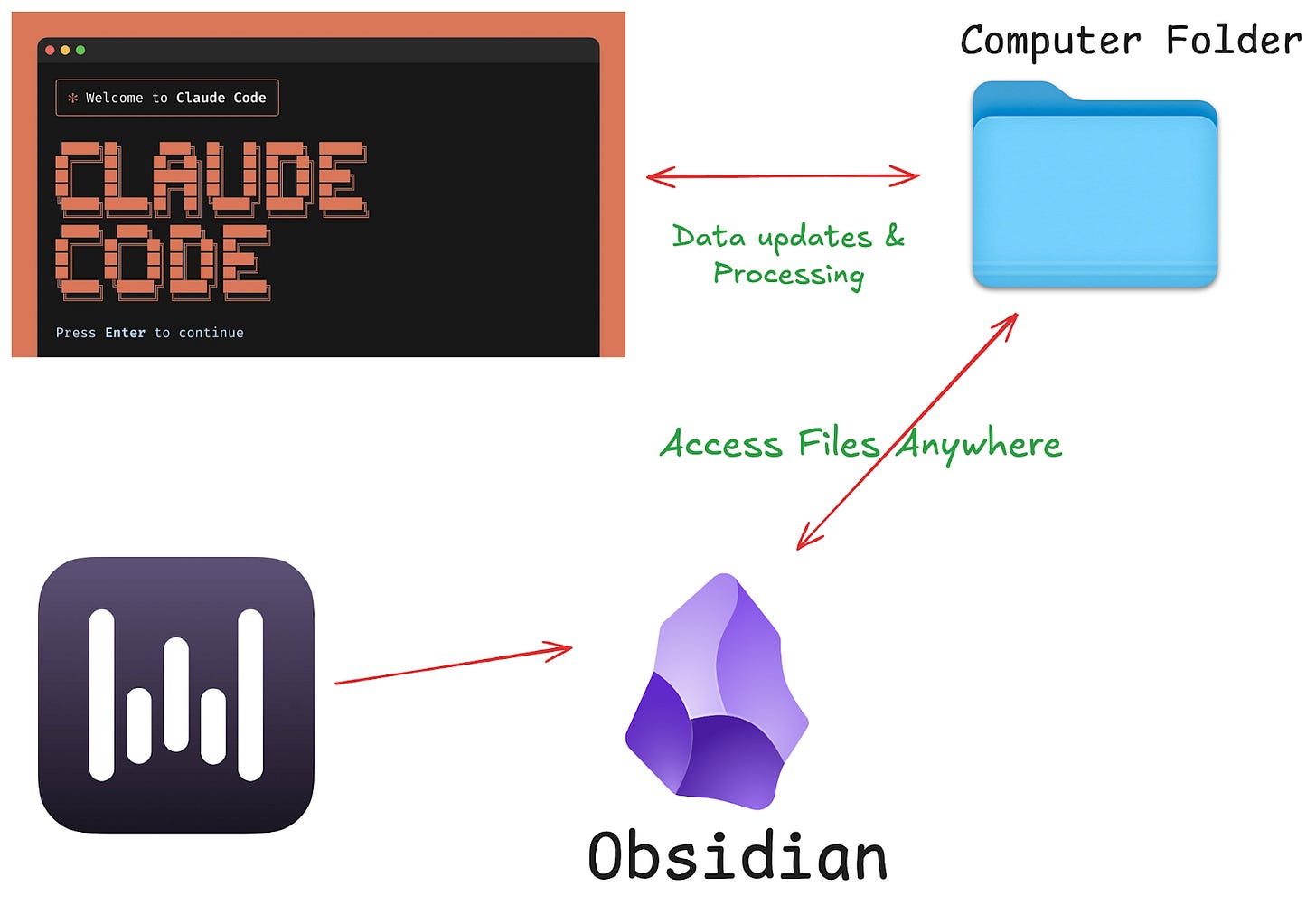
The workflow:
- Tap iPhone shortcut → speak into Wisprflow
- Transcription saves directly to my Obsidian vault (brain-dump folder)
- Later, I open Claude Code on my computer
- Run custom slash command to process my brain dump
- AI reads my accumulated context and turns raw thoughts into newsletter outlines
How this is different:
The Obsidian system accumulates context over time. Every voice memo becomes part of a bigger knowledge base that Claude Code can reference. So when I’m developing a newsletter, the AI isn’t just working with one isolated idea—it’s connecting dots across weeks of thinking.
The technical setup:
- Obsidian syncs between my iPhone and Mac
- Wisprflow transcriptions land in dated markdown files: [2025-10-03].md
- Claude Code reads my entire project folder, including all past brain dumps
- Custom slash command: “Turn these brain dumps into newsletter ideas, following my voice from past successful posts”
Here’s what the result looks like, based on the same raw thoughts from the System 1 example:
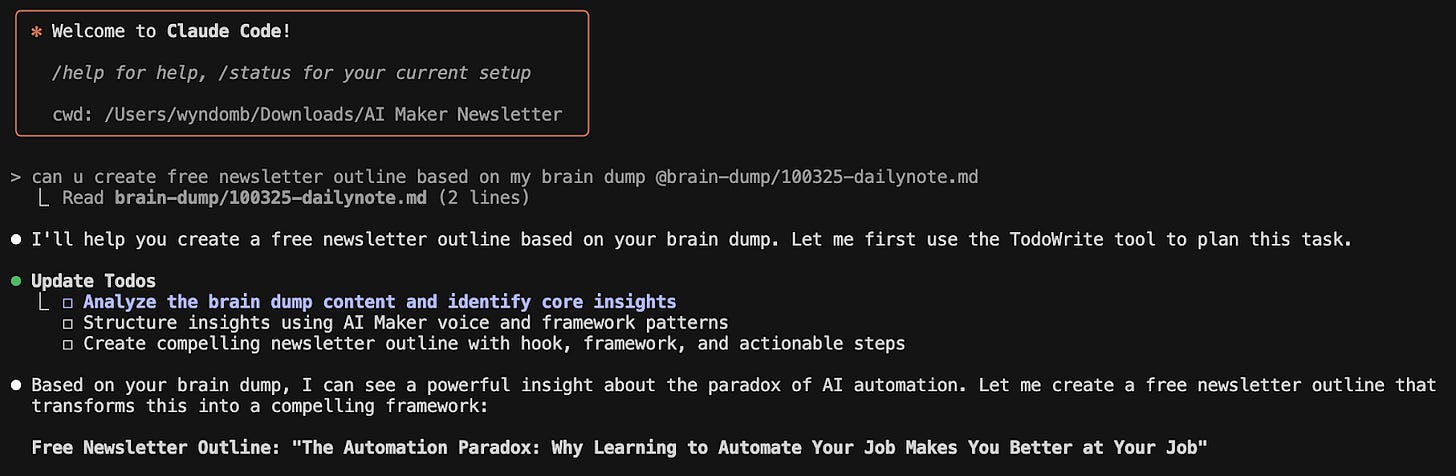
When I ran my custom command in Claude Code, it connected these scattered thoughts into a newsletter outline: “The Automation Paradox: Why Learning to Automate Your Job Makes You Better at Your Job”
The outline included my past social notes that performed well, recent research I’d saved, and frameworks I’d been developing across multiple brain dumps.
Why this matters: I am no longer afraid of losing ideas or running out of ideas for my upcoming newsletter posts. I can capture them anywhere and anytime and then develop them together with my AI agent on Claude Code that knows inside out about my newsletter project.
Share this valuable use case with someone grinding social media & newsletter content creation!
The real lesson here
Both systems solve the same core problem: reducing friction between having ideas and doing something with them.
Most creators focus on finding better ideas. I focused on not losing the ones I already had and the ability to connect them together.
Your brain is already doing creative work. You’re already making connections and solving problems in interesting ways. The bottleneck isn’t idea generation—it’s idea capture and amplification.
Wisprflow eliminated the friction of transcription. Make.com eliminated the friction of formatting. Obsidian eliminates the friction of context switching. Claude Code eliminated the friction of turning rough thoughts into polished content.
Each small friction reduction compounded into something that completely changed how I create.
✅ Try this
Start simple:
- Download Wisprflow (free tier works fine)
- Set up an iPhone shortcut to open Wisprflow with one tap
- Next time you have an interesting thought while away from your computer, speak it into your phone
- See what happens when you stop losing ideas
Level up:
Once voice capture becomes natural, you’ll realize Wisprflow isn’t just for content—it’s for any time speaking is faster than typing:
- Brainstorm with Claude/ChatGPT: Instead of typing back-and-forth, speak your messy thoughts and let Wisprflow transcribe them into Claude conversations
- Vibe-coding while thinking out loud: I use Wisprflow while coding in Cursor—explaining what I’m building helps me spot logic gaps before they become bugs
- Capture meeting insights: Record your thoughts immediately after calls while context is fresh
- Draft emails faster: Speak your email, let AI polish it, send it—no staring at blank compose windows
The pattern is always the same: if you’re thinking it, speak it. Let AI handle the translation from rough speech to polished output.
The real test: Can you capture three good ideas this week that you would have normally lost? That’s when you’ll see why this matters.
Do you have your own Personal Knowledge setup that is working with AI note takers/voice notes? Share with us in the comments!
Here’s what actually changes
I went from losing 80% of my ideas to capturing nearly all of them. From forcing myself to sit at my laptop to create, to creating wherever thinking happens.
Most people will read this and do nothing. They’ll keep typing fragments into Notes apps, keep losing ideas to bad timing, and keep waiting for their laptop to give them permission to create.
But if you’re the person who actually implements this—who captures just three ideas this week that would have normally disappeared—you’ll understand why this matters.
The best content system is the one that feels easier than not creating. Build that first. Optimization comes later.
Your brain is already generating insights worth sharing. The question is: are you ready to catch them?
What’s your biggest friction point in content creation? Drop it in the comments—I want to know what’s actually blocking you from creating more.
This article was first published in the Creators AI newsletter. View the original edition.