Kimi K2: The Open Model Getting Momentum
Here's all you need to know
Hey! You couldn't have not heard about about Kimi K2 last week because it gained Momentum across X, LinkedIn and Substack.
Kimi K2 from Moonshot AI is interesting because of MoE approach. It’s a Mixture-of-Experts model that activates only what it needs, which makes it efficient and scalable.
In this post, we’ll cover:
- How K2 breaks down complex tasks and chooses the right skills to solve them
- How it reads long documents without losing track
- How it learns to use tools like a real assistant
- What its benchmark numbers actually mean
- And some cool examples you can try yourself 🔥
If you’re here to actually understand how K2 works, you’re in the right place. Let’s break it down.
What Is Kimi K2? A Quick Overview
K2 is a large language model built by Moonshot AI, an AI company based in China, designed not just to understand language but to act on it. K2 combines language understanding with real action and delivers power and flexibility that stand out from the usual text generators.
Here’s what makes it different:
- It uses a “Mixture of Experts” architecture. That means it’s huge, over a trillion parameters but only activates parts of the network when it needs to, so it stays efficient.
- It can keep track of super long conversations or documents, handling up to 128,000 tokens at once. (not bad for Open Sourced MoE model)
- K2 is trained to do more than chat. It can call external tools, run code, browse the web, and chain these actions together without constant handholding.
- You can run it locally if you have the hardware, or access it through an API or just use the Web version
Now, let’s dig into how it’s designed and trained to make all this possible.
Architecture and Training Details
Scaling a language model to a trillion parameters isn’t a matter of just throwing more GPUs at the problem. The considerable size brings big challenges: compute costs go up fast, memory fills, and training gets unstable quickly. Kimi K2 solves this with a clever architectural twist known as Mixture-of-Experts (MoE), which means that instead of using all of its parameters for every input, it selectively activates parts of the model. This approach allows K2 to scale up without requiring excessive amounts of computation or memory.
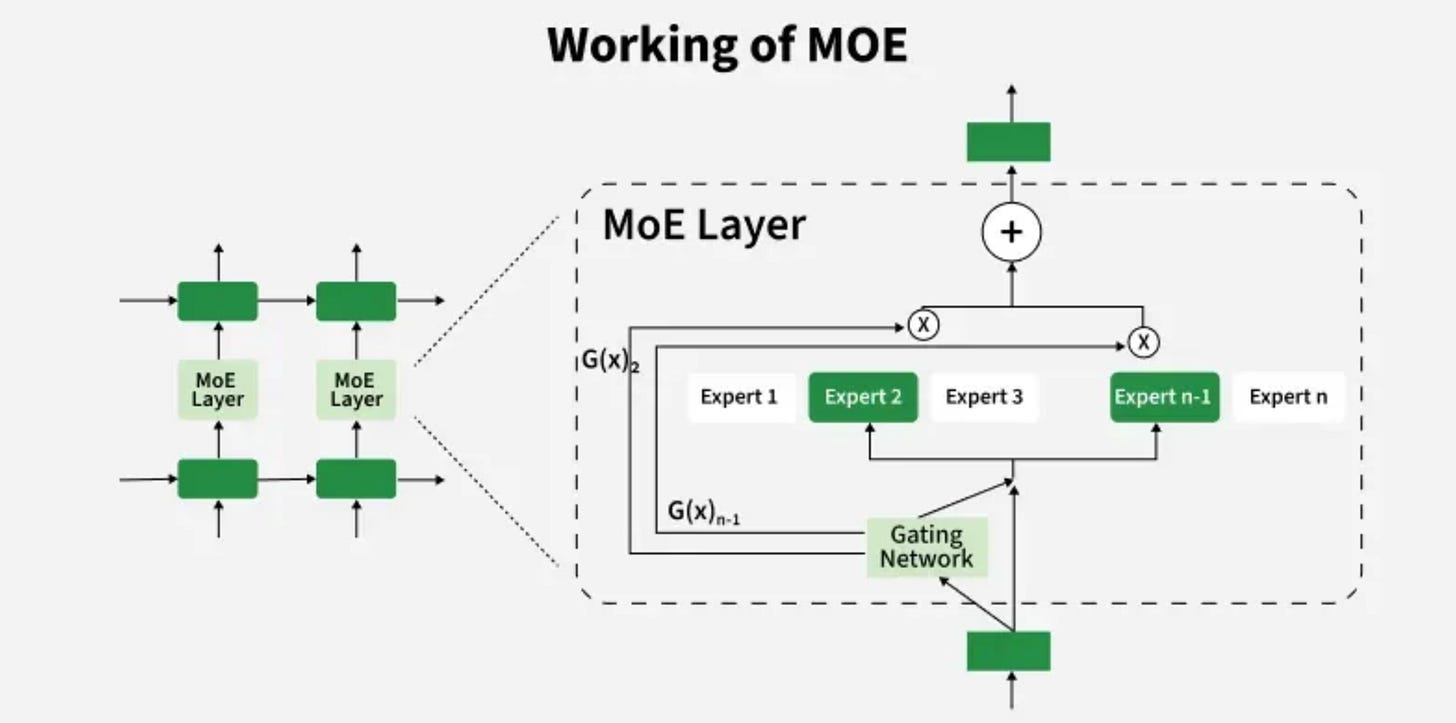
If you want to know more about the architecture of MOE, read this article.
At a high level, K2’s model is made up of 384 smaller subnetworks called experts. Each expert is a specialist trained to focus on certain types of patterns or features in the data. When the model processes a word or token, it doesn’t send that token to all 384 experts. Instead, it uses a gating network to decide which experts should be involved in processing that token.
This process of deciding which experts handle each token is known as routing. The gating network assigns scores to each expert for a given token, reflecting how relevant each expert is. Then, only the top 8 experts with the highest scores are selected to process that token. This selective routing is crucial because it allows the model to use about 32 billion parameters per token instead of all trillion which makes inference and training much more efficient.
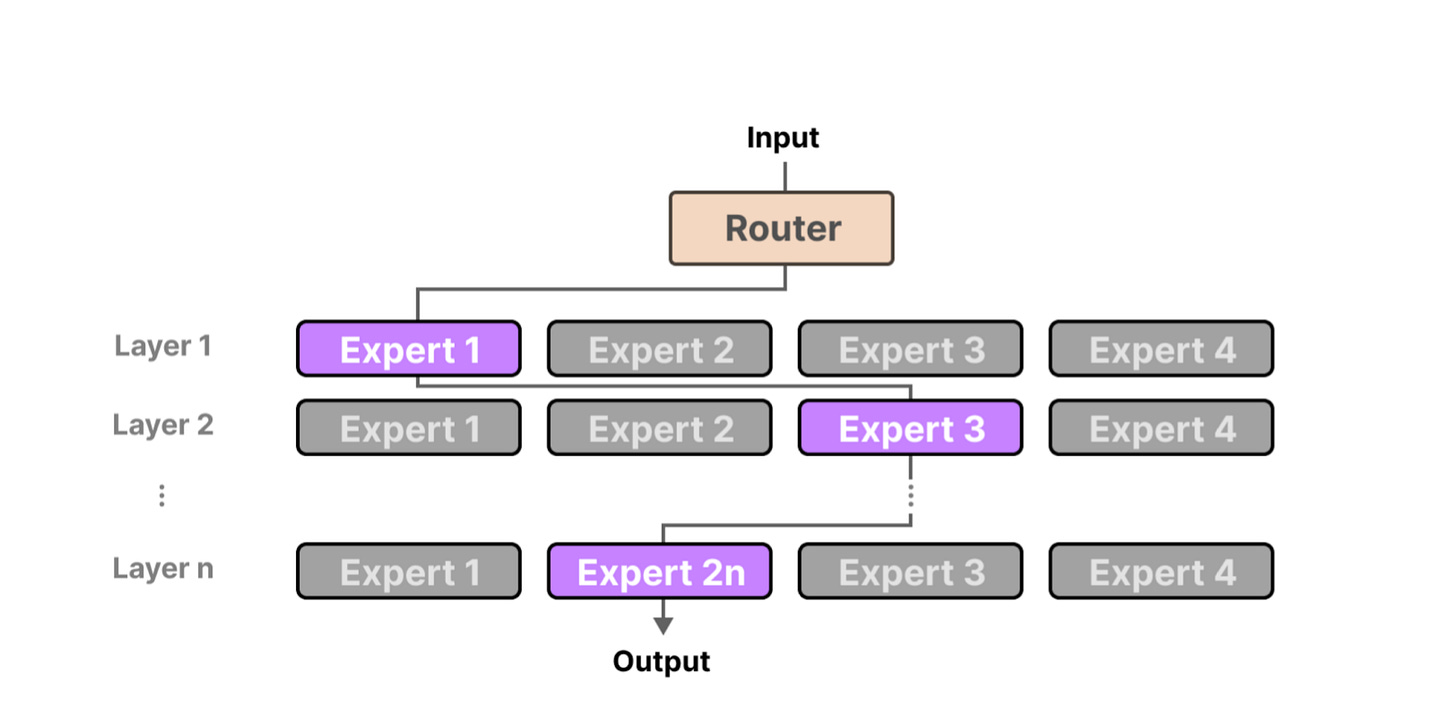
Why 8 experts? It’s a balancing act. More experts per token means richer understanding but heavier compute. Fewer experts risk losing nuance. Eight experts hit the sweet spot for K2, balancing specialization with efficiency.
Training a model like K2 is not straightforward. The gating network’s output consists of raw values called logits. These logits determine how strongly each expert is selected. Without careful control, these logits can grow uncontrollably large during training, leading to unstable updates and poor model performance.
Moonshot’s answer? MuonClip, a stabilization technique that clips gating logits within a safe range during training. It might sound simple, but it’s crucial. By clipping the logits within a stable range, MuonClip prevents training from becoming unstable, allowing K2 to learn effectively over massive datasets.
One of K2’s most impressive features is its ability to process extremely long sequences of text. Achieving this requires smart memory management and optimized attention mechanisms.
Instead of attending to every token pair (which would be computationally insane), K2 uses sparse attention mechanisms that focus only on the most relevant tokens when processing the input which significantly reduces the required compute. Additionally, it employs specialized positional embeddings to keep track of token positions accurately across the very long input. Efficient memory management techniques ensure that K2 can maintain and retrieve the necessary information during inference without running out of resources.
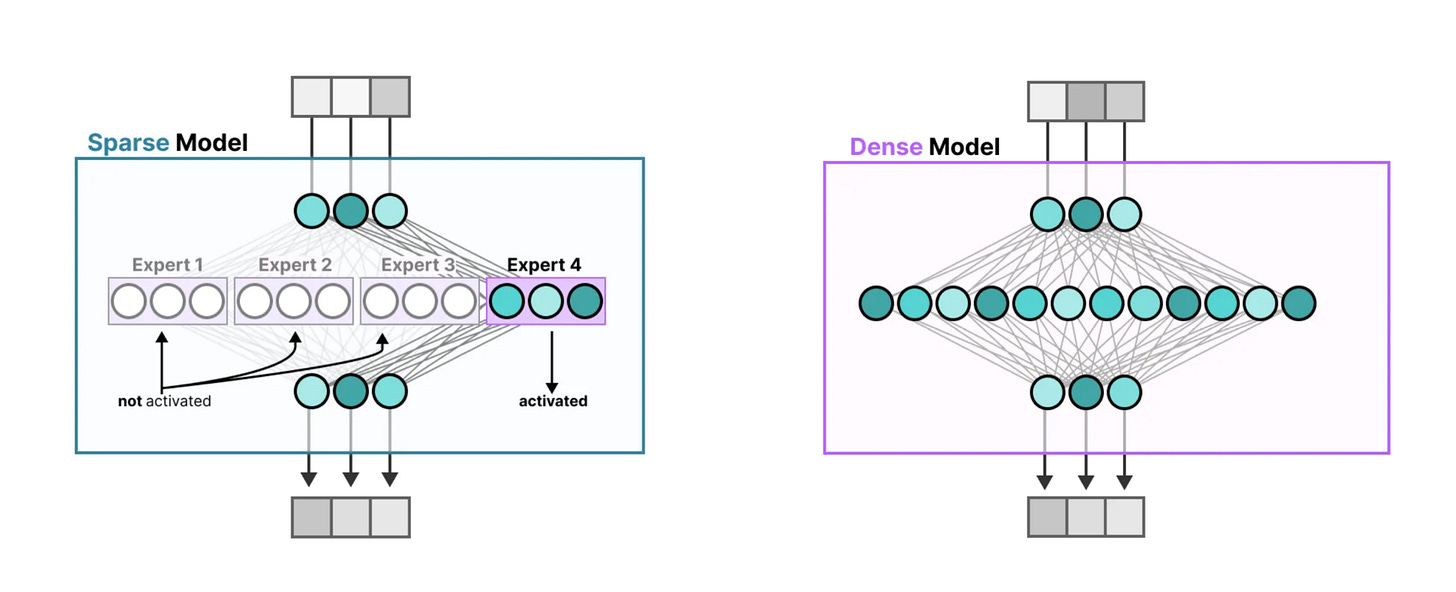
Spare vs Dense mechanism
These images show a clear comparison between Spare and Dense Models. In dense models, all parts of the network are active for every input which makes them powerful but inefficient. In sparse models , only a few specialized “experts” are activated based on the input, which reduces computation and scales better. Instead of firing up the entire model, it picks just the right parts for the job, like calling in specialists instead of the whole team.
All these pieces, MoE routing, MuonClip stabilization, and efficient long-context attention, come together to create a model that’s not just huge, but practical and powerful.
Never miss our posts, keep subscribed!
Performance and Benchmarks
Let’s talk about results. If Kimi K2 wants to compete with models like GPT-4, Claude, or Gemini, its benchmarks have to hold up. And they do.
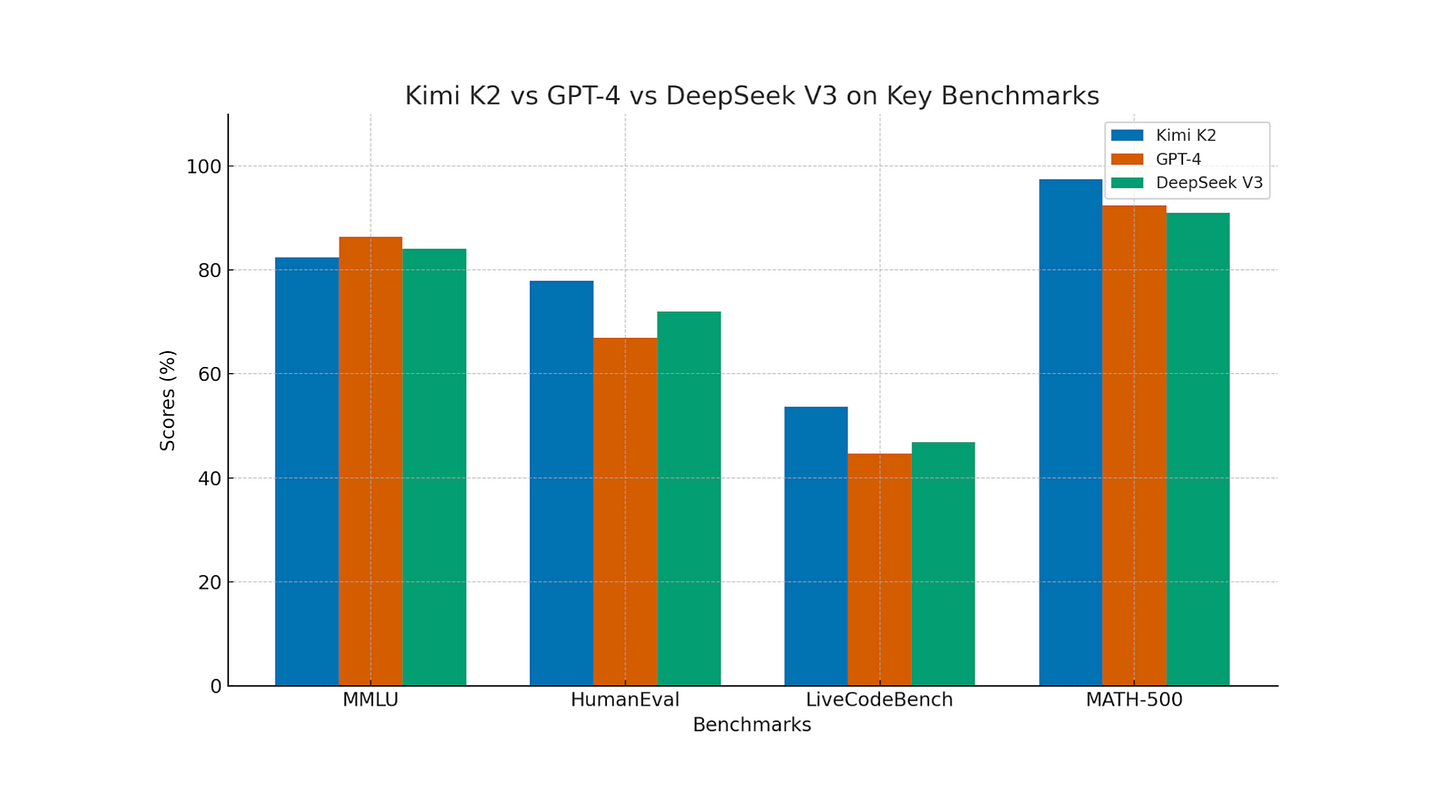
On MMLU, K2 scores 82.4%, placing it right next to GPT-4 and Claude 3.5. That’s a broad academic test spanning history, math, law, and more. Hitting above 80% means the model isn’t just parroting facts, it’s demonstrating reasoning skills on par with leading models.
On HumanEval, K2 reaches 77.9%, which reflects its ability to generate Python code that actually runs and solves problems. GPT-4 is only slightly ahead here. For people building dev tools or AI coding assistants, this is a big deal.
Then there’s LiveCodeBench, which evaluates real-world coding tasks instead of contrived examples. K2 scores 53.7%, ahead of GPT-4.1 (44.7%) and DeepSeek V3 (46.9%). It shows the model can tackle engineering-level challenges, not just toy problems.
Here’s everything you need to know about DeepSeek!
On MATH-500, a high-difficulty symbolic math test, K2 reaches 97.4%. That puts it ahead of GPT-4 (92.4%) and Claude 2.1 (88.0%), showing serious reasoning ability in structured, complex domains.
Don’t forget to share this post with your friends who are into AI!
Getting Started with K2
In this section, we’ll walk through setting up K2, whether you want to run it locally or connect through Moonshot’s API.
Running K2 Locally
You don’t need a million-dollar cluster to try K2, but you do need a decent GPU. Here’s what you’ll need to get started:
Hardware Requirements:
- GPU: A minimum of 80GB VRAM is recommended for optimal performance. GPUs with less VRAM may experience slower inference times or require model quantization.
- CPU: A multi-core processor with high clock speeds will aid in preprocessing and data handling tasks.
- RAM: At least 64GB of system memory is advisable to handle large model weights and context windows efficiently.
Software Requirements:
- Operating System: Linux-based systems are preferred for compatibility and performance.
- CUDA: Version 12.1 or higher is required for GPU acceleration.
- Python: Version 3.10 or newer.
- Dependencies: Install necessary Python libraries using pip:
pip install torch torchvision torchaudioModel Deployment:
- Model Weights: Obtain the Kimi K2 model weights from the official Moonshot AI repository or authorized distribution channels.
- Inference Framework: Utilize frameworks like vLLM or TensorRT-LLM for efficient inference. Ensure that the chosen framework supports Mixture-of-Experts (MoE) architectures.
Example command to start inference with vLLM:
python -m vllm.entrypoints.openai.api_server --model-path /path/to/kimi_k2_modelAdjust the command parameters based on your specific setup and requirements.
Integrating with Moonshot API
If running K2 locally isn’t your thing, Moonshot offers an API that lets you tap into the model instantly. Here’s how to get started:
API Access:
- API Key: Obtain an API key by registering on the Moonshot AI platform.
- Endpoint: Use the appropriate API endpoint for your region and use case.
Sample API Call:
curl -X POST https://api.moonshot.ai/v1/completions \
  -H "Authorization: Bearer YOUR_API_KEY" \
  -H "Content-Type: application/json" \
  -d '{
    "model": "kimi-k2",
    "prompt": "Translate the following English text to French: 'Hello, how are you?'",
    "max_tokens": 60
  }'
Replace YOUR\_API\_KEY with your actual API key and adjust the parameters as needed.
Be aware of the following:
- Rate Limits: API calls may be subject to rate limiting based on your subscription tier.
- Quotas: Usage quotas may apply, affecting the number of tokens or requests you can make within a given period.
Refer to the Moonshot AI documentation for detailed information on rate limits and quotas associated with your account.
Explore the Kimi K2 in Web
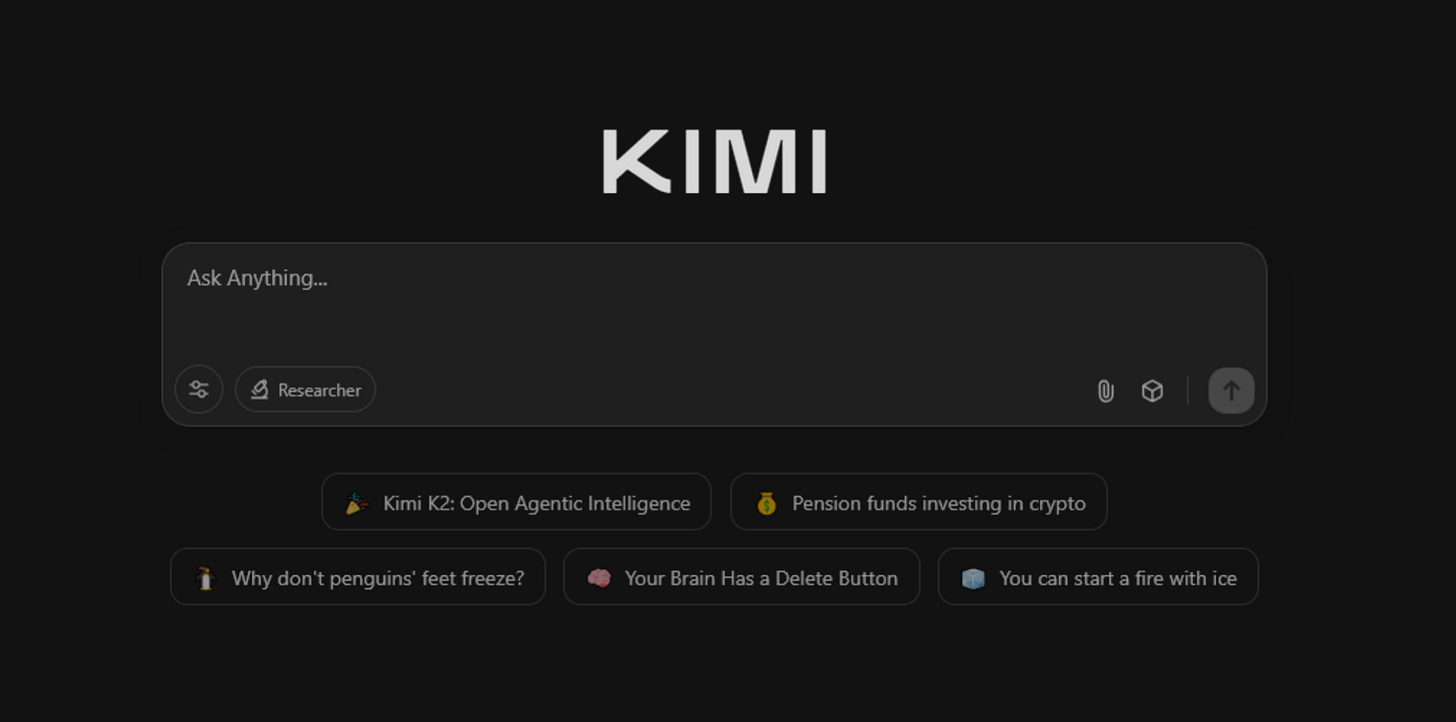
If you’d rather skip the local setup, Moonshot also offers a web interface where non-technical users can sign up, start using Kimi K2, and immediately start exploring. You get a friendly dashboard, prompt history, and easy access to advanced features. All you have to do is to simply sign up here and start prompting.
Another cool thing about Kimi K2 is its deep research feature which is known as Kimi‑Researcher. It takes K2’s agent skills to the next level. It is built on the K2 core and it’s designed to autonomously tackle complex problems, on average performing 23 reasoning steps per task and visiting over 200 URLs to build a coherent research narrative. Kimi‑Researcher is trained end‑to‑end with reinforcement learning that enables it to plan, backtrack, validate data, write code, and refine hypotheses as it learns, all while you can track its progress step by step in the interface.
To understand Kimi-researcher better, let’s compare it to Perplexity and ChatGPT. Perplexity Deep Research is the speed king. It surfaces a 100-to-200-word, citation-linked précis in under three minutes; it’s perfect for “what just happened?” questions. ChatGPT Deep Research (and the newer Agent tier) steps up the depth, autonomously browsing hundreds of sources to deliver 5–30-page, fully-cited reports in 5–30 minutes.
Perplexity gives you a clean summary, ChatGPT gives you a nicely packaged report. But Kimi-Researcher keeps the engine running. It can spin up a Python notebook mid-search, fix broken code, re-run it, and weave the results right back into its outline. That live loop means it’s not just quoting sources; it’s generating new data, crunching numbers, and testing ideas on the fly. It’s less “here’s what the internet says” and more “here’s what we just figured out.”
Want to know more about Deep Research? Check out this post.
Code, Research, Summarize — What Kimi K2 Is Actually Good At
Kimi K2 was built to handle complicated workflows without you having to babysit it every step of the way. Thanks to its long context and tool-calling capabilities, it’s perfect for tackling real-world multi-step problems that require reasoning, action, and follow-through.
In software development, Kimi K2 can autonomously navigate the entire debugging cycle:
- Error Interpretation: Upon encountering a build failure, Kimi K2 analyzes the error messages to identify the root cause.
- Patch Generation: It generates potential code fixes based on the identified issues.
- Patch Application: The model applies the generated patches to the codebase.
- Verification: It reruns the build process to ensure that the applied patch resolves the issue without introducing new errors.
This iterative process continues until the build succeeds, demonstrating Kimi K2's capability to function as a comprehensive development assistant.
Cool Use Cases
Before we wrap, let’s talk about what makes this stuff exciting outside of benchmarks and training diagrams. These are real, working sample examples of Kimi K2:
Salary Data Analysis
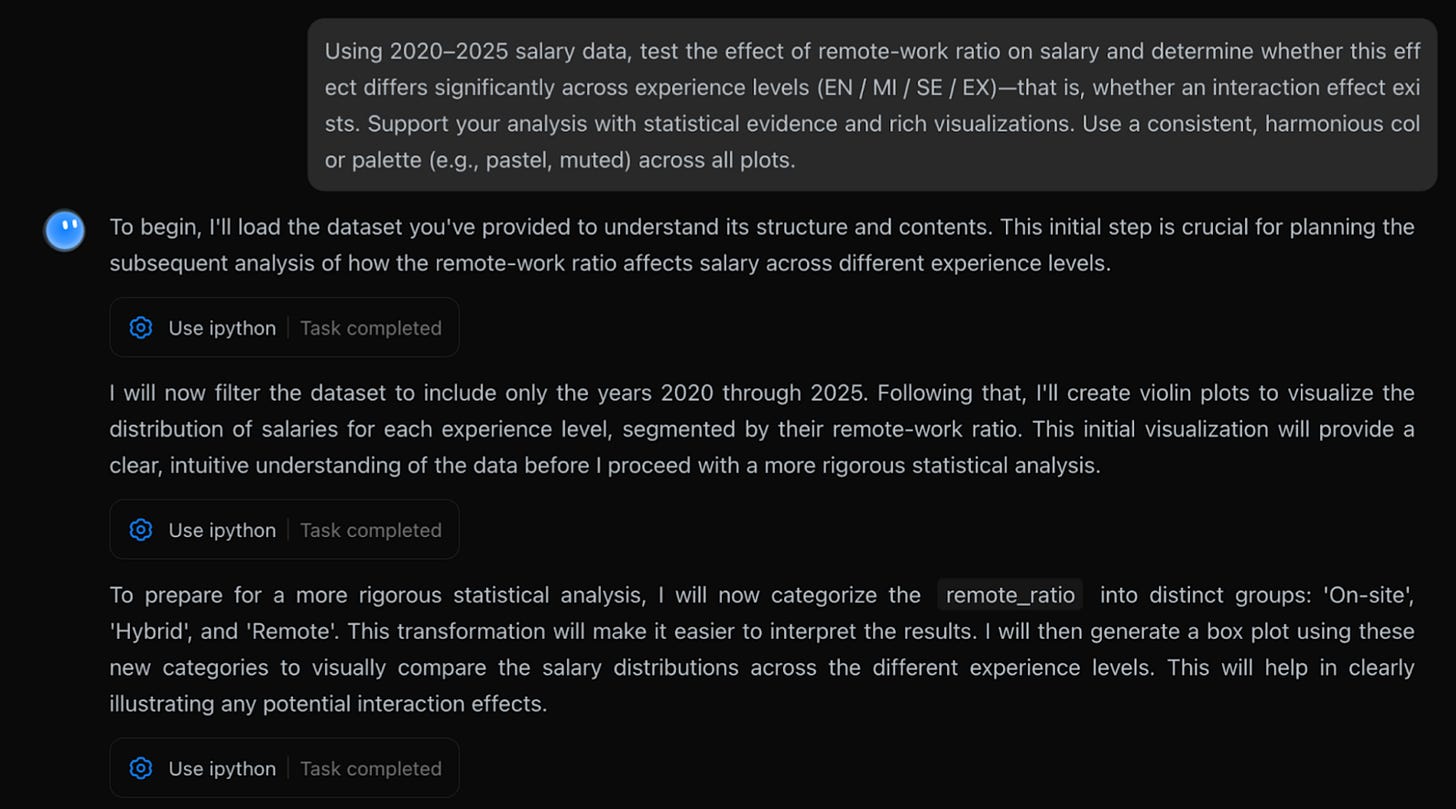
Let’s say you’re running HR analytics for a global company. You’ve got a chunky dataset of salaries from 2020 to 2025, and a simple question that ends up being anything but: Does working remotely actually change how much people earn and does that effect depend on seniority?
This is the kind of prompt that usually needs a full data team, multiple rounds of cleaning, modeling, and visualization, plus someone who knows how to turn it into a presentable report. But Kimi K2 takes that workload and quietly knocks it down in a way that feels like working with a solid analyst who also happens to know how to code, stat test, and design.
Want to see how Kimi thinks? Here’s a sample prompt to get you started. You can tweak it based on your use case, but this gives you a solid feel for how it approaches the task:
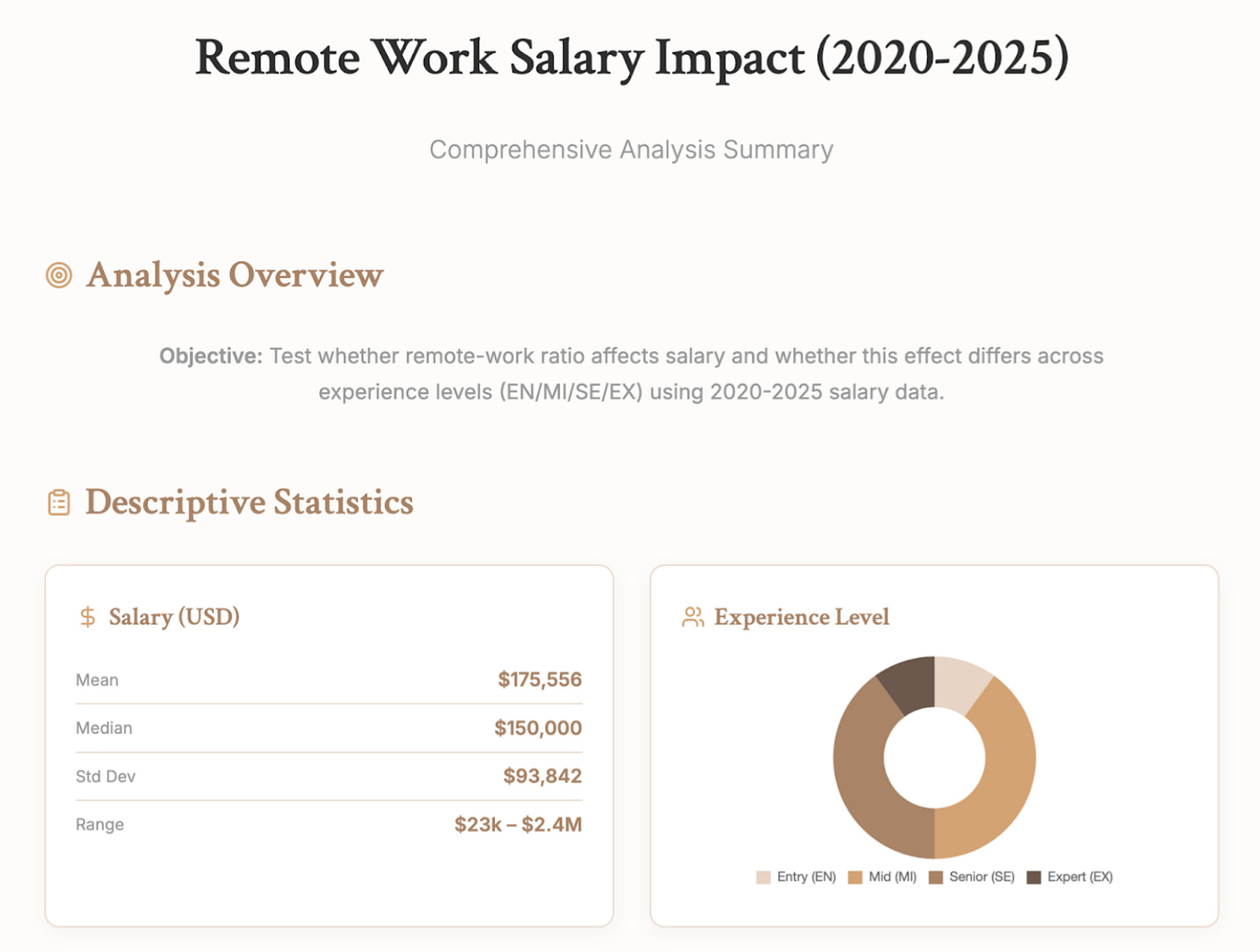
And you can try this prompt next because it’s great for pulling up a clear, insightful visual:
Please create a webpage using HTML, to show the statistical process and conclusions, using an attractive color scheme (e.g., pastel, muted, top magazine style). Embed all the previously generated images. Additionally, include a simulator where I can enter my personal details to get a recommendation on whether I should choose remote work.Here’s the result:
Coldplay Tour 2025
Imagine you live in London and want to see Coldplay in 2025, no stress, no planning, and definitely no surprise viral moments on the big screen!
Yes, we can’t forget CEO Astronomer meme. Check out our meme version here.
Here’s the prompt you’d drop into Kimi K2:
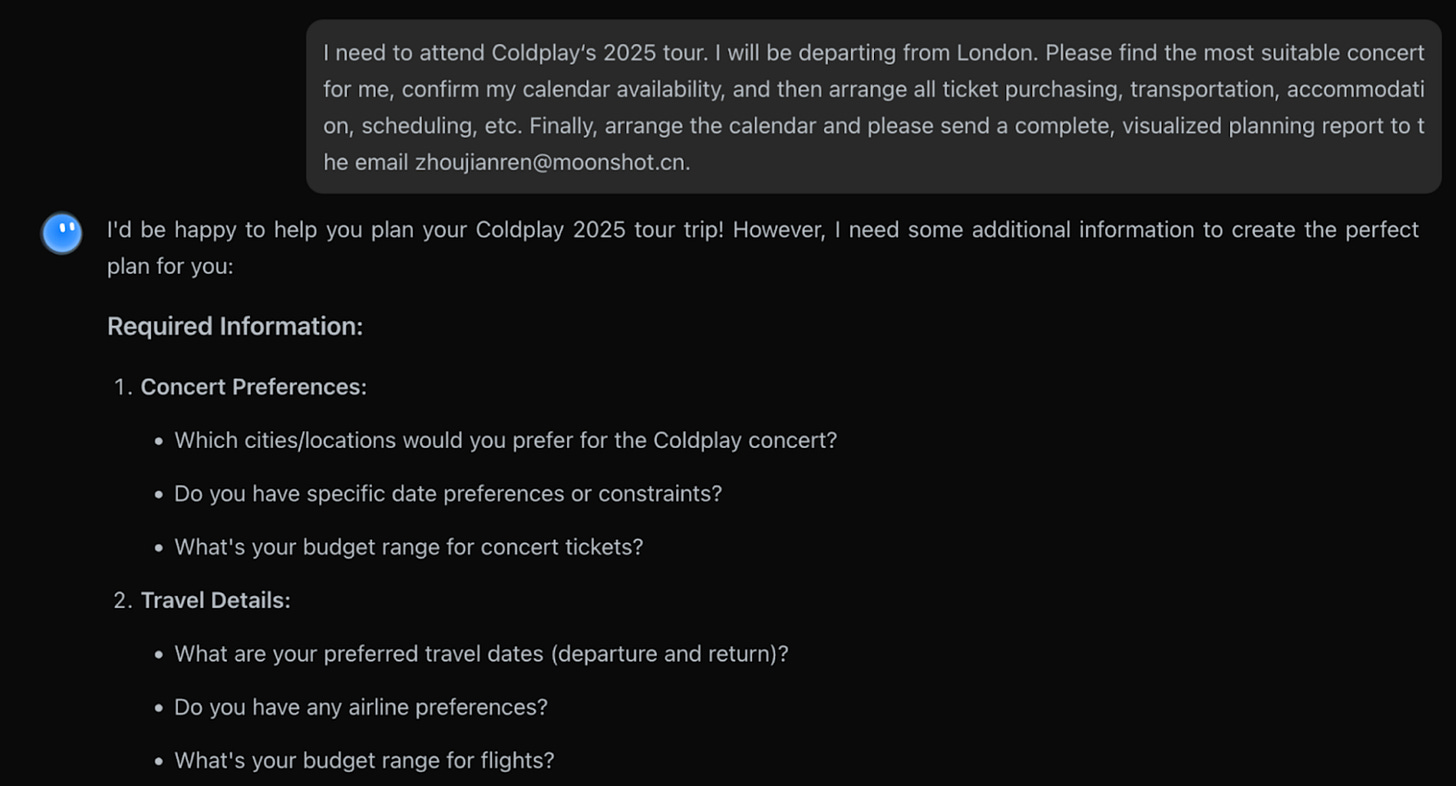
Here’s what Kimi does — all in one go:
- Checks your Google Calendar
- Scans your Gmail for any concert-related emails
- Finds concert dates and tickets (in this case, Wembley Stadium, Aug 22, 2025)
- Finds flights if needed — but you’re in London, so Kimi skips it
- Books an Airbnb walking distance from the venue
- …
Once Kimi has planned your perfect Coldplay trip, it doesn’t just hand you a list. Just like the previous example, it can build a full, beautiful webpage report with a right prompt and give you a clean result like this:
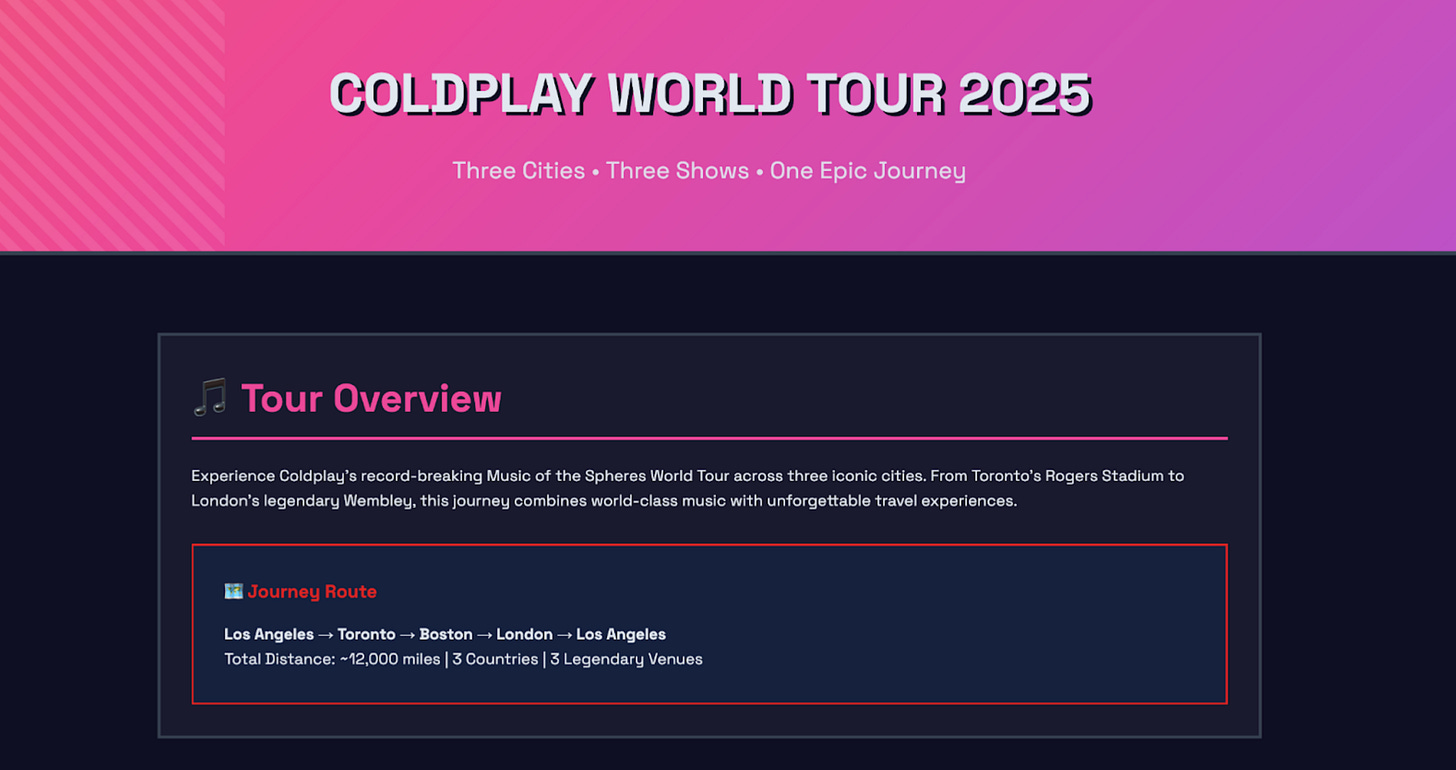
You can watch the full demo and prompts of these two examples here.
My Takeaway
From what I’ve seen and experienced with Kimi K2, it really feels like a turning point in AI models. This isn’t about flashy hype or chasing the biggest numbers, it’s about a model that’s genuinely practical and open. What really sets K2 apart, in my opinion, is how efficiently it’s built; it’s much cheaper to run than those massive dense models, yet it keeps pace with or even outperforms them in important areas like coding and complex reasoning, which are crucial for real-world tasks.
If you’re someone who needs an AI that can handle long contexts, multi-step workflows, and use external tools without constant babysitting, I believe Kimi K2 can be a good choice for you at this point.
Interested in what’s new in the world of AI?
don’t miss our weekly editions, specially the latest one:
OpenAI Launches "ChatGPT Agent"
We’re sharing tactical breakdowns, real-world builds, and experiments with agents every week. Subscribe to stay ahead!
This article was first published in the Creators AI newsletter. View the original edition.