Master Cold Emails with AI: Cases & Tutorial
How To Get 90%+ Open Rates With AI
👋 Hey, I’m Stepan and welcome to a ✨ subscriber-only edition ✨ of Creators’ AI. By subscribing, you directly support Creators' AI's mission to deliver top AI insights & practical knowledge without ads or clutter. Your subscription allows us to grow our dedicated team and curate the most important AI Tools, Stories, and Tutorials in one place. - Stepan
Email marketing may seem creative, but success actually relies on analytics and targeting. And this science can now be automated. Creators are using AI for cold emails, leading to huge results (think Alex Hormozi's $100M+ agency, which we mentioned in an earlier newsletter).
Today, we'll review a case study of creators who've succeeded in creating cold emails using AI, find out what platforms you need to use, and show you a guide to automating your email marketing. Let's get started.
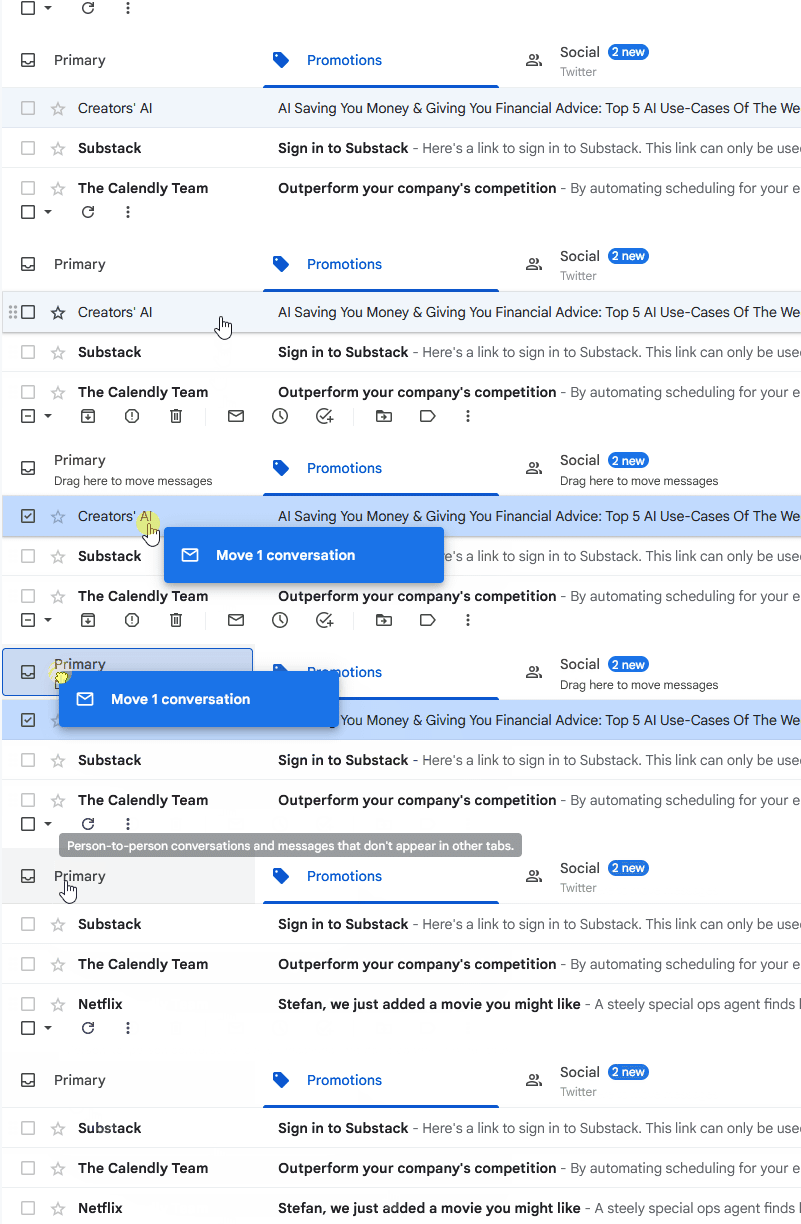
🔗 Are you already subscribed and want to ensure you don’t miss our newsletters? Move our newsletter from “Promotions” to “Primary” in your inbox! (video instructions below)

AI Tools Lead to $150K Per Year & 91% Open Rates
If you open YouTube and type in a search for something like "cold email automation", you'll see hundreds of videos of bloggers talking about how they send emails to their customers with impressive metrics. I don't see much point in dissecting every case study (and it's impossible), so let's look at a couple of examples with the most specific metrics.

Our first case study is Jay Feldman (also known on social media as Lead Gen Jay) from Florida. Jay is a co-founder of OtterPR and a host of the Mentors Collective podcast. He often works with email marketing and brand strategy development. As Jay shared in one of his videos, automation allowed him to increase the open rate of his emails to 91%.
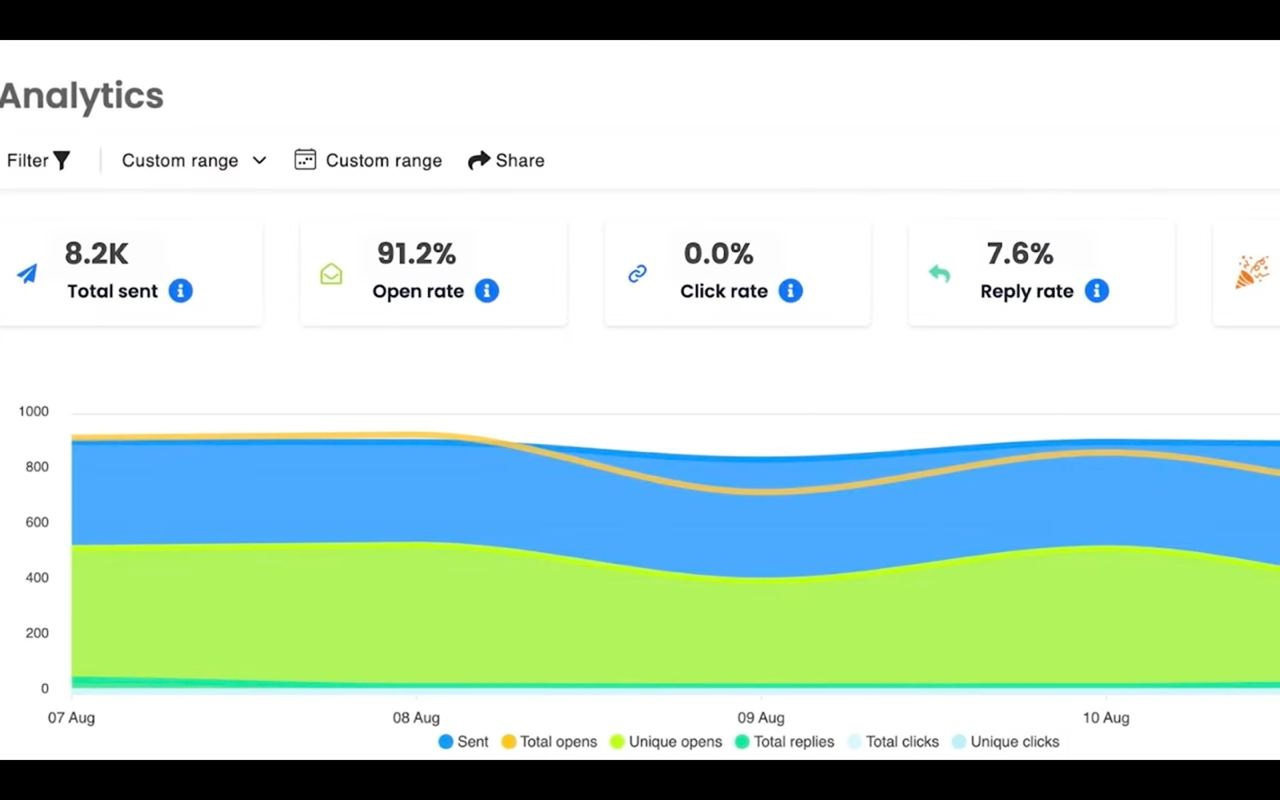
Jay uses several AI-based tools, including GPT for Sheets and the Derek App to achieve this result. Algorithms help the creator find additional information about potential clients and their interests and create personalized subjects. This approach ensures the target audience will open emails and respond to the creator's offer.
What's interesting is that Jay also developed his own AI based on ChatGPT to write cold emails. This model has been trained on thousands of creator emails and promises to generate ready-made emails in just two minutes.
Keep your mailbox updated with practical knowledge & key news from the AI industry!
Another case study is traditionally about possible revenues. Meet Nick Saraev. He is a writer and entrepreneur from California who founded LeftClick, an agency that helps brands generate leads, streamline projects, and scale without human involvement. Like Jay, Nick is very active on social media and regularly shares his successes.

In one of his videos, he talked about his results over the past year: cold emails created with AI support made him $150K in additional revenue.

Nick created "The 4-Step Cold Email Copywriting System" to do just that. Here are the rules he follows:
- Logistics: Explain where you found your prospect and why they should care.
- Background: Share your capabilities and what you can do for them.
- Case study: Provide proof of your past successes.
- Risk reversal: Offer a no-brainer deal that minimizes the possibility of rejection.
Using these steps in combination with Instantly's AI platform, Nick automates lead prospecting, personalizes emails, and speeds up mailings to potential clients.
It is difficult to accurately estimate and verify Nick's income (as the creator himself says, he is a 7-figure agency owner), but the number of his clients and testimonials speak for themselves.
Creators’ AI could be a valuable gift for your friend, colleague, or family member. Gifting books is bright, but giving an AI newsletter is a superb move 😎
What conclusions can we draw from these cases?
Here are a few key points that Jay and Nick's experience demonstrates:
- Personalization at Scale: AI can analyze prospect data to tailor email content, subject lines, and offers, making each cold email feel uniquely relevant even when sent in bulk.
- Time Savings: The right tools can automate the writing process, suggesting variations and complete drafts, freeing up the creator's time for other vital elements of their outreach.
- Data-Driven Improvement: AI platforms often track open rates, response rates, and other metrics, allowing creators to analyze what works and continuously improve their email campaigns.
Well, let's see how we can do the same (and maybe even better).
Use These Tools to Automate Your Work With Cold Emails
So, if we want to create an effective and automated strategy for cold email using AI, we'll need tools and a thoughtful approach. I suggest dividing the process into three elements:
- Preparing the text
- Reaching the target audience
- Automating the interaction
Generating the first email

As always, if we don't know where to start, we start with ChatGPT (or Gemini, Bing AI, and Claude, depending on your preference). For this guide, I'll use an online language school for entrepreneurs wanting to do business internationally.
- Start a chatbot and use a prompt like this:
Write a subject line for an email inviting to online language school for entrepreneursIf you are unsatisfied with the result, generate a few more and edit them. You can also ask the chatbot to shorten the subject line and use emojis if appropriate.
- Let's create a full email
Write a cold email template for my clients in a serious tone. My clients are high-level entrepreneurs, and I invite them to the online language school for entrepreneurs. Don’t try to sell my services hard; just make a reasonable offer.Here's the result I got:
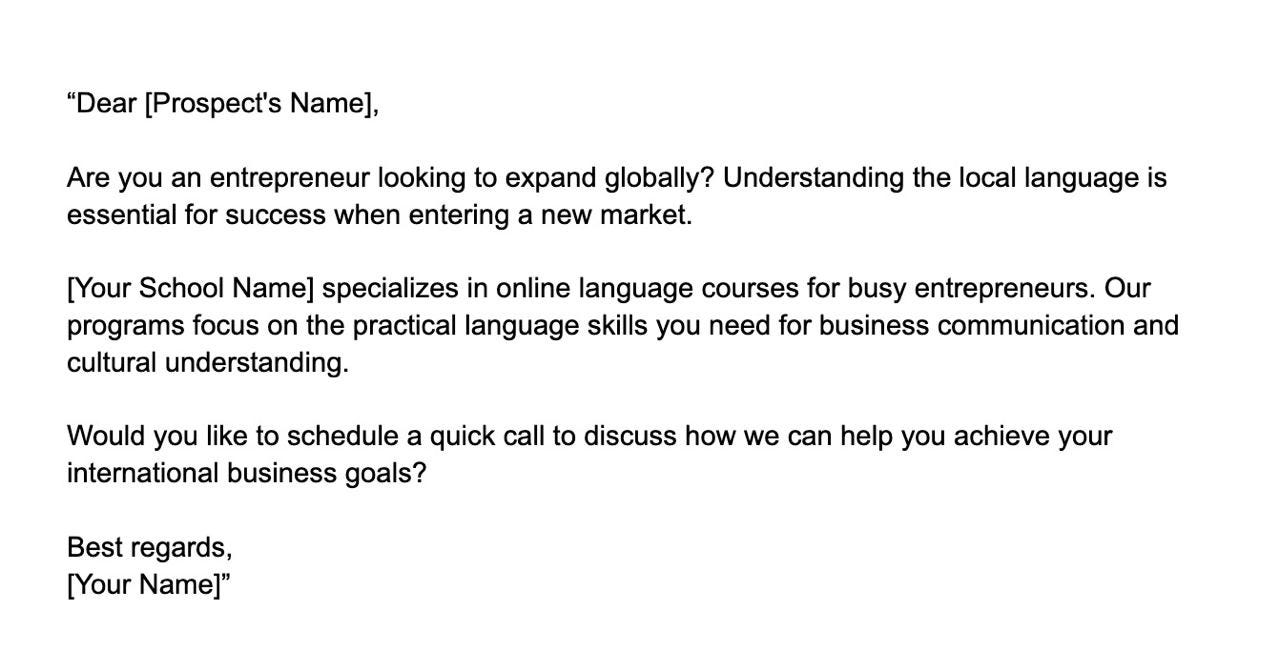
Additional tools for writing cold emails:
MailCraft AI: Free tool that helps to craft professional and personalized messages
Copy.ai: Generates high-quality marketing copy in seconds.
Rytr.me: Pretty much the same as Copy.ai, but with a nice free version
Phrasee: Creates subject lines using advanced language models.
Mailchimp: Analyzes data to suggest subject lines that boost open rates.
If you're lost in choosing a chatbot, our AI Benchmark will make your search for a daily driver easier:
Sharing is caring! Refer someone who started a learning Journey in AI!
Now, we need to find our customers. I’d say Clay is the fastest (and also free) way to get the necessary data.
- Sign up at Clay.com and select “New Table” → “Find Companies from LinkedIn”
You will be presented with a window with many filters for finding companies. Select the options you feel you need. You can skip many of them, but I recommend emphasizing keywords.
Just go back to ChatGPT and generate some if you don't know what data to enter.
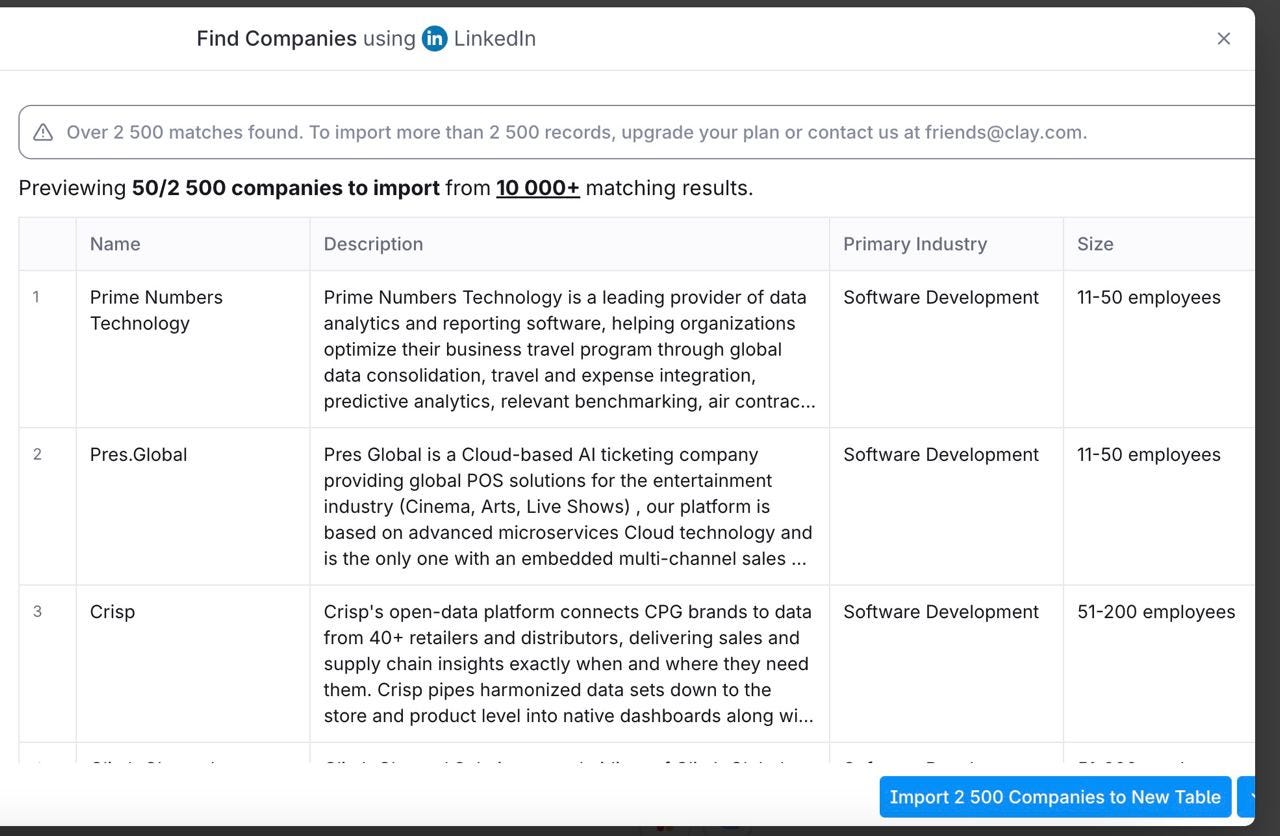
- Import the complete list to a New Table
Okay, now we have a list of companies, but who will we send emails to?
- Go back to the home page, select New Table → Find People from LinkedIn
Now, in the Table section, you must choose your company’s list and refine the details. I'm targeting senior executives, so I'll be using the following list of positions:
CEO, Chief Executive Officer, CTO, Chief Technology Officer, Chief Revenue Officer, CSO, Chief Sales Officer, Sales Enablement Manager, CIO, Chief Information Officer, VP of Business Development, Director of Sales Operations, Head of Inside Sales.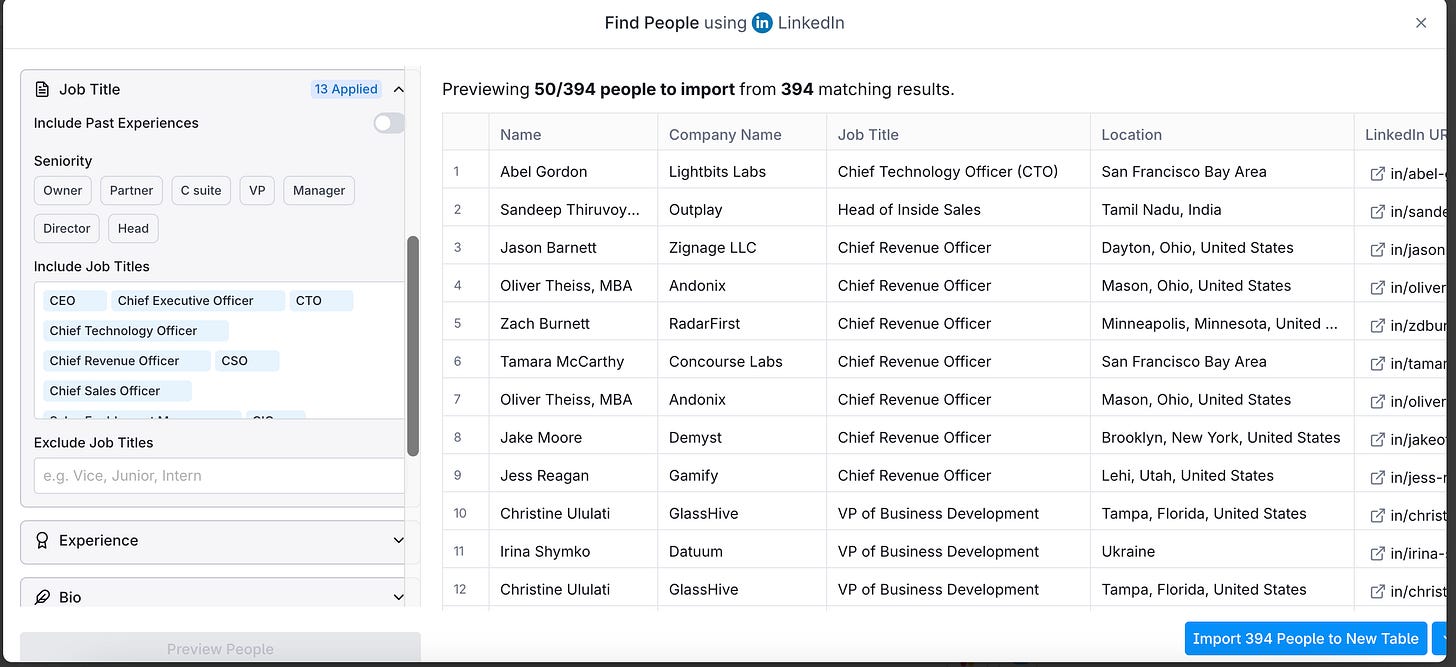
Great, we have a list of the profiles of the people we need and their email addresses. All we have left to do is merge our email template with our customers and personalize the content.
- Import a new list (enable Fully Enriched Profile)
- Select Add column → Add Enrichment
- Use AI Features to create personalized outreach ideas for each company.
These ideas can be used in the body of your cold email.
- Export your file as a CSV
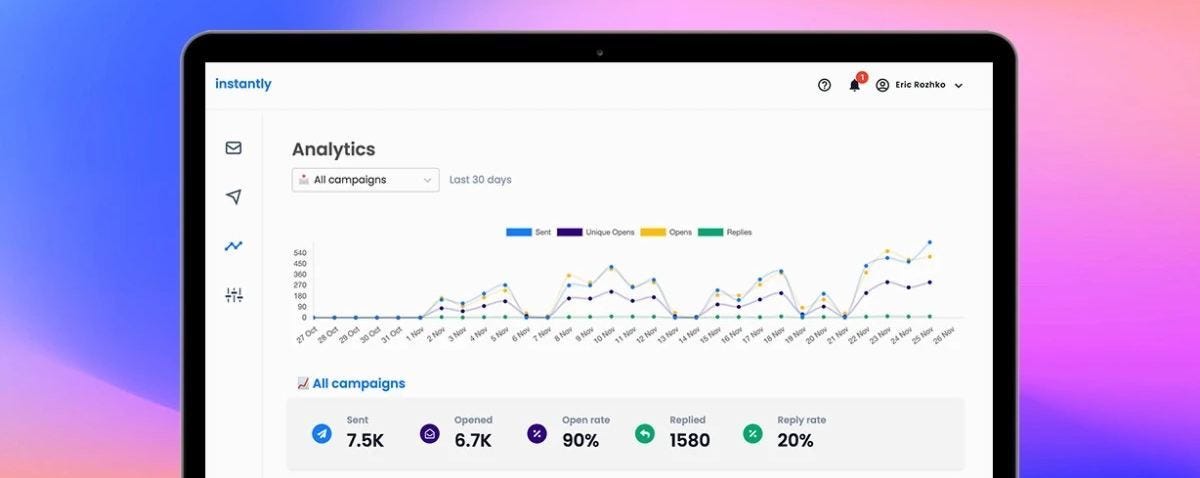
- Now go to Instantly
- Upload your file as a new campaign.
- Send your emails to customers.
Of course, this is not a complete list of everything you can do using each AI tool. But it's a basic setup that will allow you to quickly generate email templates, personalize them, and then set up a mass mailing.
Additional tools for email campaigns:
ClickUp: Platform for managing campaigns, creating engaging content, and tracking campaign performance.
Seventh Sense is an AI email optimization platform that uses machine learning to analyze and personalize email campaigns
Drift: AI-driven conversational marketing and sales tool that facilitates seamless interactions with potential customers.
Zeta: A platform for personalized email marketing, utilizing machine learning for customer segmentation, content optimization, and predictive analytics.
Mailytica: AI tool for automating email responses
Conclusion
As you’ve seen, utilizing AI for cold email doesn't have to be complex or intimidating. The right tools can streamline the process, allowing you to generate templates, add that personal touch, and discover your ideal target audience. By adopting AI, creators increase their impact on their email marketing.
So, leverage AI’s capabilities to free up your time for strategizing, crafting your unique voice, and nurturing connections. Don’t be afraid to experiment with different AI tools and find the ones that best suit your workflow and target audience. But always remember that the human touch remains essential.
What do you think about AI-powered emails? Tell us in the comments!
This article was first published in the Creators AI newsletter. View the original edition.