MCP Full Guide for Founders & Makers
All we know about MCP
Hey!
We are not sleeping on MCP, and seeing the topic is getting more attention, the ecosystem is growing, and cool materials are in place.
So we won’t let you sleep on this topic even if you are not a developer or CTO of an AI startup (yet 😁).
A lot has changed since the first post mentioning MCP and then the explainer post. MCP isn't just a cool new idea anymore—it’s everywhere. Top startups are already using it. Big companies are launching their servers. Indie creators are building tons of open-source projects every week.
So we figured it’s time to take a closer look.
In today’s post, we’re breaking down everything you need to know about MCP:
- How it works and who it’s for
- When does it make sense to use MCP
- Our favorite MCP servers right now
- Best resources to learn more and stay in the loop
Let’s go
This Substack is reader-supported. To receive new posts and support our work, consider becoming a subscriber.
Once Again… What is MCP?
If you are still not 100% confident in your knowledge of MCPs (after our previous post), no worries. Model Context Protocol (MCP) is a standard for connecting AI assistants to third-party systems. These can be your databases, development environments, or popular software. The idea is that users (or businesses) can combine chatbots with the solutions they need.
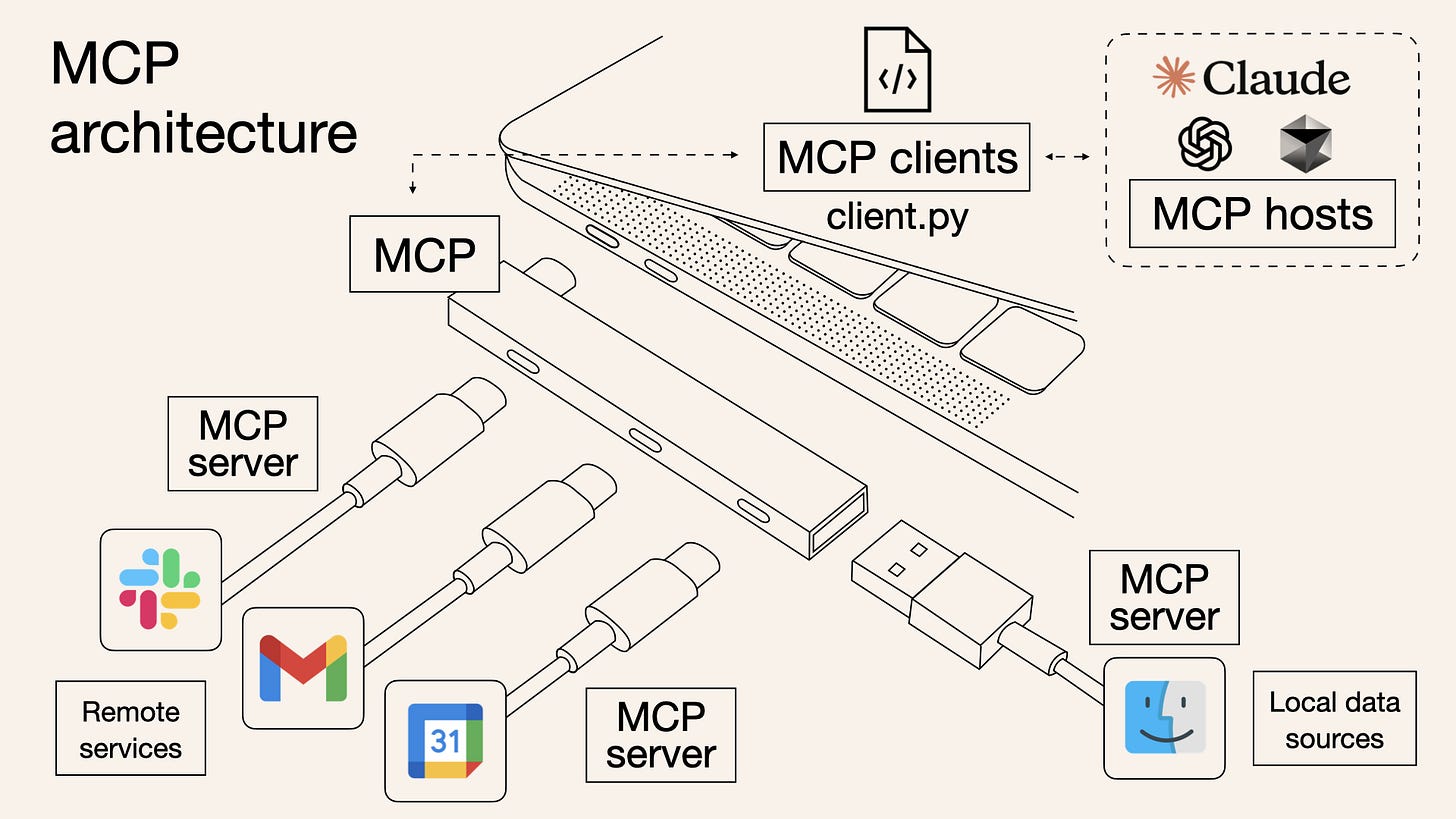
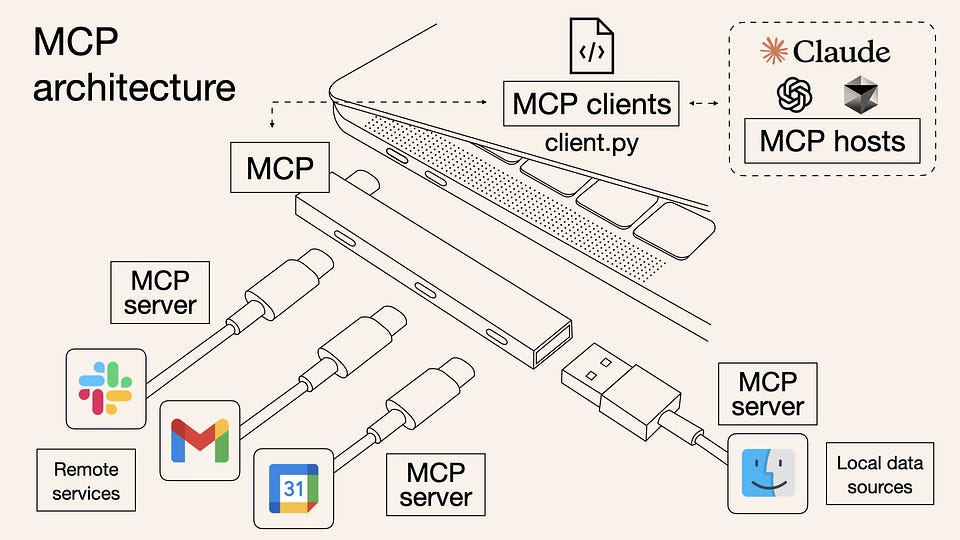
Here is how Anthropic visualizes MCP
Anthropic defines it as the USB-C port equivalent for agentic systems. It standardizes the connection between AI applications, LLMs, and external data sources (Databases, Gmail, Slack, etc.).
The Machines are the clients, the peripheral devices are tools, and the MCP is the Type-C port. So, it doesn’t matter who makes the device or peripherals; they work together seamlessly.
Don’t worry if you still not getting it, there are more examples further.
MCP Architecture
At its core, MCP follows a client-server architecture where a host application can connect to multiple servers:

So these are components of the MCP architecture.
- MCP Hosts: Programs like Claude Desktop, IDEs, or AI tools that want to access data through MCP
- MCP Clients: Protocol clients that maintain 1:1 connections with servers
- MCP Servers: Lightweight programs that each expose specific capabilities through the standardized Model Context Protocol
- Local Data Sources: Your computer’s files, databases, and services that MCP servers can securely access
- Remote Services: External systems available over the internet (e.g., through APIs) that MCP servers can connect to
Imagine still not getting it. Yes, we were there and made this super simple (aka elementary school explanation)
🧱 MCP Structure – Made Simple
1. 🧍♂️ Host
- Think of this as the "AI App" you’re using (like Claude in an IDE or ChatGPT in a browser).
- It starts the conversation and wants to use tools or get data.
2. 👤 Client
- The assistant inside the app that talks to the outside world.
- It sends messages from the AI to the server and brings back the answers.
- It’s like the messenger between the AI and everything else.
3. 🖥️ Server
- The toolbox + memory + manager.
- It gives the AI access to:
+ External tools (like APIs or databases) + Prompts and instructions + Current context
- It's like a smart butler that holds the tools and remembers everything.
💬 How They Talk — In 3 Layers
1. Protocol Layer – The Conversation Rules
- Think of this like grammar or a language manual.
- It explains how messages are written, how requests and replies should work, and how to link conversations.
Example:
AI: “Get me the weather” → Server: “Here’s the weather: 24°C”
2. Transport Layer – The Delivery Truck
- This is how the messages actually travel.
- MCP supports a few types of transport:
+ Stdio – great for local programs (like talking via walkie-talkie). + HTTP + SSE – for web-based messages (like emails with live updates).
- All messages are sent using JSON-RPC, a universal digital format.
3. Message Types – Just like humans
Request →“Hey, can you do this?” Result → “Here’s what you asked for.” Error → “Something went wrong.” Notification → “Just letting you know — no reply needed.”
Share it with people in Tech & AI who need to know what MCP is
Ok, we understand concept but why?
Who needs MCP?
In which cases and scenarios should we start thinking about MCP? Here are a few examples:
1. 🧑💼 Building an AI customer support agent
Scenario: You're automating customer replies using an LLM, but responses need to query databases (e.g., order status, subscription info) or trigger actions (e.g., refund, password reset).
Why MCP? MCP lets the AI safely access tools (APIs, CRMs) and maintain context across turns, without hardcoding every interaction.
2. ✍️ Developing an AI writing assistant inside your SaaS
Scenario: You’re building something like Notion AI or Grammarly, and the AI needs to read/edit documents, understand user context, and offer actions like “summarize,” “rephrase,” “convert to presentation.”
Why MCP? MCP connects the model with your editor state and document structure, enabling deep, context-aware writing help.
3. 🧑🎓 Making an interactive tutor or learning app
Scenario: You’ve built a learning platform where AI gives feedback on code, essays, or math answers — and it should adapt to each student’s progress or past mistakes.
Why MCP? MCP lets your app keep context about the student, access grading tools, and guide the AI in delivering personalized help.
4. 🧰 Creating an AI developer tool (e.g., Copilot for X)
Scenario: You're building an AI assistant for engineers inside VS Code or your own IDE — it should understand the file tree, read code, and trigger build/test scripts.
Why MCP? MCP gives your AI structured access to the file system, terminal tools, and project context — without fragile prompts.
5. 📥 Launching a smart inbox or productivity app
Scenario: Your AI-enhanced email app or to-do app parses incoming messages and suggests replies, tasks, scheduling, or file actions.
Why MCP? It lets your LLM interact with APIs (calendar, email, tasks), understand the user’s state, and trigger actions safely.
6. 🛠 Prototyping AI workflows fast without rebuilding everything
Scenario: You're testing GPT-based workflows for your startup (e.g., AI meeting notes → CRM log → follow-up email) and need to iterate fast.
Why MCP? You define the tools once (e.g., "log to CRM", "send email") and let the model handle the rest through structured calls.
7. 🧑⚖️ Adding AI into a regulated or high-stakes product
Scenario: You’re in legal, health, or finance, and every model interaction needs to be traceable, structured, and safe.
Why MCP? It gives you a clean, auditable interface between the model and sensitive tools — with schema validation and error handling built in.
✅ When You Should Start Thinking About MCP:
- You're beyond chat — and into action, integration, memory, or orchestration.
- You’re tired of prompt engineering workarounds.
- You want reliable, testable, multi-turn AI logic.
- You need to scale AI features across apps or teams.
🧰 What Types of MCP Servers Exist?
Thanks to an active open-source community, there are hundreds of servers already built. Here’s a simplified overview:
🗄️ Databases
Let the AI run real queries — safely.
- PostgreSQL, MySQL, MongoDB, SQLite
- Supabase, ClickHouse, Redis, Snowflake
💬 Communication
Send messages or manage inboxes.
- Gmail, Slack, Telegram, iMessage
- WhatsApp, LINE, Discord, Intercom
🌍 Browser Automation & Web Tools
Browse, click, extract — all automated.
- Playwright, Puppeteer, YouTube, Google Search
☁️ Cloud Services
Let AI talk to your infrastructure.
- AWS, Azure, GCP, Kubernetes, Docker
🧠 Memory & Knowledge Graphs
Add long-term memory to your LLM agent.
- Qdrant, Weaviate, Redis, Chroma, Neo4j
📊 Data Platforms & BI
Run analytics or trigger pipelines.
- BigQuery, Trino, dbt, Databricks
📆 Productivity & Files
Work with your stack.
- Google Sheets, Calendar, Notion, Airtable
Our favorite MCP servers right now
Claude + Brave API
Managed to integrate web search into Claude
An MCP server utilizing the Brave Search API has been used to enable web search functionality in Claude 3.7 Sonnet.
This approach offers several advantages: it provides access to real-time web data, maintains a separation between the model and the external service (enhancing modularity and control), and allows customization of the search backend without altering the model itself. Additionally, using Brave Search supports greater privacy and independence from mainstream search engines.
AI Vibe Designing (Cursor + Figma)
The code will do more work. In the video, we can see how the design changed after connecting with new data.
Cursor is now able to use 80% of Figma functionality via MCP.
This integration allows programmatic interaction with Figma through a modular and controlled interface. Key advantages include streamlined access to design assets, automation of repetitive UI tasks, and the ability to integrate design workflows directly into development environments.
Claude + 8,000 Apps
For example: Zapier + Claude in video. External integration, which allows us to get contacts from the database.
Zapier MCP is currently available in beta and is free to use.
This enables integration with over 8,000 apps and 30,000+ actions—directly from within Claude.
With this setup, Claude can now:
- Fetch CRM data ahead of meetings
- Create tasks in Asana or Jira
- Sync spreadsheet updates across platforms
- Compose and send emails in your tone, without leaving the chat
All of this happens within Claude's interface—no need to switch tabs, build custom integrations, or write code.
Was it worth it? Share it with friends!
Top resources on the topic of MCPs
- Introducing the Model Context Protocol by Anthropic
- Model Context Protocol documentation and quickstart guide
- Model Context Protocol on GitHub
- Collection of Servers
- Collection of Servers for MCP on GitHub
- Why MCP Won by swyx from Latent Space
- MCP: Flash in the Pan or Future Standard? by LangChain
- MCP Guardian on Github
- Exposing Services with MCP
Why This Matters
If you’re building an AI-powered product, MCP:
- Saves dev time: no custom glue code
- Makes things safer: strict schema + message control
- Keeps things composable: mix and match servers
- Scales better: tools are reusable across clients
✅ TL;DR for Founders
Use MCP if your AI product needs to:
- Pull live data
- Trigger external tools
- Handle complex workflows
- Integrate with SaaS or cloud platforms
- Maintain memory or state
Don’t build it all from scratch. The ecosystem is here. And while AI agents is Marketing narrative, MCP is a “boring” term with very high potential.
Thanks for reading!
This article was first published in the Creators AI newsletter. View the original edition.