Vibe Designing: AI Workflows with Figma & Others
Vibe Coding for Designers
Hi there!
In one of the digests, I mentioned that Collins Dictionary picked “Vibe Coding” as its Word of the Year. Well…I’d actually stick with just “Vibe” as the word is clearly going down and spawning another new layer of meaning.
Today, we’re talking about Vibe Designing. And it feels like exactly what designers who were deep into Vibe Coding were missing — you know, some actual life behind the pixels. It’s all about the little branches and tiny details that shape the whole user experience, rather than rigid methods.
In this article, I’m gonna break down:
- What Vibe Design even is.
- What it’s trying to achieve.
- And how designers and developers can use it to open up new creative possibilities.
Let’s dive in!
Keep your mailbox updated with practical knowledge & key news from the AI industry!
What Vibe Designing Means
Not gonna lie, hearing about another vibe-shift this year had me rolling my eyes. But after digging into it for hours, I started seeing Vibe Designing as a pretty logical follow-up to Vibe Coding. Should it have its own “official” status? That’s for you to judge later. Now, let’s first unpack what this thing is even made of.
Vibe designing aims to flip how we think about building UX with AI. It’s not about stitching together static screens but about the mood and the overall feel of the experience.
Cool cool. Now designers should guess the exact mood the screen should emit…Just a joke, that’s always been part of the job. At least now it might finally get easier to pull it off with Vibe designing.
And to make it clearer, let’s compare it to Vibe Coding.
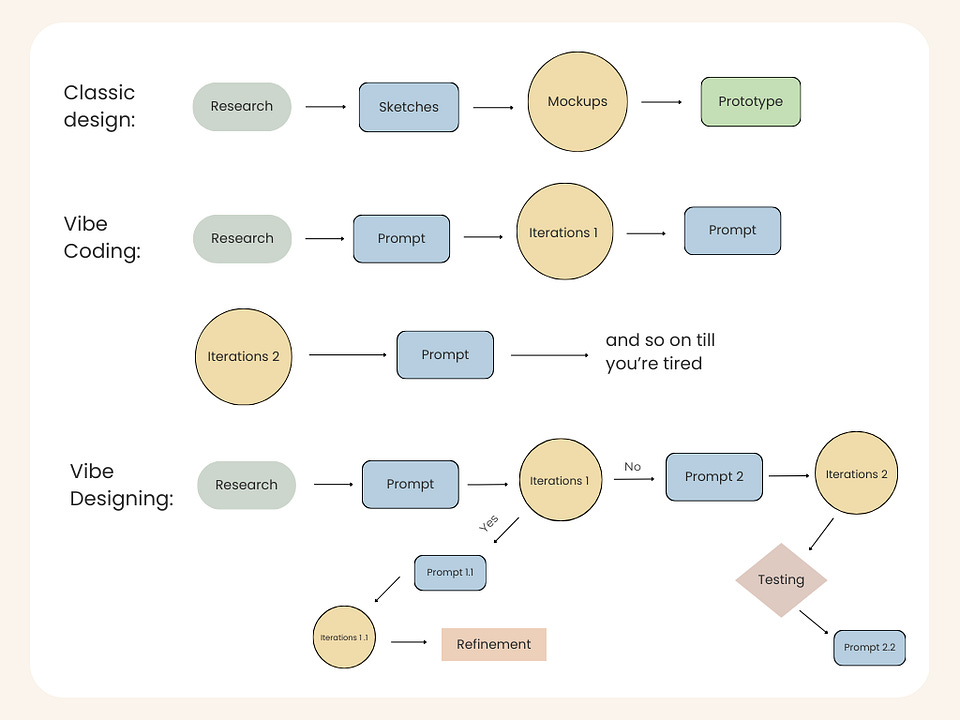
Vibe Coding is changing how software gets built. Tools like Lovable or Cursor all follow the same linear routine.
You throw in a prompt → It builds something → You tweak the prompt → It rebuilds. It’s basically a straight conveyor belt.
Traditional design also lives inside static wireframes. From my experience working in design, I know that we follow a clear structure, and often work through it all sequentially, by hand.
Vibe designing, though, plays a totally different game. More like, it connects how these two directions actually work together.

Instead of typing something dry like “design a user profile page,” we can drop a screenshot of their homepage and say: “Build a profile section with stats cards, an activity feed, and a settings menu. Make it feel just clean and energetic.”
The whole point is that design gets created efficiently, but it actually reflects the values of whoever’s behind it.
The Core Ingredients of Vibe Designing
- So we’re talking about non-linear flow. First, you generate several vibe directions, test what actually resonates, and then you dive into research and refinement once the mood you need is clear.
Designers (and not only) can describe the feeling they’re looking for, warm, energetic, premium, chaotic-in-a-good-way, and AI fills in the blanks with colors, motion, typography, and layout ideas that match the emotional target.
All this is supposed to trigger the right emotional response.
- To set up this code, we resort to multi-modal inputs. The vibe isn’t set by text alone; there are reference images, URLs, sketches, sometimes voice or user metrics, all come together to shape the target vibe.

And later on, teams load the AI with brand guides, tokens, and examples of “the right vibe”.
- This workflow blurs the traditional roles. Designers can spin up functional UI pieces without waiting on engineers, and devs can tweak visuals without touching Figma.
Vibe Coding already opened the door for non-programmers, but Vibe Designing lets literally anyone create good-looking interfaces (founders, PMs, engineers, whoever you want), because you’ll be able to describe how you feel.
- AI combs through user feedback, comments, and session data and spits out clear insights. This continuous loop between design and research results in faster iterations and more refined user experiences.
This way, it establishes trust by maintaining a cohesive design language across all touchpoints, branding, tone, design elements, the whole package. And you’re placing the user at the core of your design process, so the final product actually meets their needs and expectations.
And just like this, as Vibe Coding democratizes programming, Vibe Designing does the same for design.
In turn, people say it’s not suitable for building real apps. Since Vibe Designing tools prioritize visuals, user flows, and quick iteration, what they produce isn’t a fully functional app. To actually ship something, these folks believe that it still needs to be plugged into a bigger workflow with development tools.
But! The thing is that Vibe designers use canvas-based tools where the editing experience is incredibly flexible. You can:
- Complement what AI has created with drag-and-drop elements provided by the tool.
- Annotate the design with digital sticky notes or diagram connectors.
- Or allow freeform and easy for others to jump in and collaborate on.
So I guess all these tools for app and design creation are going to adapt just as quickly as photo and video generation tools adjusted to new trends.
Here you can check out other tools that break the usual rules too, and make you feel that you can do anything (I really felt this way):
What Problems It Solves
1. Product consistency
The product feels inconsistent because teams use different “mental models.” I bet you faced this problem, because it followed me all the time. The PM holds one product mood in their head. Designer — another. The founder, unfortunately, has a third.
Solution
Vibe Designing creates a unified emotional system through a vibe lexicon. Everyone works from the same vocabulary and visual references, so the feeling stays consistent no matter who’s building what.
Here’s how teams can implement this:
- Collect reference images, successful prompts, brand guidelines, and design tokens in one shared space. Make it accessible to everyone (don’t forget open access, hehe)
- Drop screenshots, URLs, mood boards, or voice notes into the AI as a team. This sets a shared emotional foundation from the start.
Sharing is caring❤️
2. Rapid Prototyping
Now that we’ve tackled the communication problem, let’s remember: design is art, and art can’t be just a mechanical process.
I always create multiple versions of the same screen to explore different directions, but it takes FOREVER. While Vibe Coding typically generates just one version at a time, you get a single output per prompt.
Frankly speaking, I’ve seen guys trying to hack Claude Code or Lovable into producing multiple design options at once, but it wasn’t that successful.
Instead of spending hours building components by hand, designers can just describe what they want, and AI tools will generate several interactive prototypes.
Solution
There are already plenty of tools that deal with this problem.
For example, I chose Figma AI for my experiment and stuck to a simple prompt:
Create four different prototype variations for the main screen of a coffee shop app.

Keep the core content the same: header with logo, featured drink of the day, menu categories (coffee, tea, pastries), and a bottom navigation bar.

Explore different vibes and layouts.

Version 1: clean and minimal, tight spacing, neutral colors.

Version 2: warm and cozy, textured backgrounds, hand-drawn accents.

Version 3: modern and energetic, bold typography, large product cards.

Version 4: premium and calm, lots of whitespace, subtle motion cues.

Make all main elements interactive and ready for quick testing.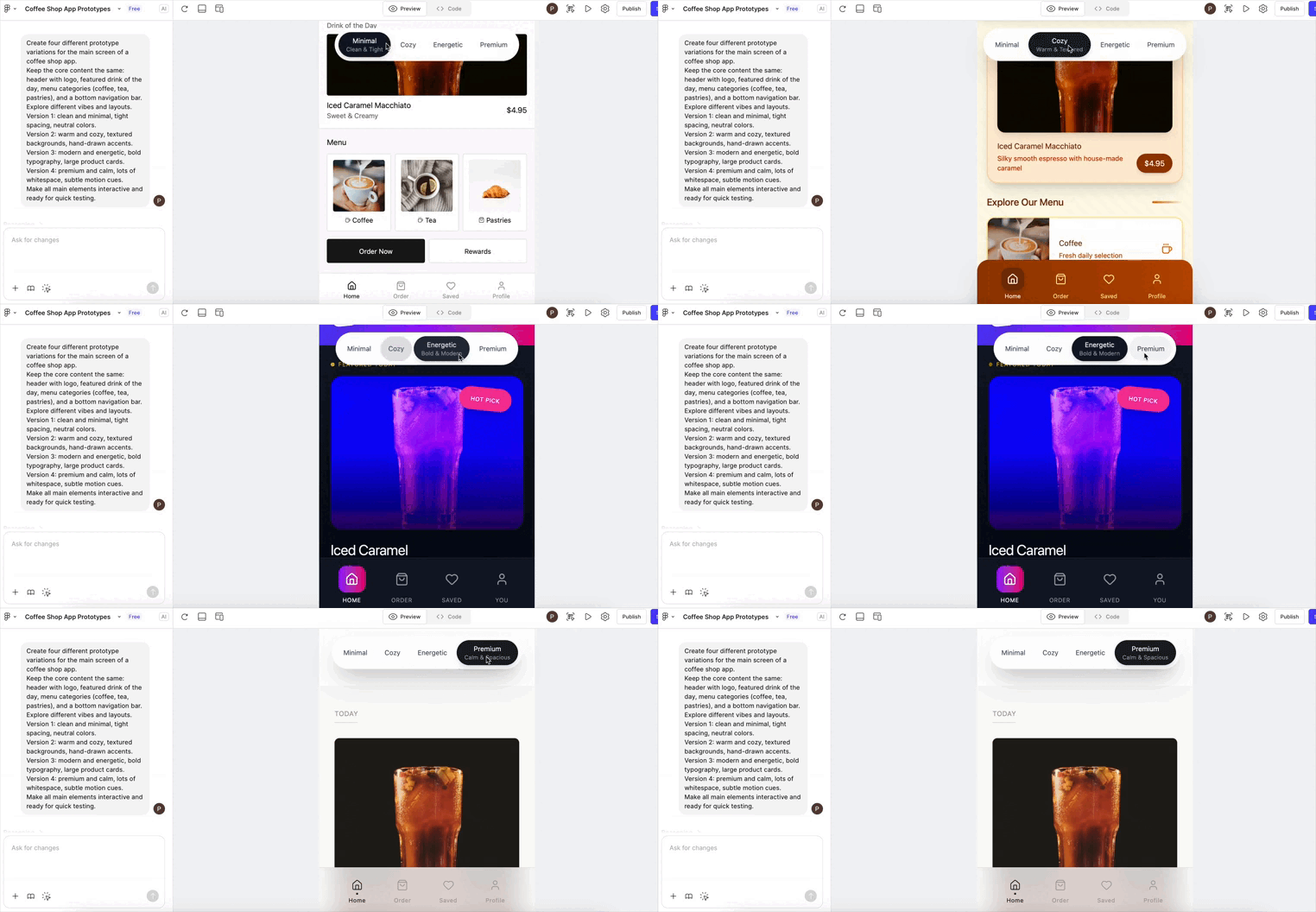
And voila! I had my feelings, and it brought four different versions of them to life.
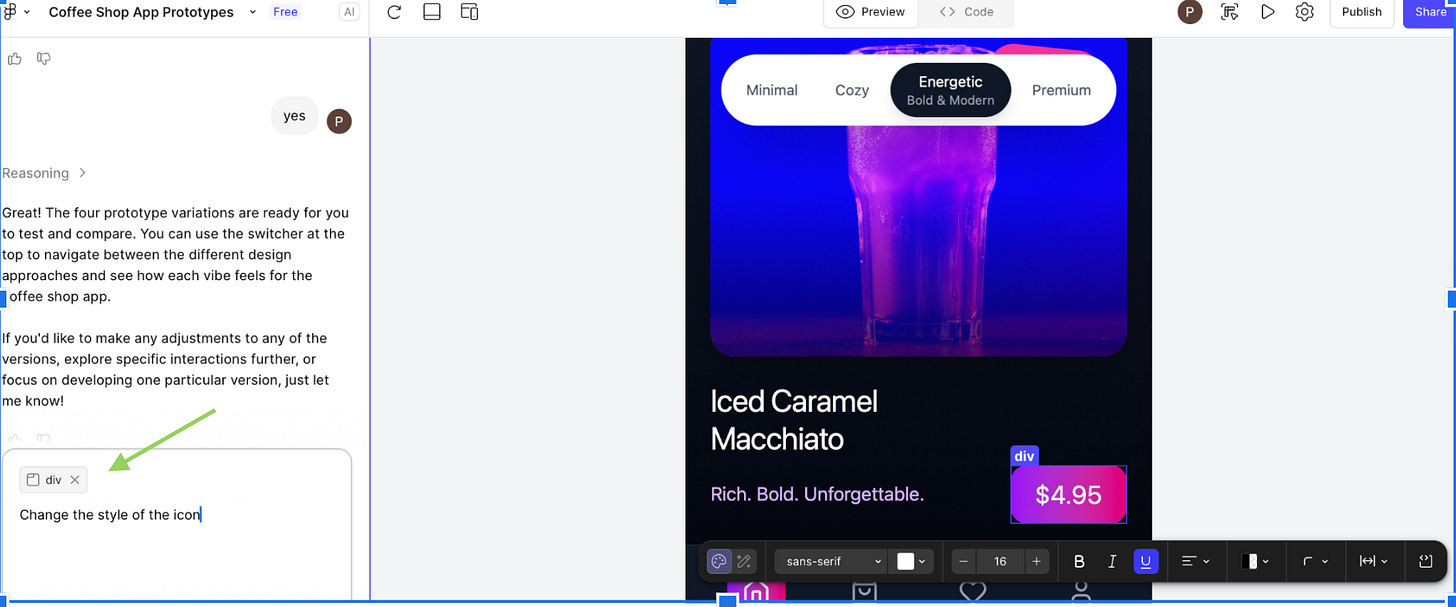
If you’re worried about tweaking things, just pick an element and change it with a prompt.
Figma AI isn’t alone in this.
- There’s also the /inspiration command in Magic Patterns, which generates 4 variants at once. You can refine the context through “add to chat” (kind of like visual edits) and regenerate the options.
- Visily comes with different Magic Themes (preset or custom) to see multiple visual variants of the same layout.
I’m sure about these, but honestly, more and more tools will embed this feature sooner or later.
3. Style & Theme Exploration
Usually, you’ll take the general vibe from one version, a section you like from another, and a small detail from a third. The goal is to gather the best bits into something that actually hits.
Solution
You can approach this from a few different angles.
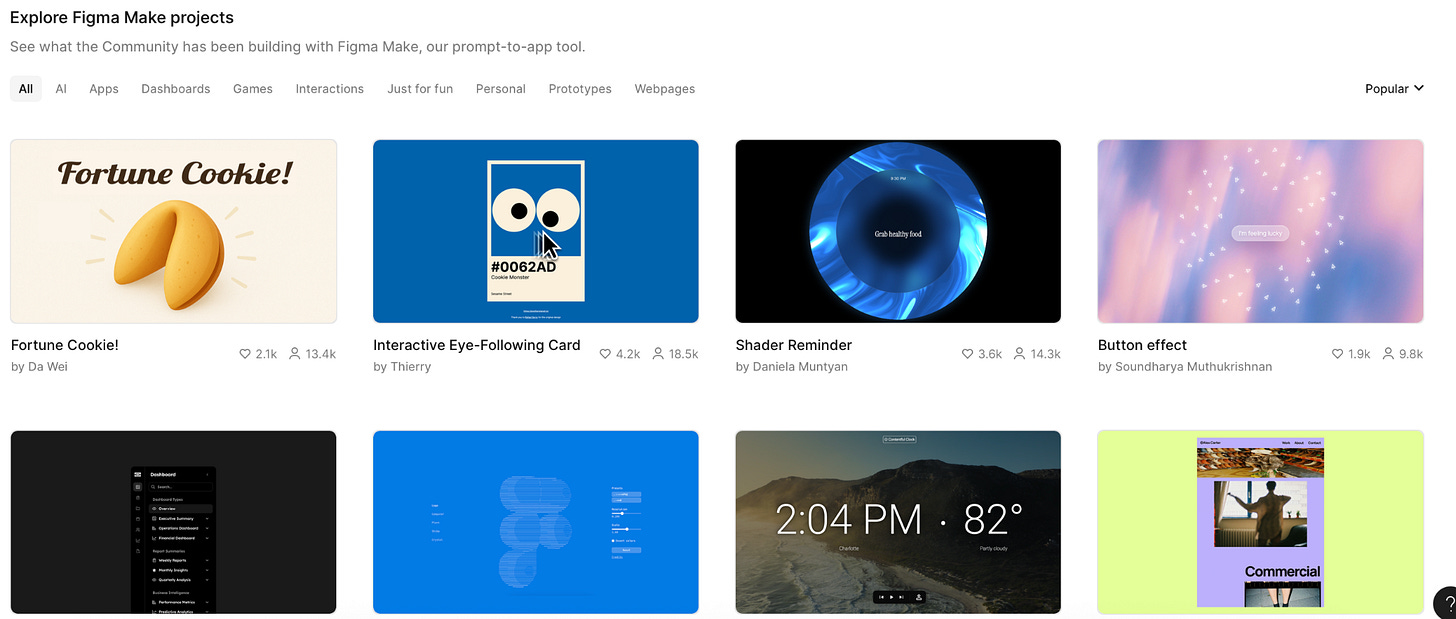
- Figma AI is offering us community ideas that we can grab to speed up our research and exploration.
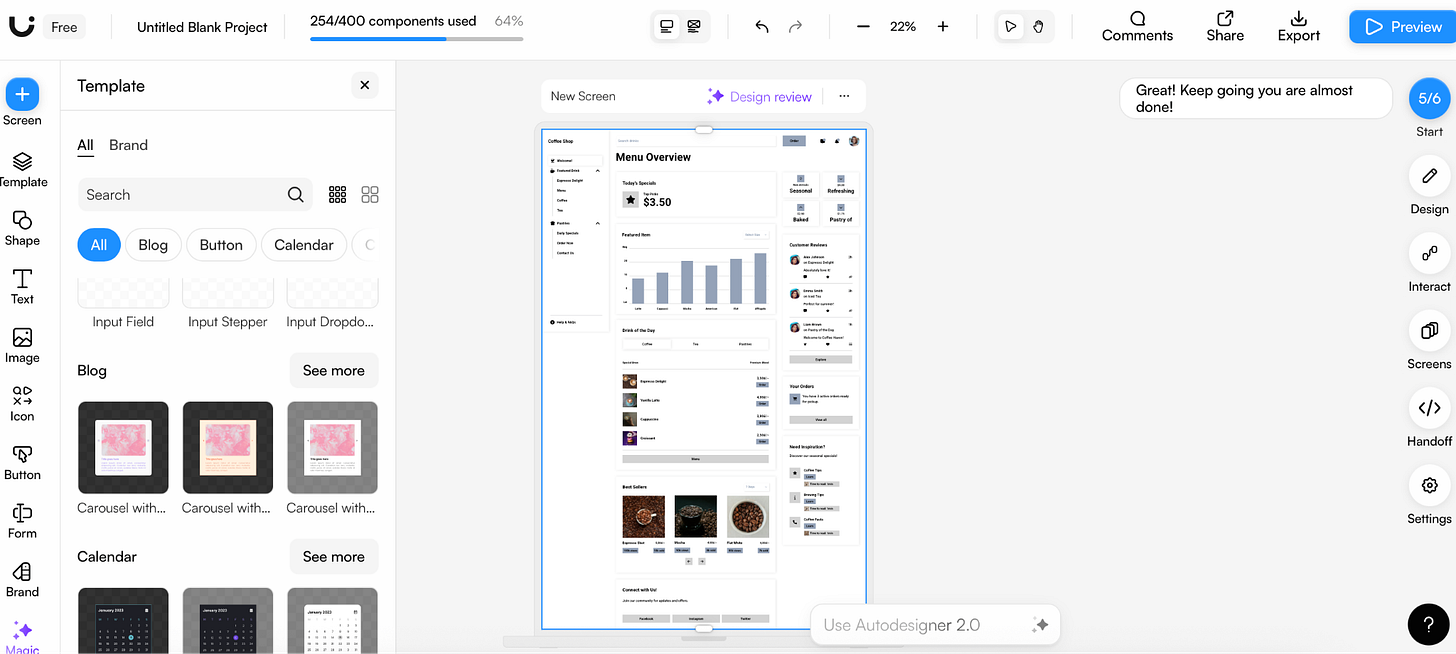
- Uizard.io gives you fully editable screens right off the bat as well. You can duplicate the AI-generated screens, tweak individual sections, and pull together the best hero, pricing block, and footer from different runs into one cohesive prototype with internal templates.
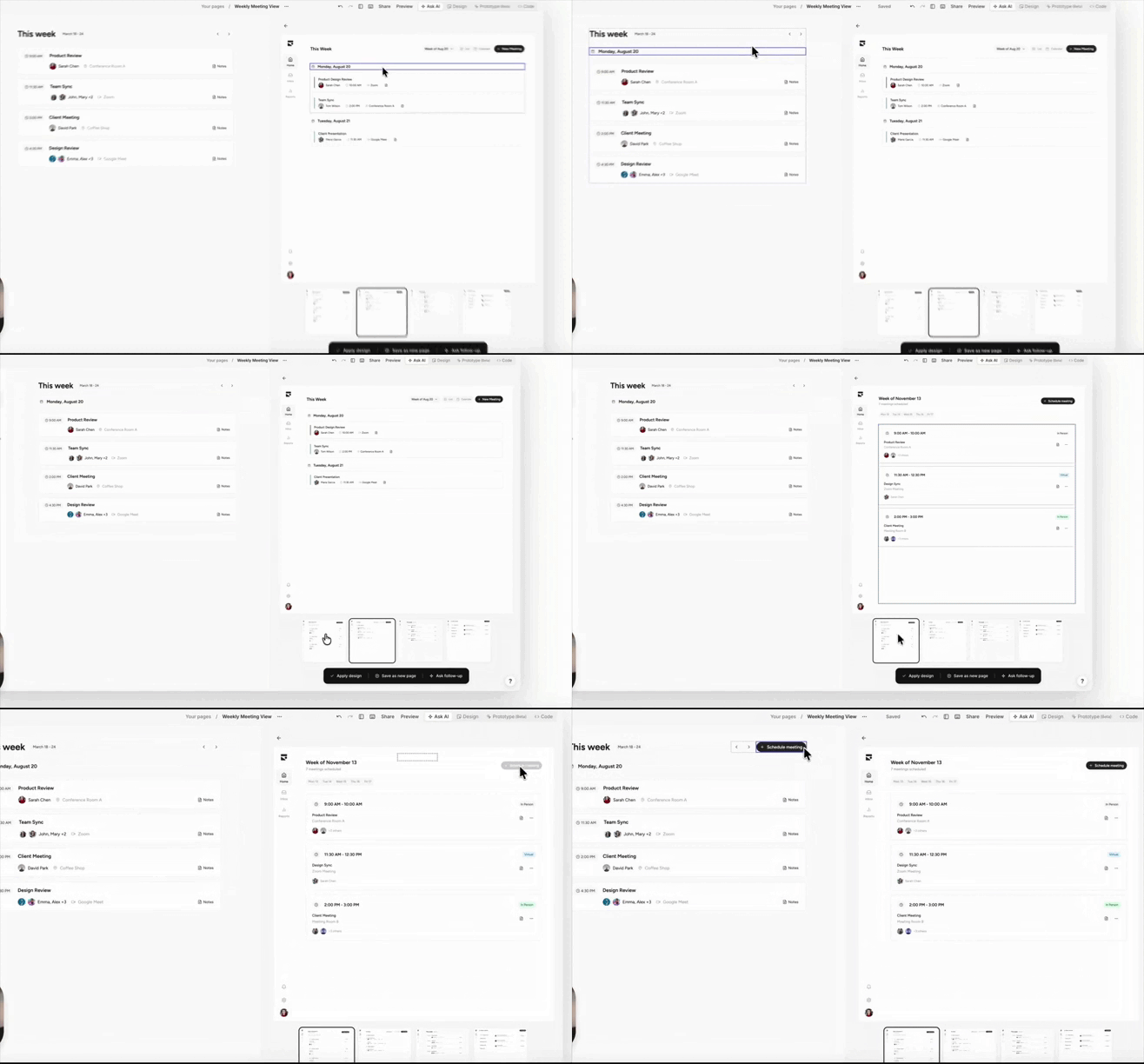
- Subframe pushes it even further. It lets you spin up multiple variations in AI mode, lock one in as your foundation, and then drag and drop components from the other options straight into your working design.
4. Reversibility
There is an unpleasant gap in some AI design tools: data flows one way from prompt → design → export to code. If you change something manually afterward, the model has no memory of it and can easily overwrite your changes next time.
Solution
For example, here’s how Framer AI manages this. You can run the AI generator again for a page to get a fresh version, but it usually regenerates the whole page rather than letting you do precise, local edits on a block without affecting your manual changes.
On the other hand, tools like Uizard.io and Subframe let you switch easily between Ask AI Mode and Design Mode, so your changes stick while still iterating with AI.
Honestly, Lovable also gives you a lot of flexibility for editing, but from what I’ve seen on Reddit, manual changes in code sometimes get overwritten by AI updates. After a prompt or prototype refresh, some edits disappear, and you have to restore the previous version.
Here’s how it actually flows:
- Start with whatever sparks the idea: a sketch, a competitor screenshot, a feeling, anything works as a launchpad.
- AI cranks out multiple directions in seconds, so take your time testing what resonates.
- AI helps create tangible designs you can react to.
A few things worth checking:
1. Visual hierarchy: What grabs your attention immediately?
2. User path: How many actions does it take to complete the task?
3. Emotional tone: Does it feel chill, chaotic, or somewhere in between?
4. Interactive details: Animations, hover effects, feedback when things go right or wrong.
5. Speed perception: How fast does it feel? Loading states, transitions, and responsiveness all matter.
- Pull the best pieces from different versions, remix them, and keep moving.
The final words
For founders and startups, Vibe Designing shrinks the gap between ideas and reality. You can go from idea to prototype in days, test it with users or investors, and tweak it without long delays.
For designers, Vibe Designing frees you from boring, repetitive tasks, but it also raises questions. If AI does the grunt work, what’s left for you?
It’s a trade-off. AI can either make your work feel flat or give you space to focus on vision, empathy, and storytelling. How it goes depends on how you play it. Treat AI as a teammate, and it helps you try more ideas.
Even with AI doing the heavy lifting, you still need to:
- Watch statistics to see where users hesitate or get frustrated.
- Track funnels to make sure people complete the main tasks.
- Talk to real users to see what’s confusing or slow.
- Tweak quickly. Small fixes stack fast.
- And finally, learn UI/UX rules, because without them, all that is impossible.
Take it all, play with it, and share your thoughts on this trend with us.
This article was first published in the Creators AI newsletter. View the original edition.