Google I/O 2025 Highlights
Veo3, Gemini Ultra + Many Cool Things

Hey there! Last week, Google surprised everyone: tons of new AI tools and features fresh from Google I/O 2025. The new Flow video tool, Imagen 4’s stunning image generation, and Veo 3’s video/audio magic are making creative work easier than ever. Project Astra is taking AI smarts real-time with live camera answers, and Project Mariner is about to let an AI agent browse the web for you.
If you missed, Google dropped a LOT of things last week:
- Flow | AI-powered video tool
- Imagen 4 | Image-Generator
- VEO 3 | Video-Generator 2
- AI in Search
- Gemini Ultra | New $249,99 Plan
- Gemini 2.5 Pro Deep Think mode
- Gemini API | Updates
- Project Mariner
- Project Astra
- Stitch | Vibe-coding tool for designers
- JAX
Keep your mailbox updated with key knowledge & news from the AI industry
# Flow | AI-powered video tool
Let’s kick off our overview of Google I/O 2025 with a tool called Flow. It’s a brand-new AI-powered video tool designed for filmmakers.
With Flow, you can bring in your characters, scenes, or whip them up right inside the tool. There’s also cool stuff like camera controls for changing angles, a scene builder to edit or extend shots, and handy asset management features.
The Flow is also used in the new Veo 3 and Imagen 4. Let’s go deeper with these tools!
AI video Apps , how are you, guys?
# Imagen 4 | Image-Generator
Image 4, one of the advanced models. The model can generate super high-quality images and even better than its previous Imagen 3. It’s great at capturing tiny details like fabrics, water droplets, and animal fur, and it works with both photorealistic and abstract styles in up to 2K resolution.
What sets Imagen 4 apart?
CHAT GPT VS IMAGEN 4

Guess where Imagen and ChatGPT are. The answer will be after the prompt (long prompt.
Answer: left image OpenAI (30-35 sec), right Imagen 4 (4.2 sec)
According to Google, it’s not just about image quality, it’s also much faster than Imagen 3, with an even speedier version on the way. Plus, it handles text and topography much better, making it perfect for things like slides, invitations, or anywhere you need images and words to mix.
Imagen 4 is already available in the Gemini app, on Google’s Whisk and Vertex AI platforms, and throughout Google Workspace apps like Slides, Vids, and Docs.
More cool examples of outputs are here: google / imagen-4
# VEO 3
Google just dropped Veo 3, its latest AI video model, and it’s a big step up; it can generate audio to go with the videos it creates! That means Veo 3 doesn’t just make visuals; it can add sound effects, background noise, and even dialogue that matches what’s happening on screen.
“For the first time, we’re emerging from the silent era of video generation,” Demis Hassabis, the CEO of Google DeepMind, Google’s AI R&D division, said during a press briefing. “[You can give Veo 3] a prompt describing characters and an environment, and suggest dialogue with a description of how you want it to sound.”
Share with people who make visuals and videos with AI. It may change their work
Also to help fight misuse, Google is adding invisible SynthID watermarks to Veo 3’s videos. According to Google, it also makes even better-looking videos than the previous version, Veo 2.
Fun example with Veo 3 from Reddit. Check it
By the way, Veo 3 is currently the most powerful, state-of-the-art model out there—and right now (limited time!), It’s available for free. Worth checking out if you haven’t tried it yet!
Of course, there are still concerns about AI disrupting creative jobs. A 2024 study predicted that over 100,000 jobs in film, TV, and animation could be affected by AI by 2026.
But the exciting news doesn't end at Veo 3. How about an AI mode that tracks 50 billion from big retailers and local shops in seconds?
# AI in Search (new SEO rules?)
Google Search's new AI Mode uses advanced tech to break your query into smaller subtopics and then sends out multiple searches at once. This helps it dig deeper into the web and find even more unique and super-relevant content for you. The real magic here comes from the Gemini model, which powers these new features. Right now, users in the US can try out the upgraded Gemini 2.5 in both AI Mode and AI Overviews. Plus, Google’s rolling out some cool experimental features in Labs, so power users can test them out and share feedback before they hit mainstream search.
So, what does all this mean? Basically, AI is turning into the new SEO. Instead of just picking the right keywords or hoping your product ranks high in search, it’s now about how well your content or shop can work with these smart AI features. AI is now at the heart of how we discover, choose, and even experience products online.
And recently, we posted an article about LLMs optimization. Check it out:
AI Mode works for shopping
It combines the Gemini model with Google’s shopping graph, which tracks over 50 billion products from big retailers and local shops, including up-to-date reviews, prices, color options, and availability. This info is always kept fresh, so you’re seeing the latest stuff. Say you’re looking for travel bags, AI Mode will show you a personalized feed of images and products tailored to your style. Need to narrow it down? Just add more details, like wanting a bag for a rainy destination, and the AI will instantly sort options based on things like water resistance or easy-access pockets. Products and images update in real time, making it easy to find what you need and even discover cool new brands.
Virtual try-on
Virtual try-on for clothes is now available right while you shop online: just upload your photo and see exactly how different outfits would look on you. This tech works with billions of products in Google’s shopping graph and takes into account your body shape and how different fabrics behave, so the clothes look super realistic on your image.
It’s powered by a new model that accurately shows how clothes fit and drape on all kinds of body types and poses. Right now, virtual try-on is being tested in Search Labs in the US. When shopping for shirts, pants, skirts, or dresses, you can hit the “try on” icon, upload your pic, and in just a few seconds, you’ll get a personalized look. You can save these looks or share them with friends to get a second opinion!
# Gemini Ultra | New $249,99 Plan
Gemini Ultra (available only in the U.S. for now) gives you the highest level of access to all of Google’s AI-powered apps and features. It costs $249.99 a month and includes the new Veo 3, the Flow video editing tool, and an upcoming feature called Gemini 2.5 Pro Deep Think mode.
With AI Ultra, you get higher usage limits in NotebookLM and Whisk, early access to Google’s Gemini chatbot in Chrome, some smart “agentic” tools from Project Mariner, YouTube Premium, and a huge 30TB of storage across Drive, Photos, and Gmail.
But if you’re not focused on commercial videos, the Pro version will be more than enough for you.
Chat GPT vs Gemini
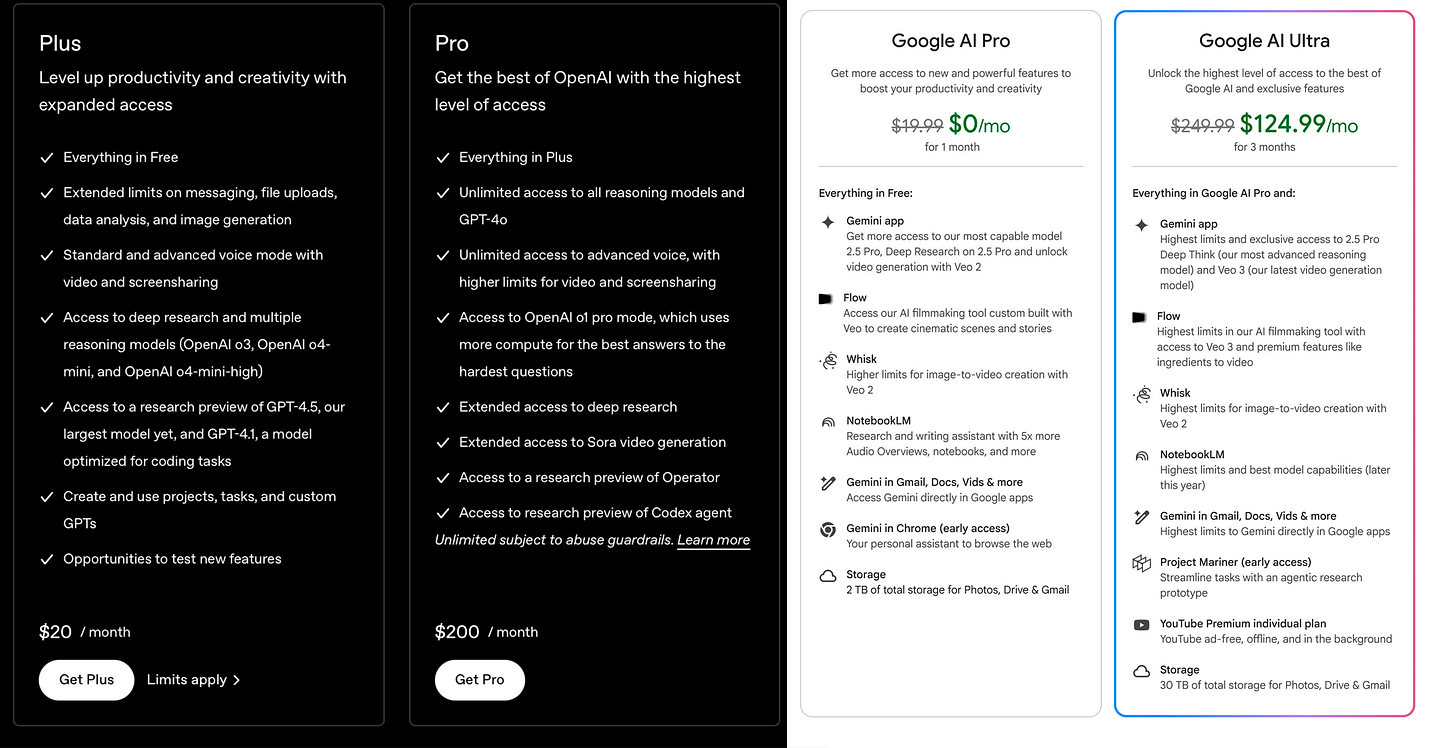
ChatGPT plans focus on advanced AI models, research, and custom tools, with Pro adding video and enterprise features. Of course, now it will be harder for GPT to compete with Veo 3. Google’s plans offer strong AI plus big storage and video tools. Google’s Pro is student-focused, and it’s free for students until 2026. Ultra adds premium features like full video access, huge storage, and YouTube Premium for creators and power users.
I'm a fan of ChatGPT. But if I had to choose between Chat Pro and Google AI Ultra, I'd probably prefer Ultra. The level of video generation and control here will be better thanks to the combination of Veo and Flow. Plus, I'm really tempted by the cloud storage. I constantly feel like I don't have enough storage, and here you get a whooooole 30 TB.
# Gemini 2.5 Pro Deep Think mode
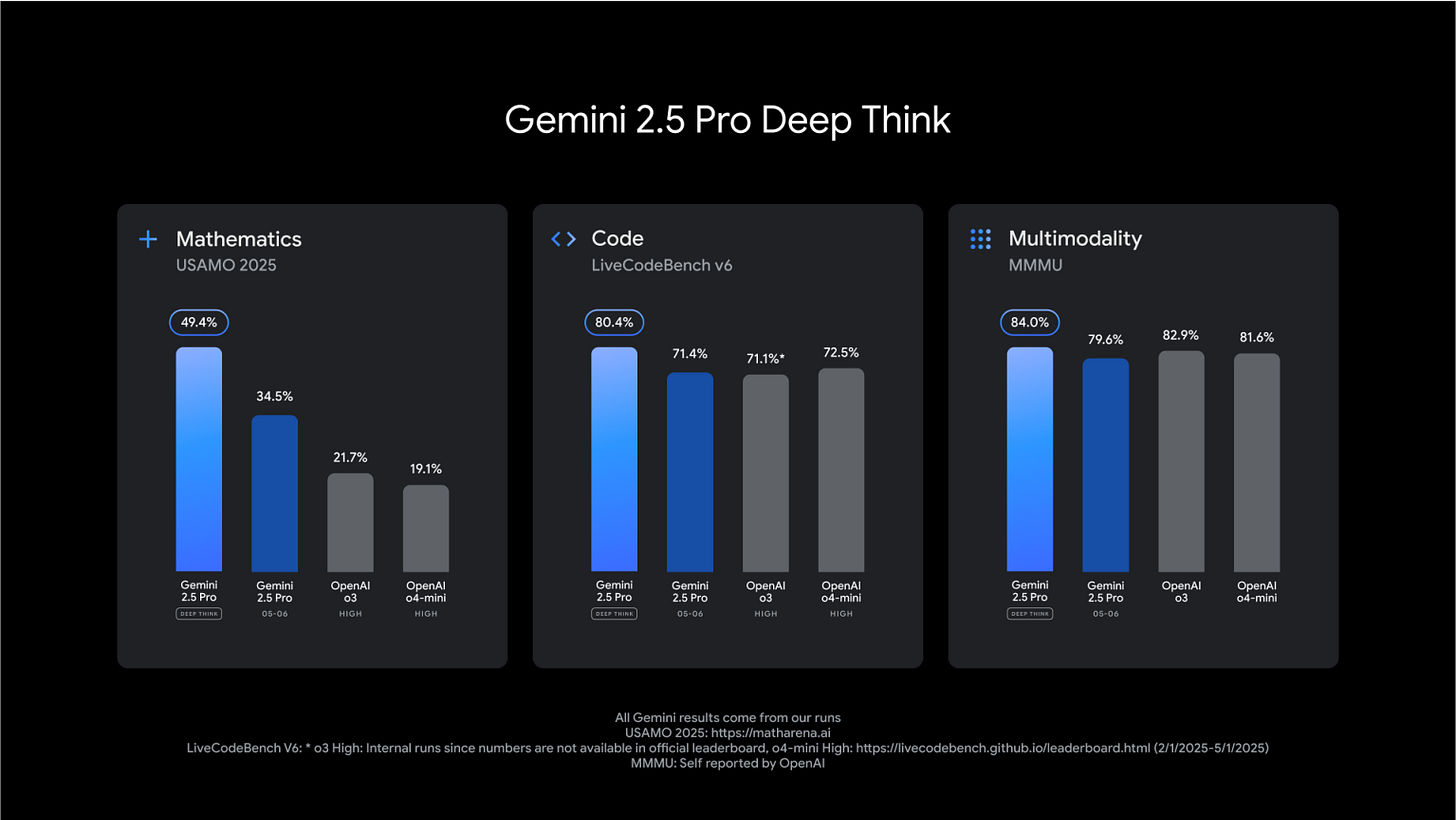
Deep Think is an upgraded reasoning mode for Google’s Gemini 2.5 Pro model. Basically, it lets the AI consider multiple possible answers before picking the best one, which helps it perform better on tough questions and benchmarks.
Google hasn’t shared many details about how Deep Think works yet, but it sounds similar to advanced modes like OpenAI-o3 and o4-mini, where the model searches for and combines the best answers.
Right now, Deep Think is only available to “trusted testers” through the Gemini API. Google says they’re taking extra time to run safety checks before launching it for everyone.
# Gemini API | Updates
Google introduced new models accessible via the API
Gemini 2.5 Flash Preview. It offers better reasoning, coding abilities, and long-context handling compared to the previous release, It uses 22% fewer tokens to deliver the same level of performance in our evaluations. Right now, it ranks #2 on the LMarena leaderboard, just behind 2.5 Pro.
Gemini 2.5 Pro and Flash text-to-speech (TTS). It supports native audio outputs for both single and multiple speakers, across 24 languages. It’s possible to generate conversations with multiple distinct voices for dynamic interactions.
Gemini 2.5 Flash Native Audio Dialog. Now in preview via the Live API, this model generates natural-sounding voices for conversations with over 30 distinct voices and 24+ languages. It features proactive audio that distinguishes between speakers and background, ensuring accurate and timely responses, and can react to users’ emotional expressions and tone for more human-like interactions. A dedicated thinking model processes more complex queries and enables the creation of conversational AI agents for use cases like call center enhancement, dynamic personas, and unique voice characters.
Thanks for reading! Feel free to share it.
Lyria RealTime. You can now create live, continuous music with Lyria RealTime in the Gemini API and Google AI Studio, It streams instrumental tracks in real time, reacts to your prompts as you go, and works great for making apps with responsive soundtracks or trying out new musical instrument ideas. Want to see it in action? Check out the PromptDJ-MIDI app in Google AI Studio!
Gemini 2.5 Pro Deep Think. There’s an experimental “Deep Think” mode being tested for Gemini 2.5 Pro; it’s already showing great results on tough math and coding tasks, and should be available for more people to try out soon.
Gemma 3n. It’s an efficient, open AI model for everyday devices, supporting text, audio, and vision, with smart features to reduce compute and memory use.
New functionality
Thought summaries provide developers with synthesized, easy-to-understand explanations, including headers, key details, and tool usage, which is based on the model’s raw reasoning, making debugging and understanding model responses easier.
Thinking budgets allow developers to control model reasoning to balance performance, latency, and cost, with this feature coming soon to 2.5 Pro as well.
Sample Python code to enable and retrieve thought summaries without streaming, returning a final thought summary with the response from Google:
from google import genai
from google.genai import types

client = genai.Client(api_key="GOOGLE_API_KEY")
prompt = "What is the sum of the first 50 prime numbers?"
response = client.models.generate_content(
  model="gemini-2.5-flash-preview-05-20",
  contents=prompt,
  config=types.GenerateContentConfig(
    thinking_config=types.ThinkingConfig(thinking_budget=1024,
      include_thoughts=True
    )
  )
)

for part in response.candidates[0].content.parts:
  if not part.text:
    continue
  if part.thought:
    print("Thought summary:")
    print(part.text)
    print()
  else:
    print("Answer:")
    print(part.text)
    print()
Improvements to structured outputs. API start supports JSON Schema features like "$ref" and tuple definitions with prefixItems.
Video understanding improvements. API now lets users add YouTube links or upload videos for tasks like summarizing or translating, supports video clipping for long videos, dynamic FPS (up to 60 for fast content), and offers three resolution options to save tokens.
New URL Context (experimental) tool. API retrieves more context from provided links, supporting research agent development and working alongside features like Grounding with Google Search.
Sample code for Grounding with Google Search and URL Context:
from google import genai
from google.genai.types import Tool, GenerateContentConfig, GoogleSearch

client = genai.Client()
model_id = "gemini-2.5-flash-preview-05-20"

tools = []
tools.append(Tool(url_context=types.UrlContext))
tools.append(Tool(google_search=types.GoogleSearch))

response = client.models.generate_content(
    model=model_id,
    contents="Give me three day events schedule based on YOUR_URL. Also let me know what needs to taken care of considering weather and commute.",
    config=GenerateContentConfig(
        tools=tools,
        response_modalities=["TEXT"],
    )
)

for each in response.candidates[0].content.parts:
    print(each.text)
# get URLs retrieved for context
print(response.candidates[0].url_context_metadata)
Async function calling. The Live API’s cascaded architecture now supports asynchronous function calling with a NON-BLOCKING behavior field, allowing agents to keep conversations going while running functions in the background.
Batch API. Google is testing a new batch API that returns results within 24 hours, offers higher rate limits, and costs half as much as the interactive API, with a wider rollout planned for later this summer.
Computer use tool. Google is bringing Project Mariner's browser control capabilities to the Gemini API via a new computer use tool
# Project Mariner
Project Mariner is an experimental AI agent that can browse and use websites for you. It’s getting a big upgrade, too: now Mariner can handle up to ten tasks at once, like buying tickets or groceries online, all without you needing to visit any websites yourself. Unlike the earlier version, which ran in your browser and kept you stuck waiting, the new Mariner works in the cloud; it means that you’re free to do other things while it takes care of your requests in the background.
Google’s vision is to make AI agents like Mariner the new way people interact with the web, doing the work for you instead of you having to jump between different sites. Competitors like OpenAI’s Operator, Amazon’s Nova Act, and Anthropic’s Computer Use are similar tools, but Google says it’s focused on making Mariner faster and more reliable.
Coming soon, Project Mariner will also be available in AI Mode (Google’s new AI-powered search experience), and Ultra subscribers will get early access to another new feature called Agent Mode, which combines browsing, research, and integrations with other Google apps.
# Project Astra
Project Astra is a multimodal AI that is now powering new experiences across Search, the Gemini app, and third-party products. The biggest update: Project Astra now runs the new “Search Live” feature. With it, you can use your phone’s camera, tap “Live,” and ask Google about whatever you’re seeing, getting answers almost instantly.
Astra also brings low-latency voice and visual features to developers through the updated Live API, which now includes emotion detection and smarter reasoning. Real-time video and screen sharing from Astra are rolling out to all Gemini users, too.
Google is even working with partners on Astra-powered smart glasses, but there’s no release date yet. For now, you’ll see Astra showing up in more Google apps and features.
# Gemini App | Updates
Google announced that Gemini apps now have over 400 million monthly users. Starting this week, everyone on iOS and Android will get Gemini Live’s camera and screen-sharing features powered by Project Astra. You can have real-time voice chats with Gemini while streaming video from your phone or screen.
Soon, Gemini Live will work even better with other Google apps, letting you get directions from Maps, add events to Calendar, and make to-do lists in Tasks. Google is also updating Deep Research, so you’ll be able to upload your own PDFs and images for more in-depth reports.
# Stitch | Vibe-coding tool for designers
Stitch is a new AI-powered tool to help design web and mobile app front ends. With Stitch, you can just type a few words or even upload an image, and it’ll generate the UI, plus the HTML and CSS you need. You can pick between Gemini 2.5 Pro or Gemini 2.5 Flash to power your designs.
Stitch isn’t as full-featured as something like Figma, but you can customize what it creates, export directly to Figma, and tweak the code in your IDE. Soon, you’ll even be able to edit your designs just by screenshotting and annotating what you want to change.
# JAX in action
JAX is a Python library designed for high-performance machine learning. It’s like NumPy, but with hardware acceleration and powerful tools for transforming functions. Google used JAX to build and train models like Gemini and Gemma, and it’s popular with researchers working on advanced AI projects. In this talk, you’ll get an intro to JAX and the Flax neural network library, see what’s new, and learn how to get started.
# Gemini API use cases for developers
Mark McDonald showed you how to build cool apps using Gemini’s features, like image understanding for object recognition and scene descriptions, creating multimodal experiences that mix voice, text, and images, and automating complex workflows with function calling. You’ll also learn how to take advantage of Gemini’s long context window for deeper reasoning and multi-step problem solving.
# To sum up
Google I/O 2025 Keynote just raised the bar for the entire AI industry.
After getting roasted last year for falling behind, Google pulled a classic move: Slow to start, but moves fast once going.
From Gemini’s massive upgrades to seamless product integrations — it’s clear: Google is back in the game and playing to win.
💬 What do you think — is it finally worth getting a Google AI subscription?
This article was first published in the Creators AI newsletter. View the original edition.