Claude Managed Agents Review: Anthropic’s Agents for Serious Builders
The feature most developers haven’t touched yet — and why that’s about to change
# Hey!
Most people using Claude are prompting it in a chat window. A smaller group is calling the API directly. But there’s a third tier that barely anyone has explored yet: Claude Managed Agents — Anthropic’s hosted runtime for building stateful, tool-using agents that actually persist across turns.
Not sessions that reset when you close the tab. Not pipelines that crash when a step fails. Real persistent agents with environments, file mounts, conversation memory, and production-grade controls baked in.
This post covers what they are, how they work inside the Console, and — crucially — how they compare to the setups you’re probably already using: Claude Cowork, cron jobs on a VPS, and self-hosted OpenClaw/Moltbot.
New to Claude agents entirely? Start with how solopreneurs are using full AI agents and Claude Code as your AI teammate before continuing here.
What Are Claude Managed Agents?
Straight from Anthropic’s cookbook repo:
“Claude Managed Agents is Anthropic’s hosted runtime for stateful, tool-using agents. You define an agent and a sandboxed environment once, then run them in sessions that persist files, tool state, and conversation across turns.”
Three things in that sentence matter.
Stateful. The agent remembers where it left off. It doesn’t start from zero each API call.
Sandboxed environment. The agent runs in Anthropic’s isolated compute layer — your files, tools, and code execute there consistently, not on your machine.
Sessions. Each run is a tracked session that can be paused, resumed, handed to a human, or branched. This is what makes production deployments possible.
The Console: What It Actually Looks Like
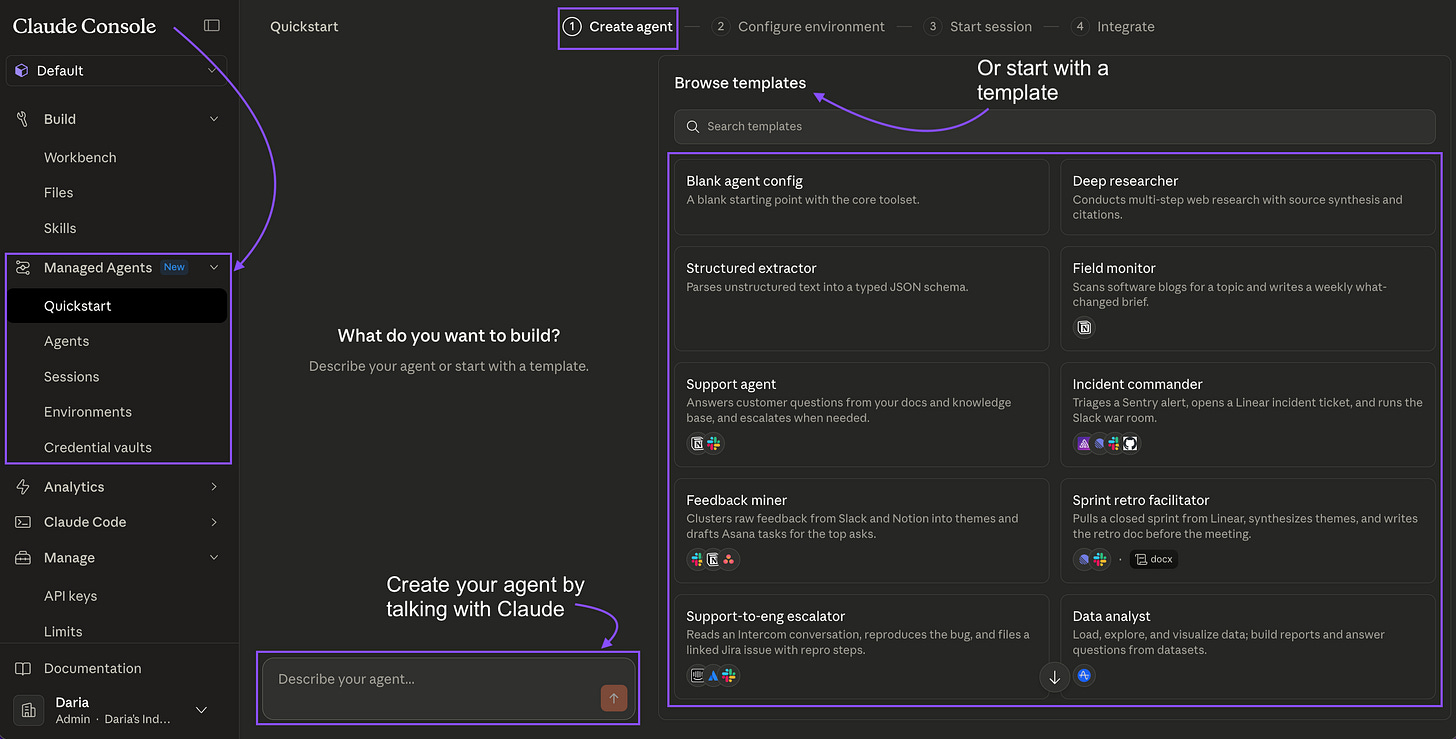
Before we talk about code, here’s what you’re working with inside Anthropic’s Console.
The Agents Dashboard
The Agents Dashboard — a list of all your deployed agent definitions. Each shows model, status, session count, and last activity. You manage definitions here; sessions run separately.
You define an agent once and it lives here permanently. The definition includes: name, model, system prompt, and which tools the agent can call. Sessions are spun up from this definition on demand — one definition, unlimited concurrent sessions.
Creating a New Agent
The Create Agent form. The system prompt is where you give the agent its domain expertise — this persists across every session that uses this definition. Tools are toggled per agent: code\_execution, file\_read, file\_write, web\_search.
The form is straightforward. The important fields:
- System prompt — this is your agent’s expertise. It doesn’t reset between sessions.
- Tools — which capabilities it can use.
code_executionis the main one for data work;file_read/file_writefor artifact generation. - Model — Haiku for speed and cost, Sonnet for most work, Opus for complex reasoning chains.
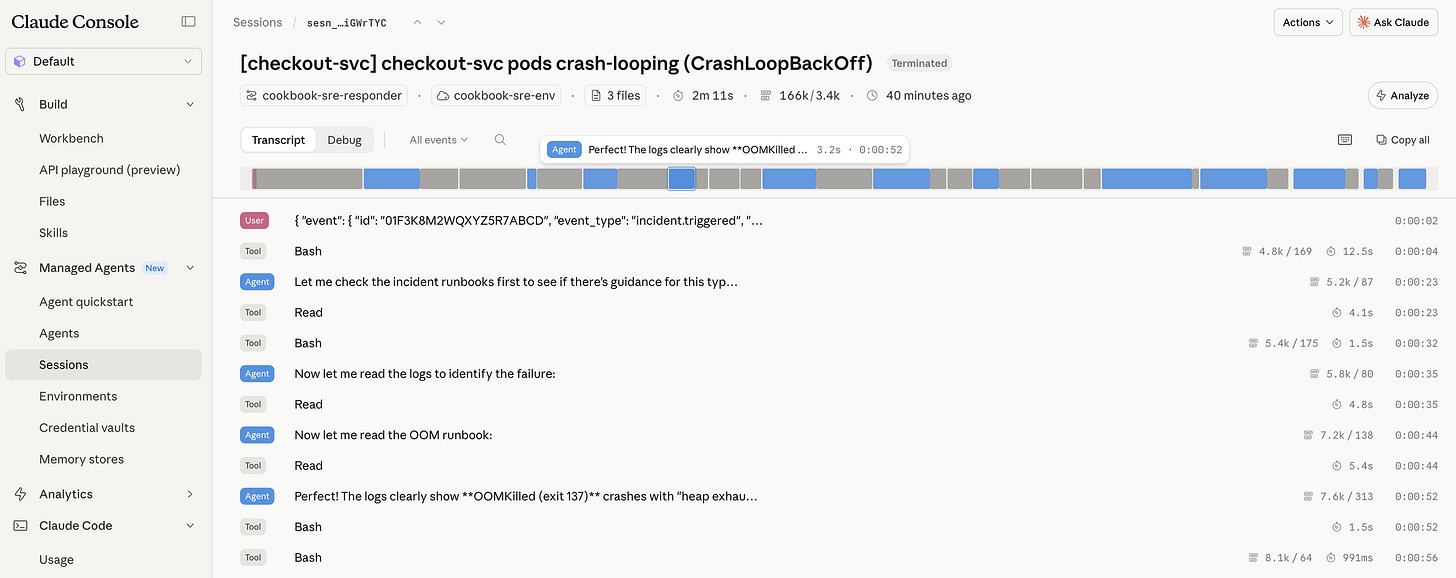
The Session Stream View
The Session Stream. Left: live event log — every tool call, result, and text the agent produces. Right: Artifacts panel — files the agent creates during the session, downloadable immediately. Bottom: file mounts and token usage.
The event stream is important to understand. It shows you exactly what the agent is doing at every step:
session_start— session initialized, files mountedtext— the agent’s reasoning (visible in real time)tool_use— the agent calling a tool (e.g.,code_execution)tool_result— what the tool returnedrequires_action— the agent is paused, waiting for your input
This isn’t a black box. You can watch it think, catch mistakes mid-run, and build confidence in what it’s doing before you trust it with production data.
The Human-in-the-Loop Gate
The requires_action state — the agent has done its work and is waiting for a human decision. The summary shows exactly what it found and what it wants to do next. You approve, reject, or send custom instructions to resume.
This is the feature most people don’t realize exists. When an agent reaches a step you’ve defined as a gate — merging a PR, sending an email, making a purchase — it pauses and surfaces a decision UI. The agent has done all the investigation. You make the final call.
The pattern: agent does the analysis, human makes the irreversible decision.
The Architecture: Three Things You Configure
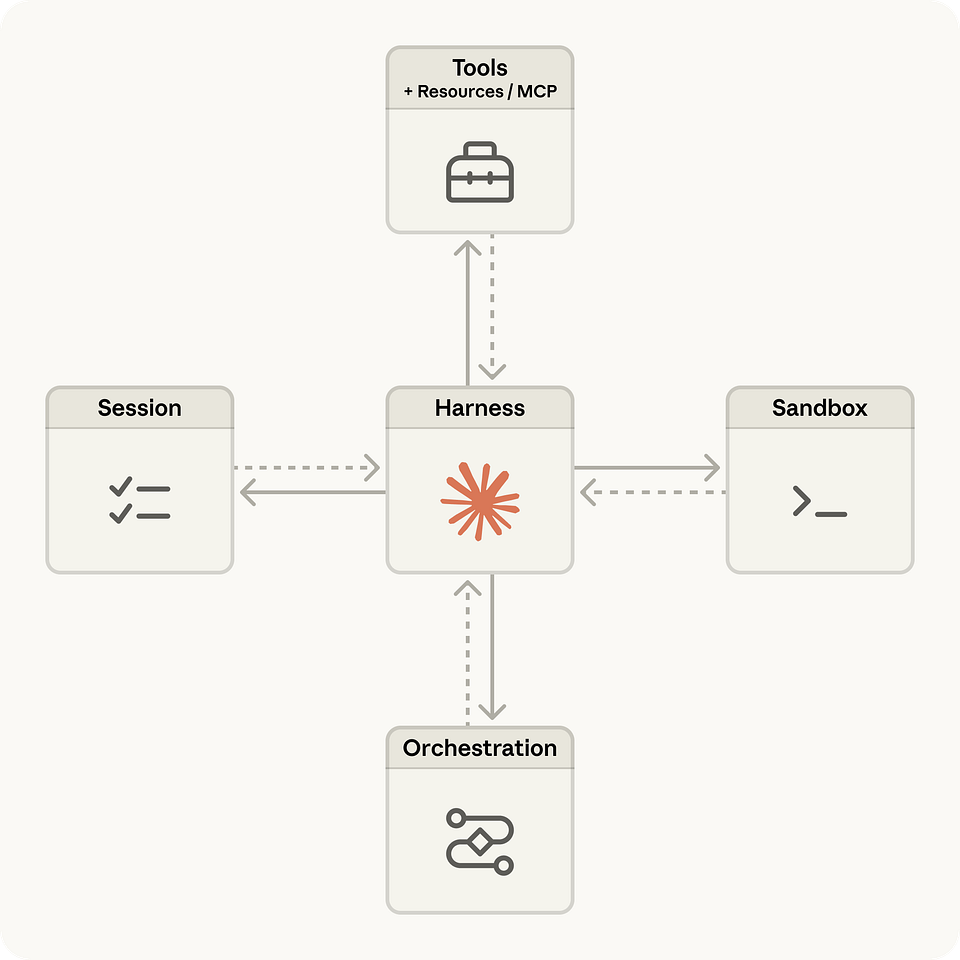
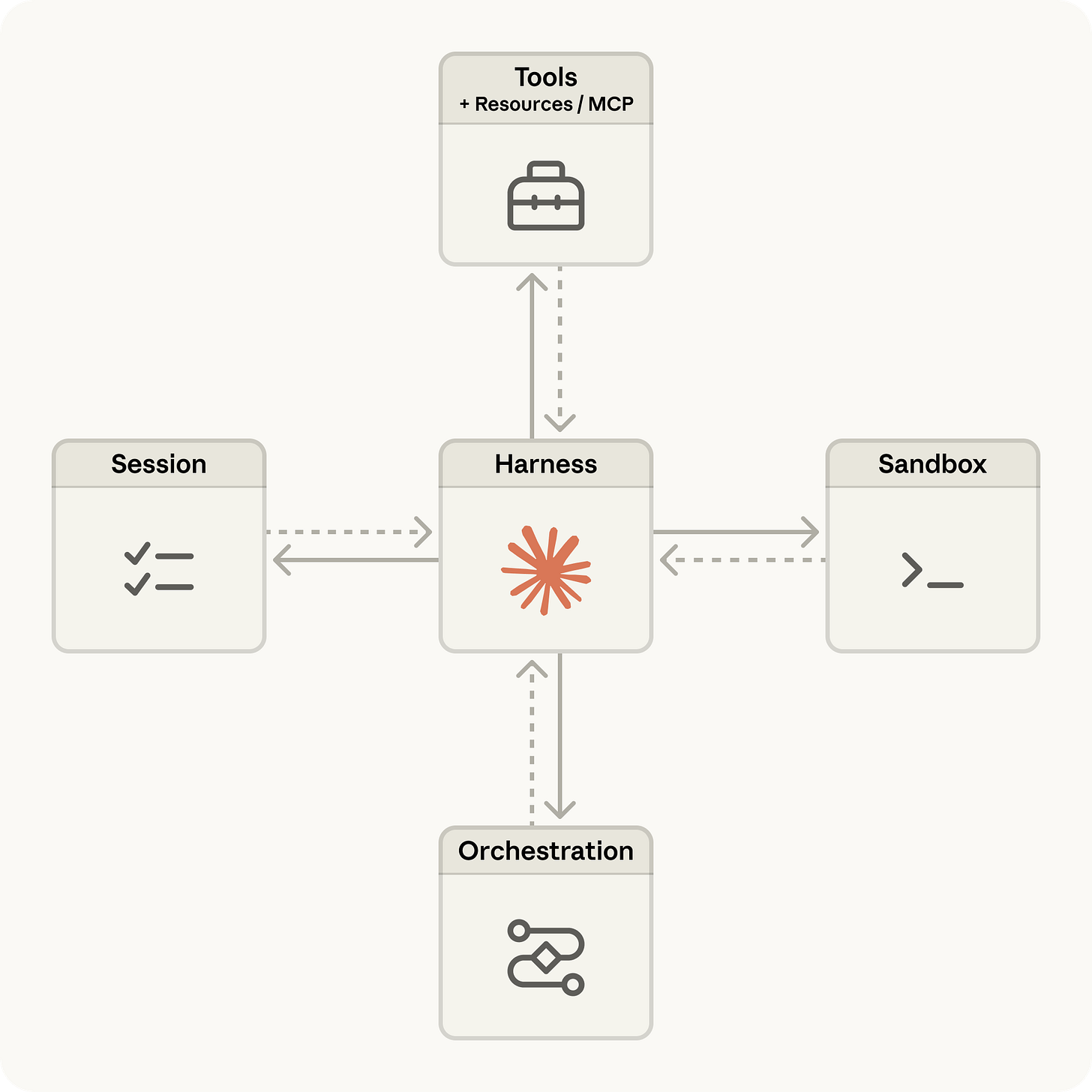
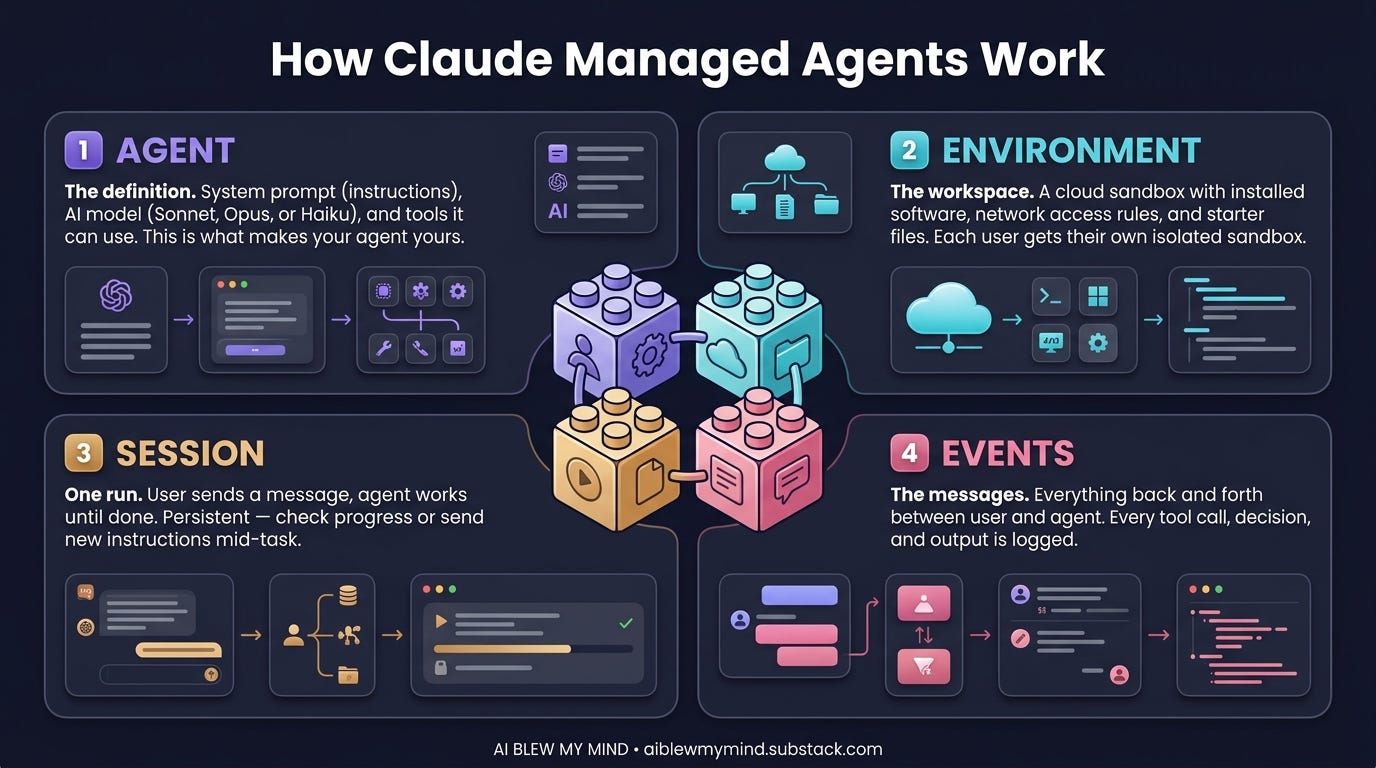
When you set up a Claude Managed Agent, there are three layers:
- The Agent definition — model + system prompt + tools + Skills. Configure once.
- The Environment — Anthropic’s sandboxed compute layer. Files mount here. Code executes here. State persists here across turns in a session.
- Sessions — each conversation thread. Multiple sessions can run from the same agent definition simultaneously. Each keeps its own file state, tool outputs, and conversation history.
The core API:
import anthropic
client = anthropic.Anthropic()

# Define the agent once
agent = client.beta.managed_agents.agents.create(
    name="data-analyst",
    model="claude-sonnet-4-6",
    system_prompt="You are a senior data analyst...",
    tools=[{"type": "code_execution"}, {"type": "file_write"}],
)

# Spin a session per user/task
session = client.beta.managed_agents.sessions.create(
    agent_id=agent.id,
    files=[{"path": "sales_q1.csv", "content": csv_bytes}]
)

# Stream the run
with client.beta.managed_agents.sessions.stream(
    session_id=session.id,
    input="Analyze this CSV and generate a revenue report."
) as stream:
    for event in stream:
        if event.type == "requires_action":
            handle_human_approval(event)

# Pull artifacts when done
artifacts = client.beta.managed_agents.sessions.artifacts.list(session.id)
The Real Use Cases
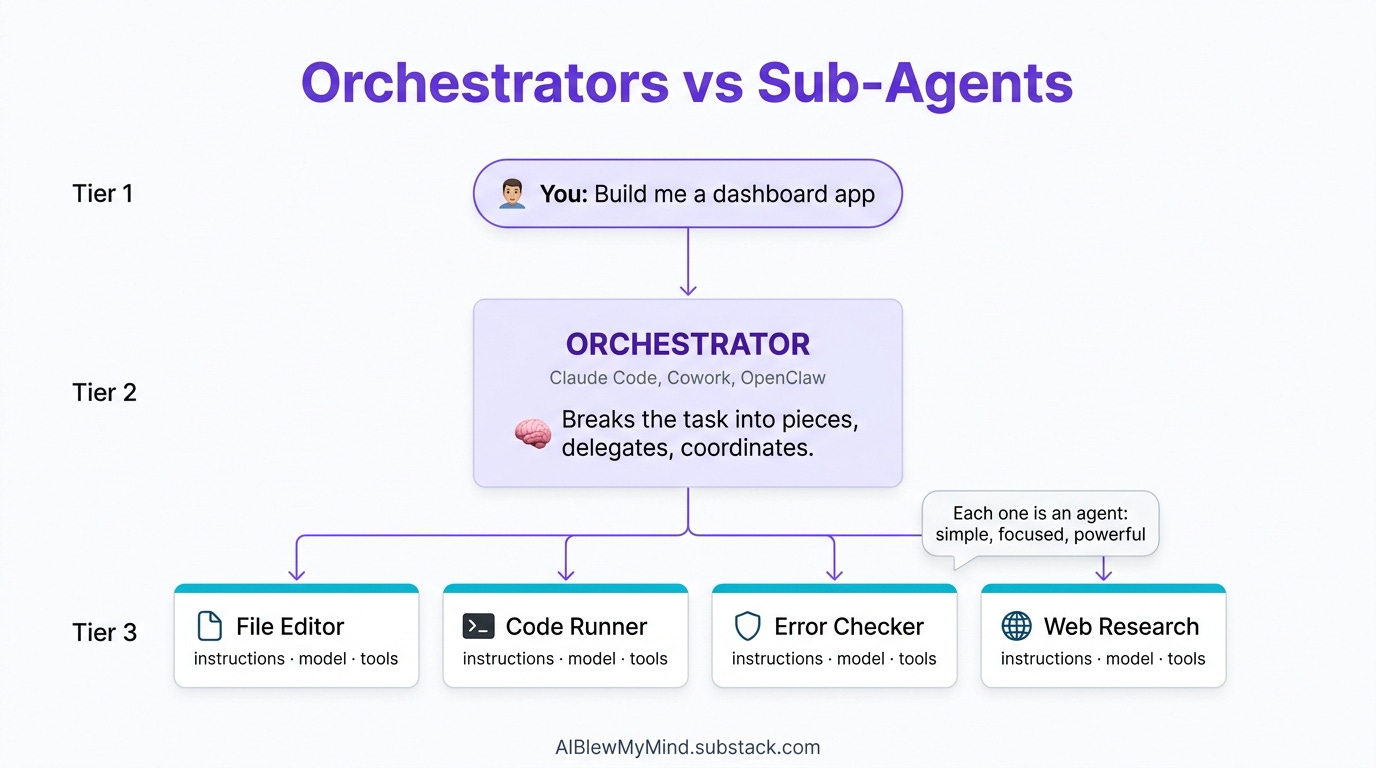
Anthropic ships five applied notebooks in claude-cookbooks/managed_agents. Here’s what each one does:
1. Data Analyst → HTML Report. Mount a CSV. The agent analyzes it with pandas and plotly, generates charts, writes a full narrative HTML report. No dashboard, no data engineer — one session, one artifact.
2. Slack Data Bot. The same data analyst agent, wrapped in a Slack integration. Mention it with a CSV attached — it replies in-thread with the report. The key is session continuity. Each Slack thread maps to one session. Follow-up questions in the thread continue the same session; the CSV is already loaded, the prior analysis is in memory. No re-uploading, no re-explaining.
We covered how a similar pattern powers newsletter automation systems in our n8n playbook post. Managed Agents brings that same continuity natively, without the workflow builder overhead.
3. SRE Incident Responder. A pager alert fires → session opens → agent investigates (reads logs, diffs code, identifies root cause) → opens a PR with a fix → pauses for human approval before merging. The human-in-the-loop gate is native here. No custom code required — the agent calls requires_action, the Console surfaces the approval UI, and you resume the session with your decision.
4. Expense Approval Workflow (paid). Employees submit expenses in natural language. Agent reviews policy, either auto-approves (within threshold) or escalates to a manager. Custom decide() and escalate() tools give the agent structured actions; the requires_action state handles the escalation pause.
5. Issue → PR Pipeline (paid). Takes a GitHub issue, fixes it, opens a PR, monitors CI, addresses a review comment, and merges — all in one session. The critical feature: when CI fails mid-chain, the agent reads the failure (stored in session file state) and continues from that checkpoint. It doesn’t restart.
The Comparison You Actually Need
Here’s where most posts stop. They describe Managed Agents in isolation, without comparing it to what you’re already doing. Let’s fix that.
There are four real approaches to running Claude agents. They’re not interchangeable — each makes sense in different situations.
All four setups compared across: state persistence, scheduling, infrastructure, human-in-the-loop control, cost, and technical skill required.
Setup 1: Claude Cowork (Desktop App)
What it is: A desktop app that gives Claude access to a folder on your Mac or Windows machine. You open it, give it a task, it works through files. No code required.
How state works: Per-session only. When you close the app, the session ends. Nothing carries over to tomorrow’s session automatically.
Scheduling: None. You trigger it manually every time.
Human-in-the-loop: You’re always in the loop — you review what it’s about to do and approve each step.
Best for: Document cleanup, research briefs, file organization, one-off analytical tasks. Non-technical users who need Claude’s capabilities without any setup.
What it can’t do: Run overnight. Handle multiple users simultaneously. Persist context across days. Respond to external triggers (webhooks, alerts, messages).
We did a full practical breakdown of Claude Cowork in this guide. The key principle: it shines when you give it a bounded folder and a clear brief — but it’s always a human-initiated, single-session tool.
Cost: Claude Pro ($20/mo) — no server, no API key.
Setup 2: Cron + Claude Code on a VPS (or Locally)
What it is: You write a script that calls Claude Code (or the Claude API directly), schedule it with cron, and run it on a VPS or your local machine.
This is the most flexible setup and the most popular among technical builders. It’s how our own OpenClaw runs for sponsorship research — a cron job kicks off a Claude Code session on our Digital Ocean droplet on a schedule.
How state works: You manage it entirely. State lives in files, a database, or environment variables you maintain yourself. Nothing is automatic.
Scheduling: Full control. Any cron interval: 0 6 1 for Mondays at 6am, */30 for every 30 minutes. You can also trigger on events via a lightweight webhook listener.
# /etc/cron.d/claude-weekly-digest
0 7 * * 1 root /opt/scripts/run_digest.sh >> /var/log/digest.log 2>&1
Human-in-the-loop: You build it yourself. A common pattern: agent produces a draft, writes it to a file, sends you a notification, you review and approve before the next step runs.
Best for: Weekly digest automation, data pipeline runs, GitHub monitoring, recurring report generation, anything that needs a fixed schedule or custom trigger logic.
This is the pattern behind our digest automation system and the Firecrawl MCP crawler setups — Claude Code sessions kicked off on a schedule, with human review before publishing.
What it can’t do: Persist sandboxed environments across runs without your own infrastructure. Handle multi-user sessions cleanly. Give you a native approval UI — you build all of that yourself.
Cost: Claude API (usage-based) + VPS ($5–20/mo). Typically $25–60/mo depending on usage.
Technical skill needed: Medium. You need to know bash, cron, and basic Python or Node.
Setup 3: Claude Managed Agents (Anthropic Hosted)
What it is: Anthropic’s hosted runtime. You define an agent via API, fire sessions on demand. The sandboxed environment, state persistence, and human-in-the-loop controls are all built into the platform.
How state works: Native and automatic. Files, tool outputs, and conversation context persist across all turns within a session without you managing anything.
Scheduling: Event-driven. You trigger sessions via API — from a webhook, a user action, a Slack mention, whatever. You can also wrap it in a cron if you want scheduled runs, but the scheduling logic lives in your application, not in Managed Agents itself.
Human-in-the-loop: The standout feature. Native requires_action state pauses the session and surfaces the decision in Console. No custom plumbing needed.
Best for: B2B products where you’re building for other users. Multi-user, multi-session workflows. Anything that needs reliable state without you maintaining infrastructure. Production incident response. Client-facing automation.
What it can’t do (yet): Provide a no-code interface. Run on a rigid cron schedule without wrapping it yourself. Replace your VPS if you need always-on local file access.
Cost: Claude API usage-based. No server bill. Costs scale with session complexity — a data analyst session with heavy code execution will run higher than a simple Q&A session.
Technical skill needed: Medium. You’re writing Python to call the API. No server management required.
Setup 4: OpenClaw / Moltbot (Self-Hosted Agent in Messenger)
What it is: Open-source framework that runs Claude as a persistent agent on your machine or a cheap VPS, accessible through Telegram, WhatsApp, Slack, Discord, or any messenger. Proactive — it reaches out to you, not just the other way around.
How state works: File-based. MEMORY.md stores preferences and history; a vector index handles semantic search across past interactions. You control what it remembers and forgets.
Scheduling: Event-driven — responds to messages, but can also proactively alert based on conditions it monitors (dashboards, email, price changes). Some users add cron triggers that send it scheduled check-in messages.
Human-in-the-loop: You’re always the human — you message it, it responds and acts. You can set up approval workflows via custom Skills, but it’s all manual plumbing.
Best for: Personal agents that handle your email, file organization, meeting prep, and proactive alerts. Agents that need to live where you already are (your messenger). Long-running tasks where you want to check in via WhatsApp from your phone.
What it can’t do: Serve multiple users cleanly. Provide a production-grade hosted environment. Handle complex approval workflows without custom coding.
We covered Clawdbot/Moltbot in depth in this post and the full OpenClaw ecosystem in this one. The $25/mo cost includes Claude Pro + a $5 VPS — genuinely the cheapest way to have an always-on personal agent.
Cost: Claude API + VPS ($5/mo) = ~$25–50/mo. More if you use it heavily for complex tasks.
Technical skill needed: Low to medium. CLI wizard handles setup; Skills require basic text editing.
Decision Framework: Which Setup For You?
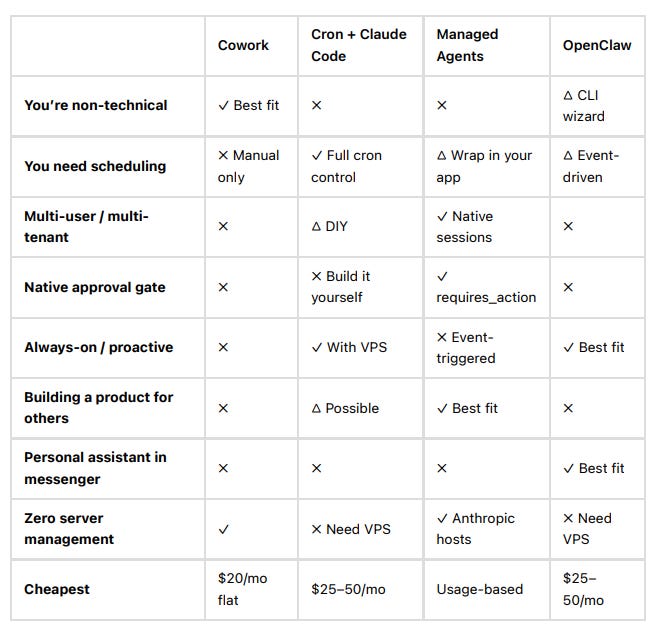
The honest answer for most builders:
- Starting out? Cron + Claude Code on a $5 VPS is the highest value-per-effort setup. You control everything, costs are predictable, and it forces you to understand the underlying mechanics.
- Building for yourself, want something always-on? OpenClaw/Moltbot — set it up once, it lives in your messenger.
- Need to handle other people’s data across multiple users? Managed Agents is the right layer.
- Non-technical and doing one-off tasks? Cowork.
If you’re building a product where other people’s workflows run through Claude — where you need isolated sessions, persistent state, and a native approval gate that you didn’t have to build — Managed Agents is the only hosted option that gives you all of that out of the box.
Getting Started With Managed Agents
Anthropic’s recommended entry point: CMA_iterate_fix_failing_tests.ipynb — give the agent a broken Python package with failing tests, watch it run a do → observe → fix loop until everything’s green.
What you need:
- Anthropic API key with beta access
- Python 3.10+
pip install anthropic
Full cookbook: github.com/anthropics/claude-cookbooks/tree/main/managed\_agents
Notebook What it teaches Runtime CMA_iterate_fix_failing_tests Agent/session/environment basics. Entry point. ~2 min CMA_orchestrate_issue_to_pr Full dev pipeline with mid-chain recovery ~5 min CMA_explore_unfamiliar_codebase Grounding in a new codebase ~3 min CMA_gate_human_in_the_loop decide() / escalate() custom tools ~3 min CMA_prompt_versioning_and_rollback Version pinning, regression detection ~4 min
The Honest Caveats
Beta. The API surface is still moving. Don’t ship a customer-facing product on this without a fallback.
Requires Python. There’s no no-code interface. If that’s a blocker, start with Cowork or n8n + Claude API instead.
Costs scale with complexity. Stateful sessions with code execution and file I/O cost more than simple completions. Prototype small, measure, then scale.
Not always-on by default. Managed Agents responds to API calls — it doesn’t proactively monitor or run on a schedule unless you trigger it. For that, you still need cron or a webhook-based trigger in your application.
The Bottom Line
Managed Agents isn’t the right answer for everyone. If you’re a solo builder running a weekly digest, a $5 VPS with a cron job and Claude Code costs less and gives you more control. If you want a personal assistant in your phone, Moltbot is already set up for that. If you’re non-technical, Cowork is the right door.
But if you’re building a product where other people’s workflows run through Claude — where you need isolated sessions, persistent state, and a native approval gate that you didn’t have to build — Managed Agents is the only hosted option that gives you all of that out of the box.
The cookbooks are public. The API is open. The gap between knowing this exists and using it is a couple of afternoons with a Jupyter notebook.
The real barrier isn’t technical. It’s that most builders don’t know this tier exists yet. Now you do.
Everything we’ve written on the Claude agent stack:
This article was first published in the Creators AI newsletter. View the original edition.