Prompt Engineering Is Easy
Anyone Can Write Better Prompts in 5 Minutes With This Formula
Hey Creators! 👋
Ever wondered why some seem to get more out of ChatGPT & Claude than you? Maybe you’ve even noticed that AI responses are getting worse, and thought “Is Sam Altman up to something here?” or “Did Claude get nerfed again?”
The “secret” in using AI to its fullest potential lies in not just asking the right questions, but engineering them in a specific way. Most of the guides you can find online are mediocre at best and only give surface-level knowledge, so in today’s post, we’ll be:
- Breaking the myth of “Prompt Engineering” being difficult
- Showcasing Good vs Bad Prompt Outputs
- Revealing the simple formula for writing excellent prompts
- 3 plug-and-play prompts that will make your life easier
Do you have a minute to participate in our Subscription Giveaway and make our newsletter even better? Take a quick survey and tell us about your experience & participate in the free Giveaway of a Premium Subscription for 6 months.
The Myth of Prompt “Engineering”
At their core, AI like ChatGPT and Claude are a lot like us — they use language to communicate, think, and process information, often creating narratives and using structured logic similar to ours.

This is why prompt engineering is less about deep technical skills and more about using language effectively and understanding basic human psychology – meaning anyone could get good at it, and you don’t need a fancy degree in tech!
When you craft a prompt, you're guiding the AI through a thought process, similar to explaining a complex idea to a friend. The clearer & more direct your explanation, the better the AI understands and responds.
And if you want to learn on a less fundamental & more advanced level on how AI really works, you can check out our post here, explaining LLMs simply:
Prompt Engineering – Before & After
Just to show you the difference between good & bad prompt engineering, here’s what a simple question from ChatGPT gets you. Let’s take weight loss (without giving up chocolate), for example:

What even is that answer? It has no clear actionable steps to take, no plan of action, and hasn’t anyone trying to lose weight heard of those generic tips before?
Here’s what a specific & clear, context-based prompt, following a specific formula can get you:
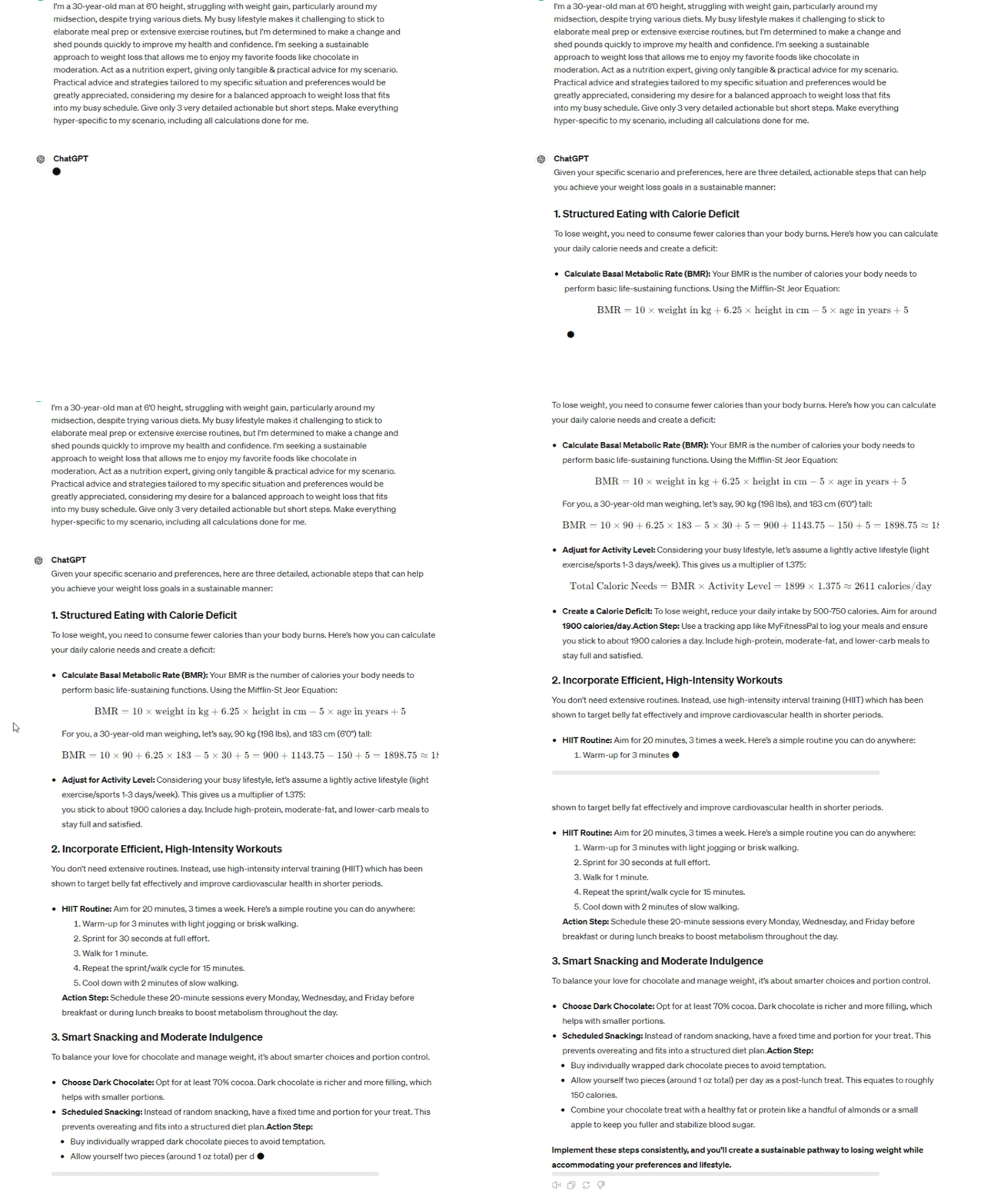
As you can see, the output was extremely specific and much more valuable than the former response, it even did complex calculations! Just like you would consult with a real expert – you want to be as specific as possible with your current situation, so that you get you can get a proper, educated response.
You may think that overcommunicating is the key insight here, but it’s actually far from that – the prompt above followed a very specific formula that made ChatGPT respond in such a valuable way.
P.S – The special prompt formula works with any AI, be it ChatGPT, Claude, it could even make Elon’s Grok more useful! All AI depends on your input, so the formula is universally applicable.
We won’t leave you waiting any longer, here’s the only formula you need to write excellent prompts that make AI give you answers that can actually help you.
Also — check out our post on another new prompt engineering technique - Program Simulation, where we dive deeper into the more technical side of prompt engineering here:"
Keep your mailbox updated with key knowledge & news from the AI industry
The Only Prompt Formula You Need
Context + Details + Role + Intent + Response Format = Golden PromptThe above prompt formula is golden, each part of it is essential for the AI to do its job to the fullest (without going into technical details).
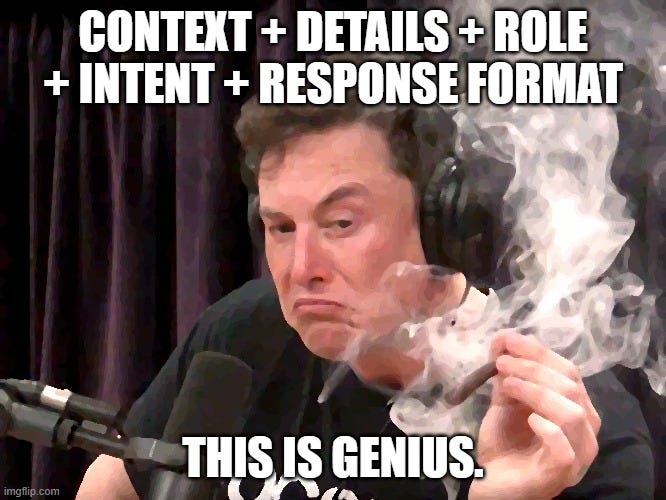
Now, this formula alone won’t get you results without knowing what each element of it does. Let’s dissect it to understand why each part is important & how it helps AI better understand our queries:

Get more from Creators' AI in the Substack app
Available for iOS and Android
Before we get to the nitty gritty, I invite you to prompt along with me!
Pull open a tab with ChatGPT or Claude right now and write out each step alongside me, you’ll very quickly learn how this formula works and how you should articulate to get better results.
- ContextBy setting the context, you're helping the AI understand the domain or scenario you're referring to, preventing it from going off on tangents and rambling about.

Mention the specific field, subject, or scenario you are facing. The more detailed, the better the response, let’s take an AI SaaS for example: “I am the founder of an AI SaaS startup struggling to improve user engagement on our platform, which provides predictive analytics for e-commerce businesses.”
- DetailsDetails eliminate misunderstandings by narrowing down the AI’s area of focus, it’s also important to understand what details are & aren’t necessary because unnecessary details only dilute the prompt and can make the output more vague.

Necessary details: “Our AI SaaS platform is designed to predict customer buying behavior for e-commerce businesses. We've noticed a drop in user engagement during the initial setup phase, where users integrate their data. Despite providing tutorials and user guides, many seem overwhelmed.”
Unnecessary details: “We recently changed the logo of our platform and updated our Terms of Service. Also, I usually have meetings with the dev team on Tuesdays, don’t know if that’s hurting my business or not.”
- RoleAssume the role you want your AI to embody to ensure it provides the most appropriate and targeted advice. Assigning a role helps the AI act as if it were an actual expert in the field, and, in most cases, this works very well.

Here’s an example: “Act as a user experience expert, providing concrete and practical advice for improving initial user engagement on our predictive analytics platform.”
- IntentThe intent clarifies what you aim to achieve with your query. Specifying your intent helps the AI focus its response on solving your specific problem or answering your question in a way that aligns with your goals.

Example for AI SaaS: "I want to identify clear, actionable steps that can be implemented to simplify the initial setup process and boost user engagement without overwhelming the new users."
- Response FormatThe response format specifies how you want the AI to structure its answer. You can request a list, a step-by-step guide, or even ask it to respond in a tabular format.
Defining the format ensures that the information is presented in a way that is immediately useful and applicable to your needs, here’s an example: "Provide a tabled format of steps that our team can follow to enhance the user onboarding experience, focusing on immediate, high-impact changes that can be implemented within the next 30 days."
In the response format, you can additionally remind the AI to be hyper-specific to your scenario, or even add extra details it should include. More Info ≠ Better output, but more useful info = an output much more rich in detail.
Sharing is caring! Refer someone who recently started a learning journey in AI. Make them more productive and earn rewards!
If you’re into programming, you should check out our post on more advanced prompt engineering techniques (specifically for GitHub Copilot) here:
When all of these actions are combined, we get a long prompt for your AI of choice. Here’s a showcase of this formula at play:
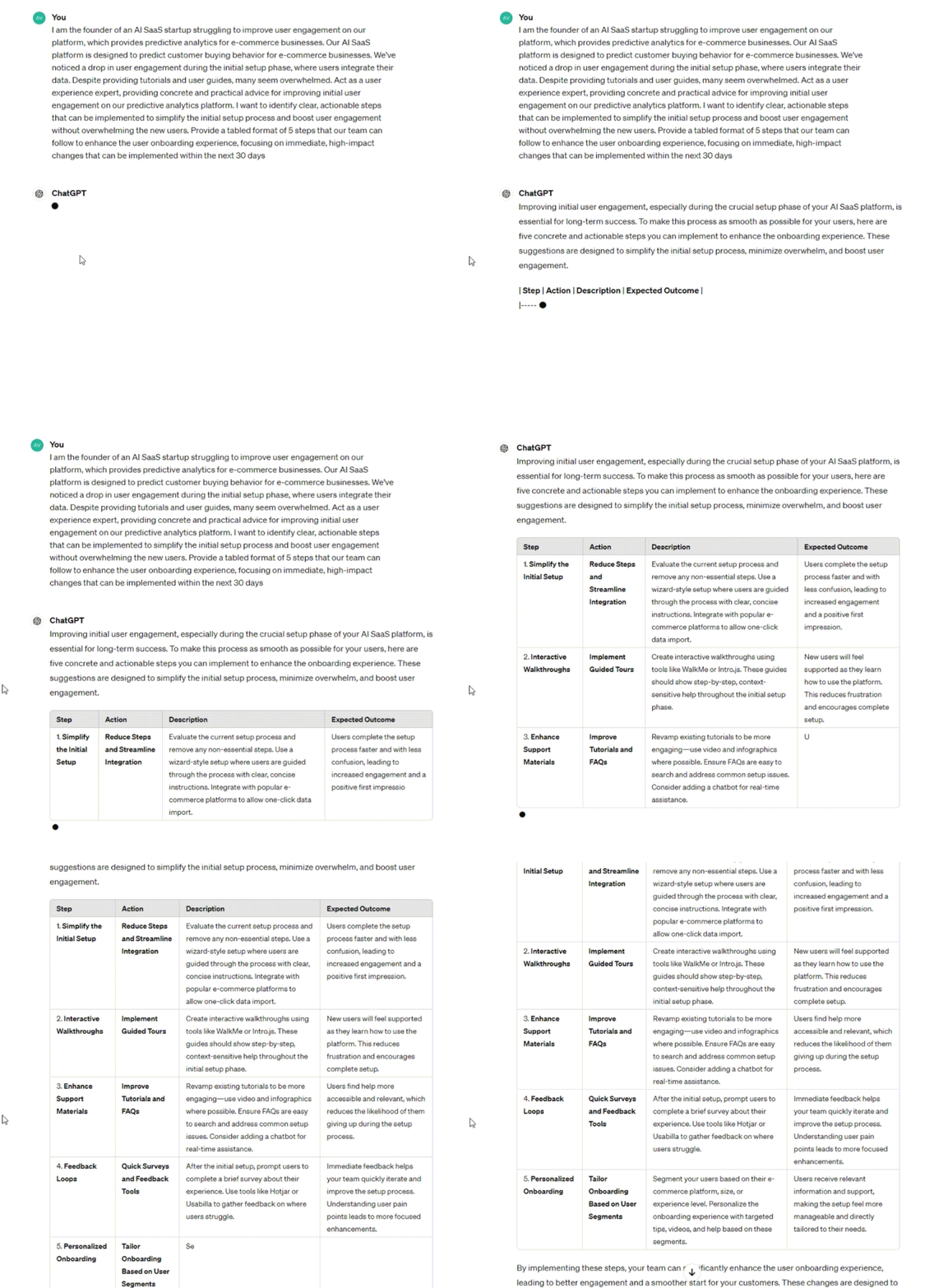
As a result, we get a very easy-to-consume tabular list of actionable steps – and, depending on your case, you could get way more out of this formula if you provided more specific data.
Remember – this formula is just the skeleton. The output depends entirely on your input, and if you aren’t satisfied with the results, tinker with your wording, remove more unnecessary details, perhaps try on a different role for the AI.

And just in case you want to use this formula for learning anything, combine it with the information in one of our previous posts to become a learning machine:
Now, I’ll share some of my personal prompts following this formula that have saved me countless hours and helped me sleep at night, I’m sure these will help you out a ton, too!
Creators’ AI Subscription is the best gift for Creators diving into AI.
3 Prompts To Make Your Life Easier
I’ve modified these prompts so that you can plug them into ChatGPT or Claude, fill in your own details & make use of them right away.
Time Management
I am a [who you are & what you do] and struggle with timeblocking for [tasks you struggle allocating time for]. [Insert any specific details here, like your typical time of day/night you do a certain task at, your energy levels]. Act as a time management expert with many years managing the time and energy levels of professionals. I want you to help me allocate time for [the task you want to find time for], include realistic buffers (30% time buffer). Respond in a simple-to-follow format.Wind-down Routine
I am a [who you are & what you do] and struggle with winding down after deep work sessions. [Insert any specific details here, like what your work consists of, your current sleep hygiene habits]. Act as a sleep expert. I want you to create the perfect 20-minute wind-down routine that can help me shut my brain off and fall asleep, even after a deep work session. Respond in a simple-to-follow plan.The above prompt is very basic – you should add very specific details, like how you spend an hour with your family, work way past midnight, or even drink coffee late at night (couldn’t be me). This specificity will help your new sleep expert give more detailed responses!
Idea Generation
I am a [who you are & what you do] and struggle with coming up with ideas related to [anything you can't easily come up with ideas for - tweets, for example]. [Insert any specific details here, like your previous tweets and ideas you enjoyed writing about, for example]. Act as an idea brainstorming expert, who [knows how to write tweets that can go viral]. I want you to create 10 ideas for [for example, writing viral tweets]. Respond in a tabular format with 3 columns: 1. Idea 2. Viral Mechanisms 3. Tweet draft.These three prompts are just placeholders, you can experiment with them to see what this formula is capable of.
And just to recap – the formula is:
Context + Details + Role + Intent + Response Format = Golden PromptHave you tried this formula yet? What was your experience with it? Leave a comment below & let us know!
This article was first published in the Creators AI newsletter. View the original edition.