Skills, Plugins, Swarm Mode: Practical Tips for Claude
Unlocking secrets of Claude Code & More
We’ve spent a lot of time talking about Claude, agents, and MCP cases, but barely scratched the surface of how Claude is actually used by Professional Devs & Vibe Coders.
Most people still rely on prompts in chat. However, instead of explaining the same rules and tone again and again, you can offload that logic.
In this post, we break down how to simplify your work with the Claude ecosystem, and when it’s better to use what:
- What Skills and Plugins are
- Skills vs Plugins vs Commands
- Where to find them and how to create your own
- Ready-to-use Skills and Plugins
- Tips from Boris Cherny (creator of Claude Code!)
- 🔥 BONUS: Hidden pro feature with orchestration of Claude Code subagents
Jump in!
Keep your mailbox updated with practical knowledge & key news from the AI industry!
Working Effectively with Claude: Skills and Plugins
Claude is evolving at an incredible pace. New features and capabilities are emerging every week (I’m sure you’ve noticed if you’ve been following our posts). Without knowing them, you are sleeping on Claude’s potential.
Inside Claude Skills
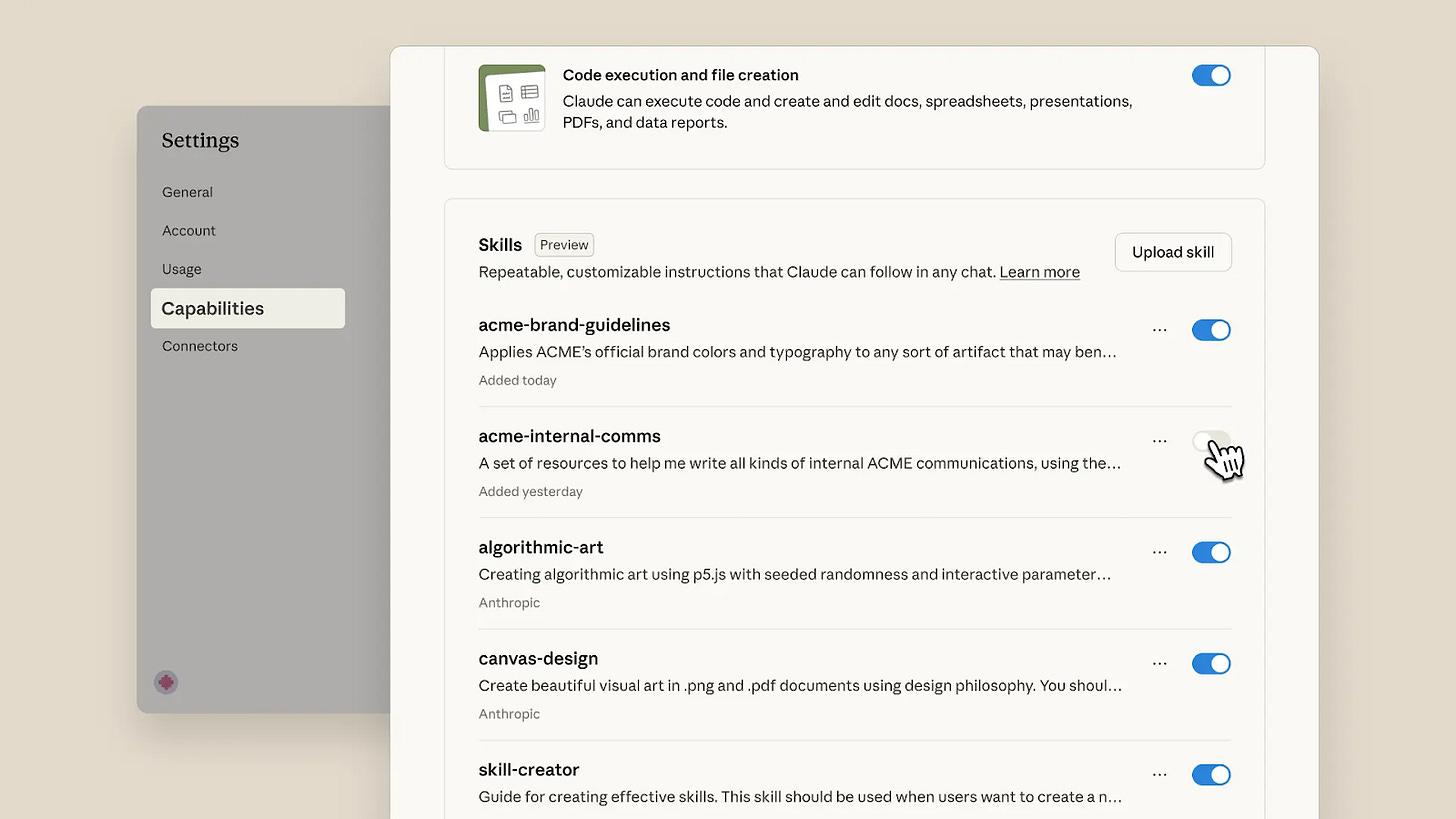
I often see people wondering, “Are Skills just markdown?” when trying to find a definition.
You can’t really answer yes or no to the question in the title; a Skill is actually a folder of instructions and scripts stored inside the SKILL.md.
Skills are reusable resources that provide Claude with domain-specific expertise. And the good news is that you don’t need to memorize the name or trigger it manually.
Selective Context Loading
Traditionally, the system prompt stays loaded for every single message. It’s a constant tax you pay whether you need it or not.
Skills approach:
- Metadata stays loaded all the time (~100 words per skill)
- SKILL.md loads only when the skill triggers (<5k words)
- Most importantly, resources load only when Claude decides to read them
It’s also not a Command
Commands look like this: /pdf rotate document.pdf. And you still pick it manually.
Skills: Claude figures it out: “User mentioned a PDF…there’s a Skill for that”, and behavior changes based on the description. It discovers the right Skill automatically.
To explain super simply, a command is a TV remote, while a skill is a voice assistant.
So…It’s just another prompt?
No, because it works on a different system.
Take the simplest example. We write: When I upload a PDF, check if it needs to be rotated and fix it.
Sometimes, Claude might just rotate it; other times, it might rebuild the PDF, which could make the text no longer selectable.
Skills change the system
Skills work on two principles: Discovery (Claude figures out when to use them) and Determinism (they execute the same way every time). And there is a three-phase loading process:
Phase 1: Awareness
Claude sees metadata for all available skills: “there’s a pdf skill for fixing sideways documents” and “there’s a docx skill for editing Word files”. Each costs about 100 tokens to keep in memory.
Phase 2: Activation
When you say, “This document is sideways, can you fix it?”, Claude loads the pdf/SKILL.md file where everything is already explained.
Phase 3: Deep Dive (optional)
If Claude needs more details, it reads specific files from references/ or executes scripts like rotate\_pdf.py. Tokens are spent only as needed.
No doubt, Skills are powerful, but they unlock only individual capabilities you can teach Claude to perform.
There is something even ahead of the pack. We're talking about bundles of multiple skills and commands working together, turning isolated capabilities into integrated systems. These are Plugins.
Claude with Plugins
Plugins are packages of tools and customizations for Claude Code that you can install with a single command.
What’s inside a plugin:
- Slash commands – shortcuts for common tasks
- Subagents – specialized agents for specific development work
- MCP servers – connect to tools and data sources securely
- Hooks – points where you can customize Claude Code behavior
How they work:
- Install with /plugin
- Toggle on/off as needed
- Reduce system prompt context and simplify workflows
That's just how skills and plugins work fundamentally. And here are SO MANY templates available that you'll definitely find the ones that automate your tedious processes.
Where to Find Skills and Plugins
The ecosystem offers multiple marketplaces where you can discover and install community-created tools. Here are several main places to explore:
1. Claude Code Templates
An open-source hub for sharing and discovering Skills with the most comprehensive feature set.
Best for: Developers and creators looking for complete workflow solutions
Website: Click
2. Skills.sh
A marketplace focused on rapid distribution. Everything is super clear: you browse, pick a skill, and adapt it for yourself.
Best for: Developers and creators who want the fastest way to try new Skills
Website: Click
3. Claude Code Plugin Marketplace
Anthropic’s official distribution channel for Claude Code plugins.
Best for: Developers and creators who want the simplest way to try new Plugins
Website: Click
4. Agent Skills Marketplace
A searchable hub for the open SKILL.md ecosystem with over 128,000+ skills.
Best for: Developers searching for specific functionality across a huge catalog
Website: Click
Creating Your First Claude Skill
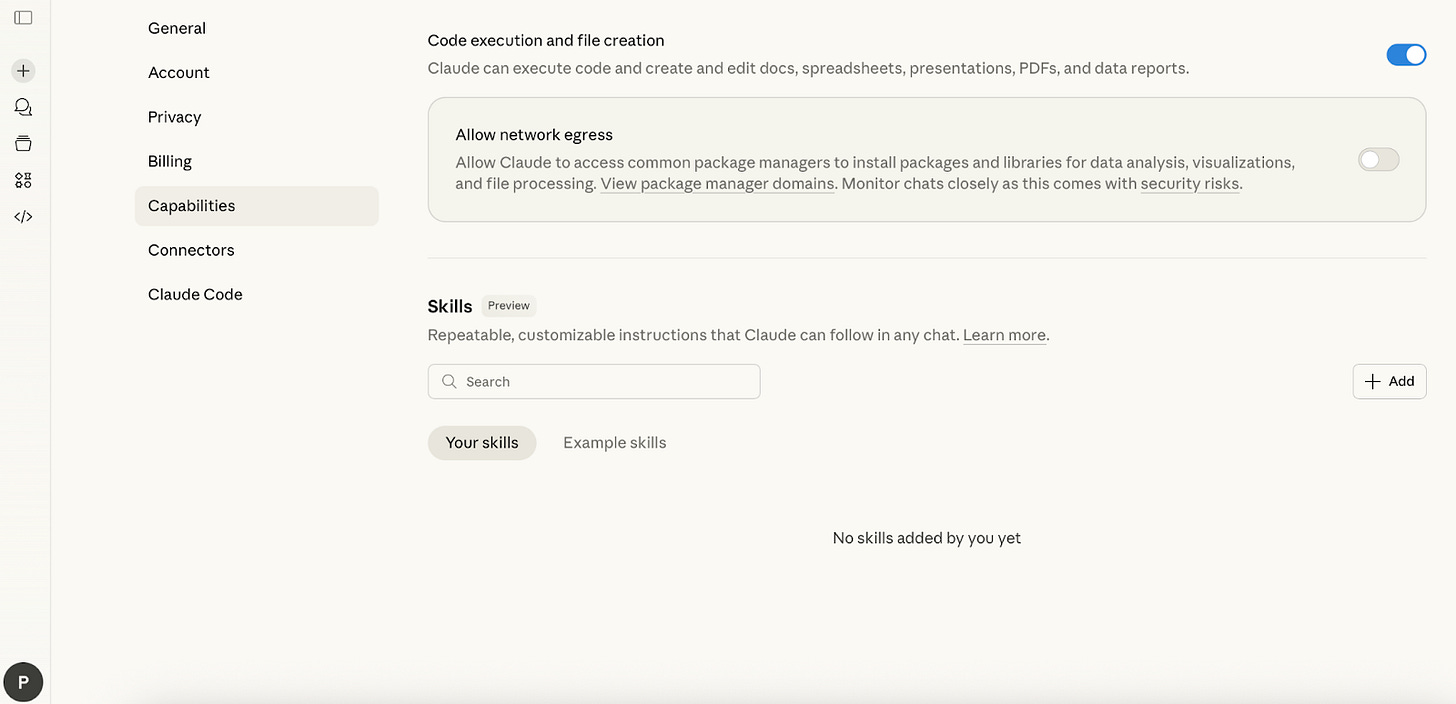
Let’s walk through how to set up your own skill.
Step 1: Go to Settings → Capabilities → Skills.
Make sure that Cloud code execution and file creation are on.
Step 2: Add a New Skill
You have three main options:
Create with Claude
- Start a chat and ask Claude to help you build the skill. Feed it all the necessary information, such as documents, examples, notes, and feedback.
- After, you can download the resulting SKILL.md file or click “Copy to skills” to import it automatically.
Write Skill Instructions
If you already have some ideas on your mind, add them directly into skill instructions.
Fill in: 1. Skill name 2. Description 3. Instructions
Upload a Skill
As we see, a Claude Skill is just a folder with clear instructions and (optionally) some code.
So, we can just upload these folders. You can use the cases we covered above as a starting point, or create your own skill from scratch
Customizing Cowork with Plugins
Cowork includes plugins for common functions as well:
- Productivity – tasks, calendars, workflows
- Enterprise search – find info across company tools
- Sales – research prospects, prep deals
- Finance – analyze financials, build models
- Data – query and visualize datasets
- Legal – review docs, flag risks
- Marketing – draft content, plan campaigns
- Product management – write specs, prioritize roadmaps
Full collection: GitHub
Adding Plugins
- Go to Cowork tab -> Plugins
- Browse and install, or upload custom plugin files
Note: Plugins save locally.
Customizing Plugins
After installing:
- Click the Customize button
- Claude prompts you to tailor the plugin
- Click “Let’s go” to start customization
Using Plugins
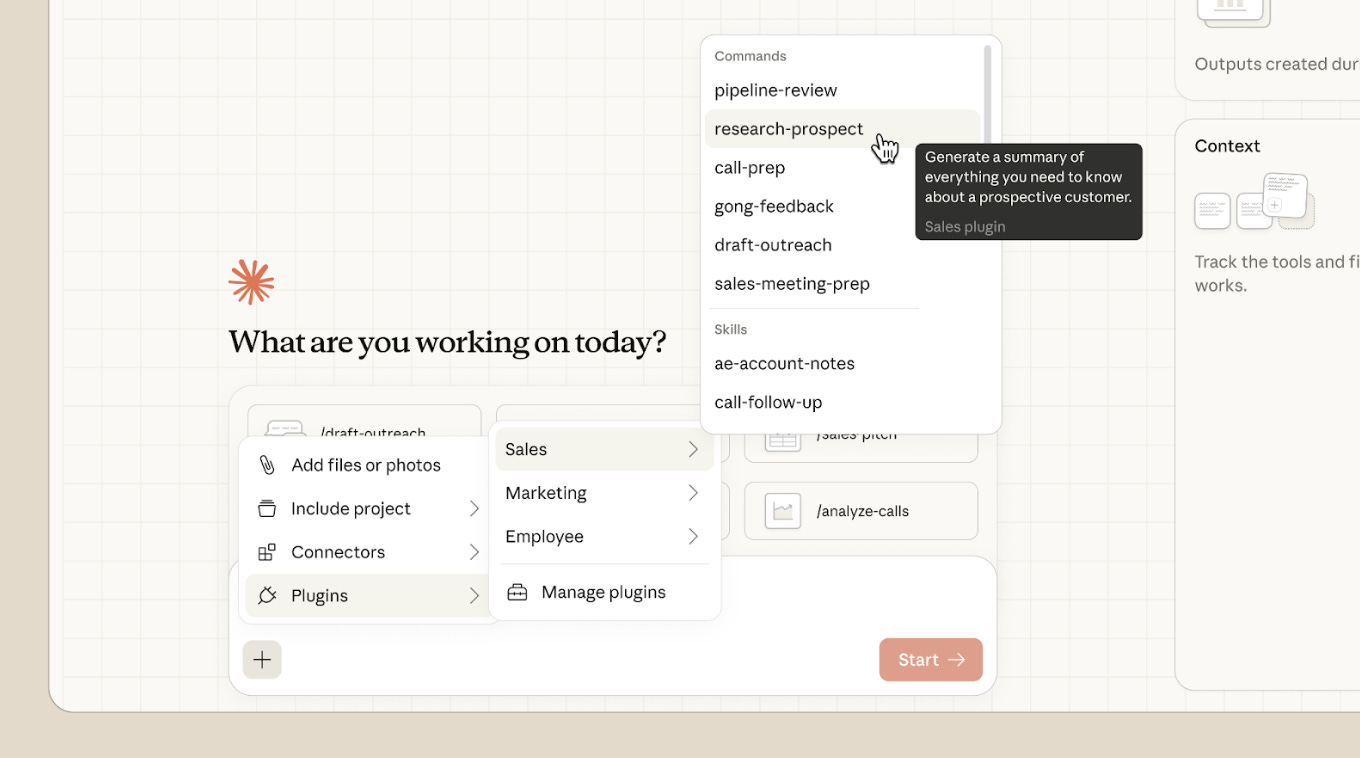
Type + to see commands from installed plugins.
Now that we've covered the basics, let's see how people are actually using them.
The Best Skills and Plugins You Can Use
I’ve put together a selection of Skills from different areas that you can add to your Claude Code to make your work a lot easier.
Content Creator Skill
What problem does it solve?
From my experience, keeping a consistent tone of voice can be tough when you’re creating content, especially if you’re juggling multiple projects at once. SEO quickly turns into guesswork.
This skill skips burning hours of creation without any real system.
Who’s it for?
Solo marketers and content creators, content managers and editors, or startup teams that try to maintain a brand voice.
How it works
- This skill analyzes your brand voice by looking at tone, readability, and structure.
- It handles SEO optimization by checking keyword usage and content architecture, and adapts your content for specific platforms like LinkedIn, Twitter, or Instagram.
- Plus, it comes with ready-made frameworks for blog posts, email sequences, social media, and case studies.
How to install
npx ai-agent-skills install alirezarezvani/claude-skills/marketing-skill/content-creatorHere you’ll find a detailed plan on how to set it up: Click
Marketing Demand & Acquisition Skill
What problem does it solve?
Sometimes, there’s no clear logic connecting your top-of-funnel efforts to bottom-of-funnel conversions. You don’t know how to plan your budget.
Who’s it for?
Growth marketers, startups, or teams breaking into new markets.
How it works
- This skill covers your entire acquisition funnel from awareness to conversion.
- It maps out a full-funnel strategy across TOFU, MOFU, and BOFU stages, includes playbooks for LinkedIn, Google Ads, Meta, SEO, and partnership channels, calculates CAC (including blended metrics), and provides B2B SaaS benchmarks. So you know where you stand.
- It also guides you through scaling logic and A/B testing frameworks.
By the way, you can actually create a plugin from this. You can integrate a Tech Stack Integration:
* HubSpot CRM (campaign tracking, attribution, workflows), Google Analytics 4 (traffic analysis, conversion tracking), Google Search Console (keyword performance), LinkedIn Campaign Manager, Google Ads, Meta Ads
…and turn the skill into a complete workflow.
How to install
npx ai-agent-skills install alirezarezvani/claude-skills/marketing-skill/marketing-demand-acquisitionHere you’ll find a detailed plan on how to set it up: Click
Marketing Strategy & Product Marketing Skill
What problem does it solve?
You’re launching stuff constantly, but nothing feels systematic or strategic. Sales is telling one story while marketing tells another. So, this skill puts them together.
Who’s it for?
Product marketing managers, heads of marketing, startups prepping for launch or scale, or teams expanding internationally.
How it works
This skill turns strategy into deliverables: ICP definition, positioning (April Dunford methodology), messaging hierarchy, competitive battlecards, GTM strategies, launch plans, and sales enablement materials.
How to install
npx ai-agent-skills install alirezarezvani/claude-skills/marketing-skill/marketing-strategy-pmmHere you’ll find a detailed plan on how to set it up: Click
Invoice Organizer Skill
What problem does it solve?
Invoices, receipts, and financial documents often pile up into chaotic folders. This skill automatically reads and organizes them into a tax-ready system.
Who’s it for?
Freelancers, small business owners, and, actually, anyone managing expenses across multiple vendors.
How it works
- You drop in a folder with invoices or random downloads.
- The skill reads each file, pulls out key details like date, vendor, amount, and description, then renames everything in a clean, consistent format and sorts it into logical folders.
- You end up with a tax-ready system you can actually use, plus a clear summary of what was processed and what needs review.
How to install
npx ai-agent-skills install alirezarezvani/claude-skills/invoice-organizerHere you’ll find a detailed plan on how to set it up: Click
Best Practices from Boris Cherny (Creator of Claude Code)
Boris and the Claude Code team shared their battle-tested workflows. These tips focus on coding workflows, but the principles apply to any work you do with Claude. Here’s how they actually use the tool:
Do more in parallel
The single biggest productivity unlock, according to the Claude Code team.
Spin up 3–5 git worktrees at once, each running its own Claude session in parallel.
For non-developers in Cowork: open multiple Claude windows or tabs for different projects. Work on your presentation in one, analyze data in another, draft emails in a third.
Learn more: Click
Start every complex task in plan mode
Pour your energy into the plan so Claude can 1-shot the implementation.
Advanced workflow:
- Have one Claude write the plan
- Spin up a second Claude to review it as a staff engineer
When things go sideways,switch back to plan mode and replan.
Invest in your CLAUDE.md
Claude learns from its mistakes when you make it.
After every correction, say: “Update your CLAUDE.md so you don’t make that mistake again.”
Create your own skills and commit them to git
As mentioned, reusable skills = automation at scale across every project.
Tips from the team:
- If you do something more than once a day → turn it into a skill or command
- Build a /techdebt slash command to find and kill duplicated code at session end
- Set up a command that syncs 7 days of Slack, GDrive, Asana, and GitHub into one context dump
Learn more: Click
Claude fixes most bugs by itself
Zero context switching means faster debugging.
Enable the Slack MCP, paste a bug thread into Claude, and just say “fix.”
Or simply say “Go fix the failing CI tests.” Don’t micromanage how. Point Claude at docker logs and let it work.
Level up your prompting
It gives you better results + built-in quality control.
Challenge Claude: Say “Grill me on these changes and don’t make a PR until I pass your test.” Make Claude your reviewer.
Or say “Prove to me this works” and have Claude diff behavior between main and your feature branch.
Terminal & Environment Setup
Proper setup saves hours of frustration.
The team’s favorites:
- Ghostty terminal for synchronized rendering, 24-bit color, and proper unicode support
- Use /statusline to show context usage and the current git branch
- Voice dictation (fn x2 on macOS) as you speak 3x faster than you type, prompts get way more detailed
More tips: Click
Use Claude for data & analytics
You can analyze metrics on the fly.
Ask Claude Code to use the bq CLI to pull and analyze metrics directly. The team has a BigQuery skill checked into the codebase that everyone uses for analytics queries in Claude Code.
Learning with Claude
Finally, Claude becomes your personal tutor and documentation generator.
Tips from the team:
- Enable “Explanatory” or “Learning” output style in /config to understand the why behind changes
- Have Claude generate visual HTML presentations explaining unfamiliar code (it makes surprisingly good slides).
- Ask Claude to draw ASCII diagrams of new protocols and codebases
- Build a spaced-repetition learning skill: you explain your understanding, Claude asks follow-ups to fill gaps, and stores the result.
Use subagents
Keep your main context clean and throw more compute at complex problems.
- Type use subagents for any request where you want more computational power
- Offload individual tasks to subagents to keep your main agent’s context window focused
- Route permission requests to Opus 4.5 via a hook, let it handle the heavy lifting
Now, as promised earlier, here's the hidden pro feature most people miss. And, what is more, it takes subagents to the next level.
An Orchestration system with Swarm Mode
What problem does it solve?
Claude Code’s subagents work sequentially. When you need true parallel coordination, multiple agents working simultaneously on different parts of a complex task, and you’re stuck. Swarm Mode unlocks hidden team coordination features: spawn 100+ agents, shared task boards, inter-agent messaging, and autonomous work distribution.
Who’s it for?
Teams handling multi-part projects, developers hitting Claude Code’s subagent limits, and anyone frustrated with sequential AI workflows.
How it works
The system, called Claude-sneakpeek, patches Claude Code to enable hidden swarm features. One install, completely isolated from your main setup.
You get:
- Task boards where workers autonomously claim unblocked work
- Inter-agent messaging (spawn teams, broadcast, coordinate)
- Crash recovery (failed tasks automatically return to the pool)
- Model selection: Haiku for fast tasks, Sonnet for implementation, Opus for complex reasoning
Pattern:
- Create plan -> break into tasks with dependencies
- Spawn workers
- Workers grab and complete tasks autonomously
- Coordination via filesystem (no central broker)
How to install
npx @realmikekelly/claude-sneakpeek quick --name claudespHere you’ll find a detailed plan on how to set it up: Click
The Final Words
The Claude team is truly working to eliminate routine tasks across every field. Now it’s time for you to take it from here.
Don’t worry about how much information is here. Start with Skills. Just type your most time-consuming task or area into the resources we’ve shared above and see how others are cutting hours from their workflows. And once you build it, it stays with you.
This article was first published in the Creators AI newsletter. View the original edition.